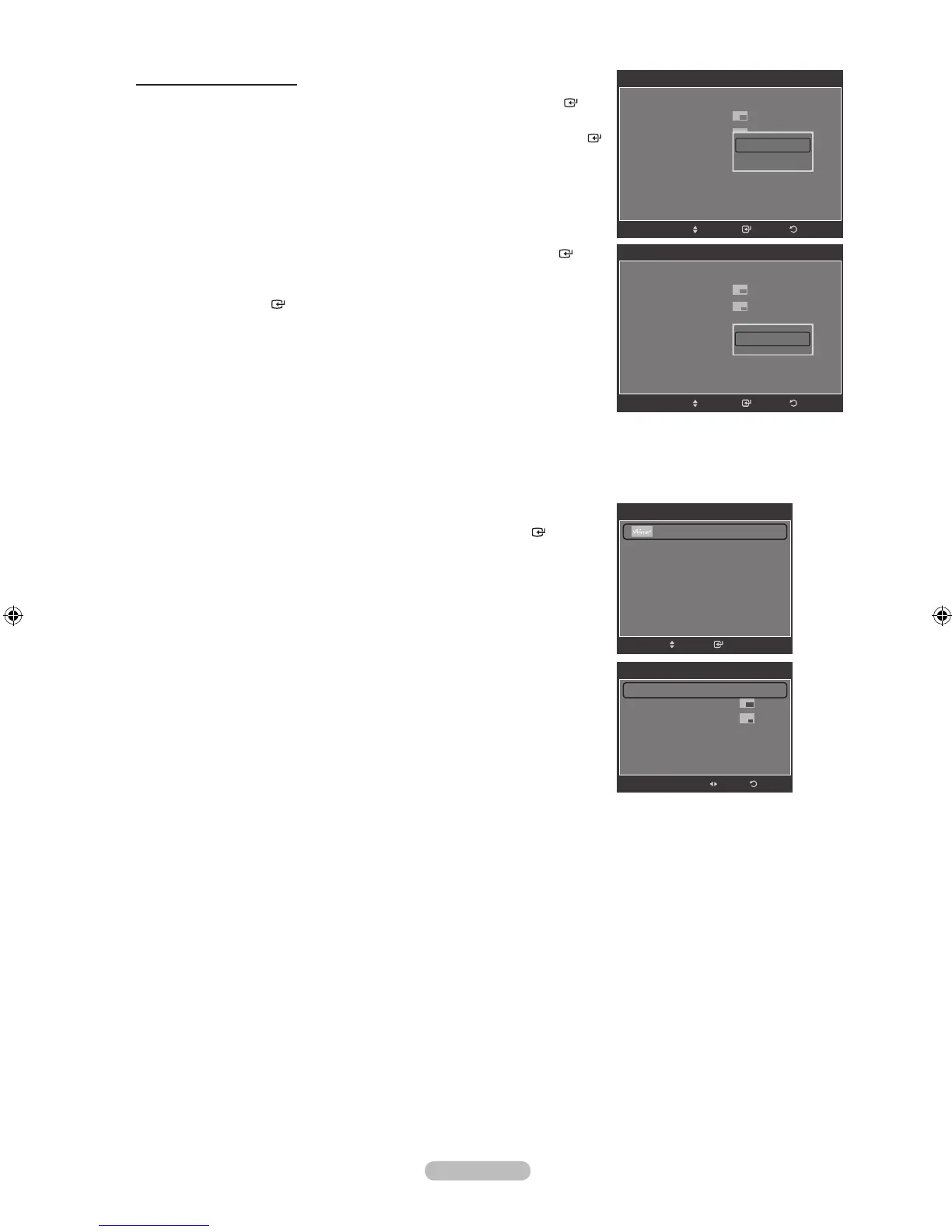
Changing the PIP Channel
5. Press the ▲ or ▼ button to select “Air/Cable”, then press the ENTER
button.
6. Press the ▲ or ▼ button to select “Air” or “Cable”, then press the ENTER
button.
7. Press the ▲ or ▼ button to select “Channel”, then press the ENTER
button.
8. Press the ▲ or ▼ button to select the desired channel in the PIP window.
Press the ENTER button.
You can select only analog TV broadcasts on the PIP screen(sub-picture).
9. Press the EXIT button to exit.
Easy Setting
1. Press the TOOLS button on the remote control.
2. Press the ▲ or ▼ button to select “PIP”, then press the ENTER button.
3. Press the ◄ or ►button to select “On”.
4. Press the ▲ or ▼ button to select a particular item.
5. Press the ◄ or ► button to select the desired option.
6. Press the EXIT or TOOLS button to exit.
➣
PIP
PIP : On
Size :
Position :
Air/Cable : Air
Channel : Air 11
ReturnEnter
Move
Air
Cable
PIP
PIP : On
Size :
Position :
Air/Cable : Air
Channel : Air 11
ReturnEnter
Move
▲
Air 11
▼
PIP
PIP ◄ Off ►
Size :
Posion :
Air/Cable : Air
Channel : Air 11
Sound Select : Main
Adjust
Return
Tools
Anynet+ (HDMI-CEC)
Picture Size : 16:9
Picture Mode : Standard
Sound Mode : Custom
Entertainment : Off
Sleep Timer : Off
PIP
Move Enter
e
Exit



 To Next Page