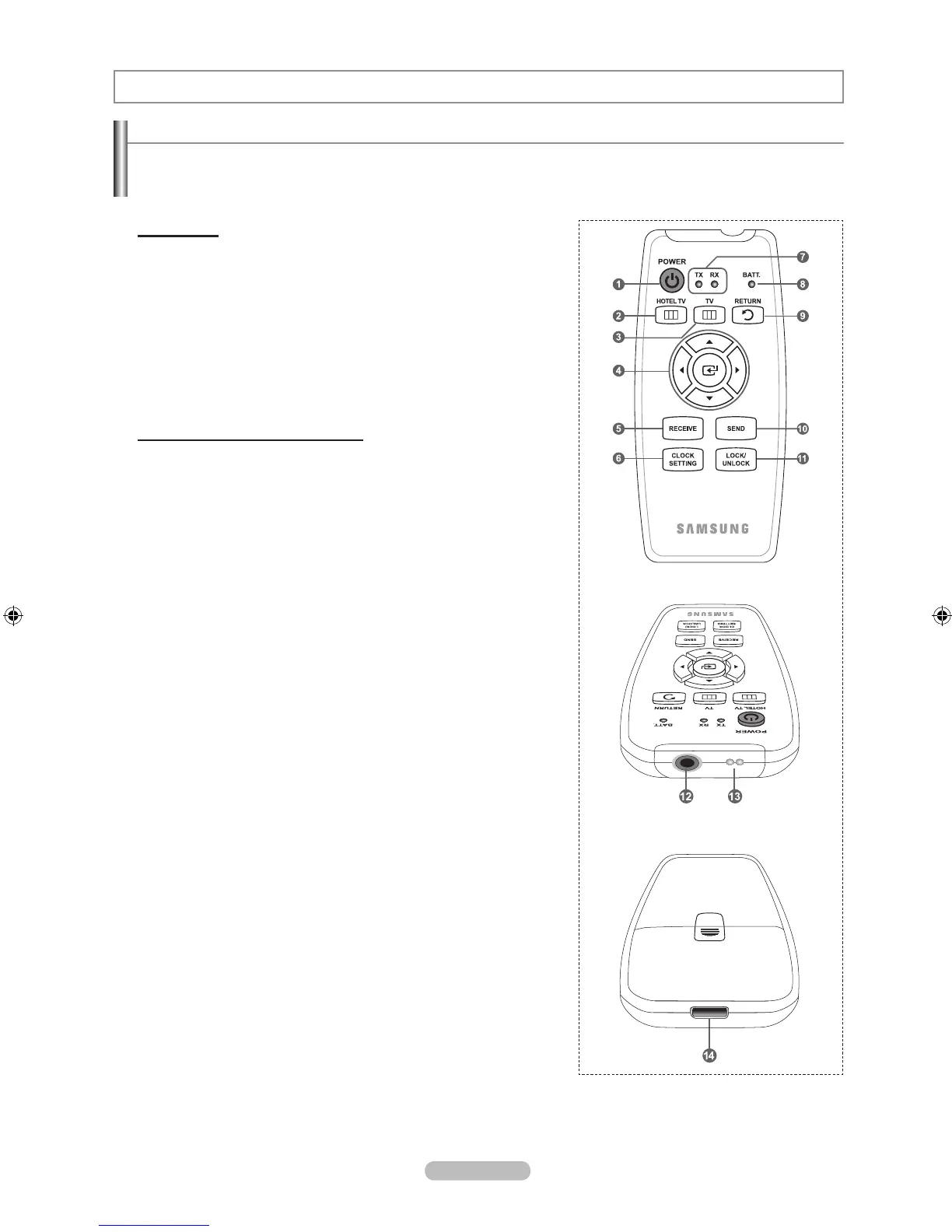
Viewing the Clone Remote Control
This function is only available when the TV is installed in a hotel.
The Clone Remote Control is only for use in Hotel installations and is not included with the Accessories.
A Remote control which instantly sets up TV settings to predened values.
Setting Mode
Picture mode
Picture size
Channel name
Tune Frequency
Hotel service mode: Interactive Hotel TV
Hotel mode: Retail TV
Buttons, Indicators and Connections
1 Press “Power” button
Television Power is On
2 Press “Hotel TV” button
Interactive TV: Enter Interactive Hotel TV Option
Hotel Mode TV: Enter Hotel Mode Option
3 Press “TV” button to enter TV MENU.
4 Control the cursor in the menu
5 Receiving the data from TV or PC.
6 Press Clock Setting
- Enter clock set up menu
- Change clock data with Up/Down/Left/Right buttons
7 Communication Status Indicators
- TX: Indicates that the Clone Remote Control is sending data to the TV.
(If the Send button is pressed, the TX Indicator will blink.)
- RX: Indicates that the TV is sending data to the Clone Remote Control.
(If the Receive button is pressed, the RX Indicator will blink.)
8 Battery Indicator noties remaining battery charge
- Red: Battery Low
- Green : Battery Middle
- Blue: Battery Full
The battery needs to be charged when the indicator blinks red.
9 Return
0 Send
! Press Lock/Unlock
- Front(side) panel buttons and IR receiving(except lock/unlock button) is
non-available or available.
@ Connect TV with Clone remote control via RS-232C Cable
# Remote IR out
$ Charger connector
➣
➣
➣
Hotel function



 To Next Page