Selecting a Menu Language
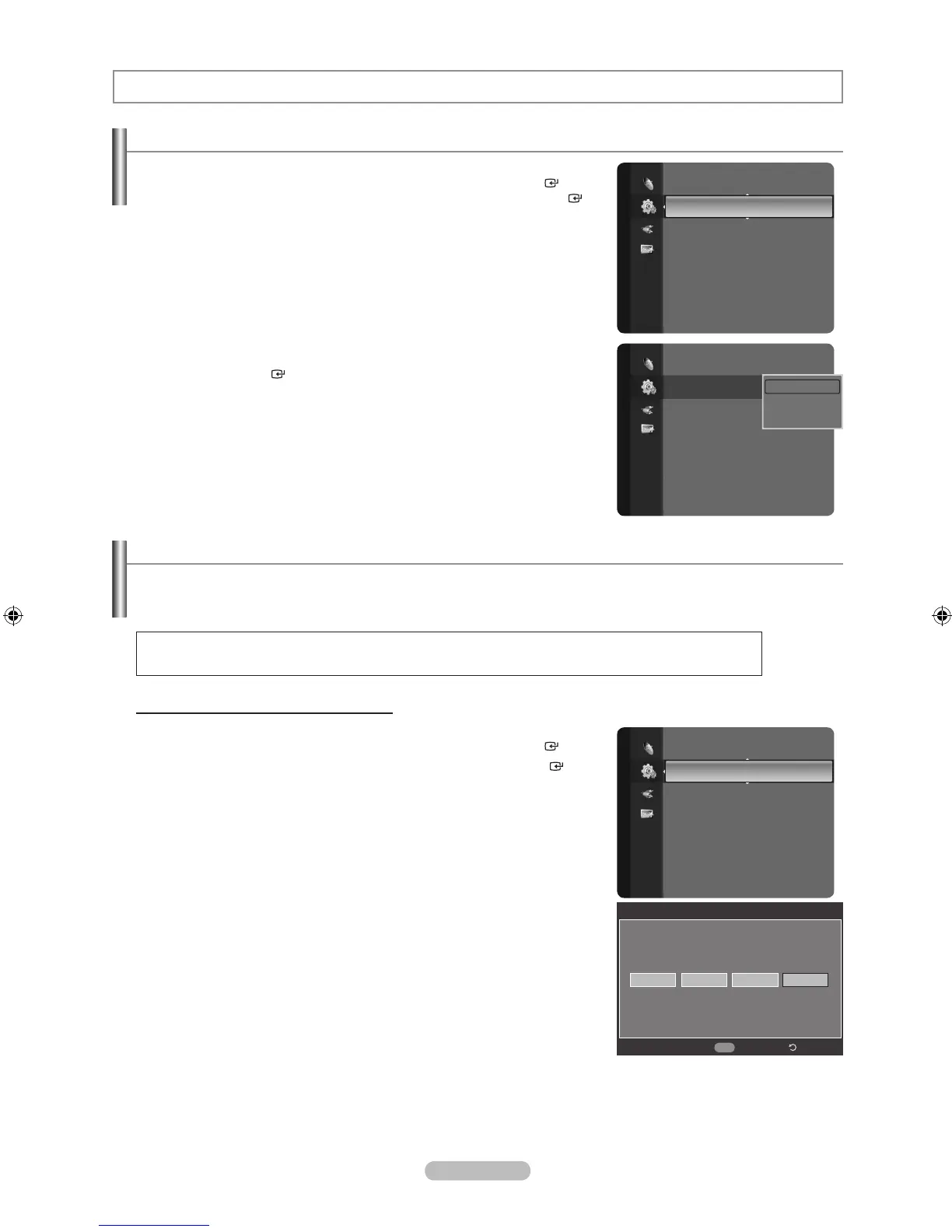
1. Press the MENU button to display the menu.
Press the ▲ or ▼ button to select “Setup”, then press the ENTER button.
Press the ▲ or ▼ button to select “Language”, then press the ENTER
button.
2. Press the ▲ or ▼ button to select “English”, “Español” or “Français”.
Press the
ENTER button.
Press the
EXIT button to exit.
Function Description
Using the V-Chip
The V-Chip feature automatically locks out programs that are deemed inappropriate for children. The user must enter a PIN
(personal ID number) before any of the V-Chip restrictions are set up or changed.
“V-Chip” function is not available in HDMI, Component or PC mode.
U.S.A Only
This product is covered by the following U.S.patents: US4, 930, 158, US4, 930, 160.
Setting Up Your Personal ID Number (PIN)
1. Press the MENU button to display the menu.
Press the ▲ or ▼ button to select “Setup”, then press the ENTER button.
2. Press the ▲ or ▼ button to select “V-Chip”, then press the ENTER
button.
The message “Enter PIN” will appear. Enter your 4 digit PIN number.
The default PIN number of a new TV set is “0-0-0-0”.
➣
➣
Setup
Plug & Play
Language : English ►
Time
V-Chip
Caption
External Settings
Entertainment : Off
Energy Saving : Off
PIP
Setup
Plug & Play
Language : English
Time
V-Chip
Caption
External Settings
Entertainment : Off
Energy Saving : Off
PIP
English
Español
Français
Setup
Language : English
Time
V-Chip ►
Caption
External Settings
Entertainment : Off
Energy Saving : Off
PIP
CableCARD™
CableCARD Setup
V-Chip
* *
Enter PIN
*
Return
0~9
Enter PIN



 To Next Page