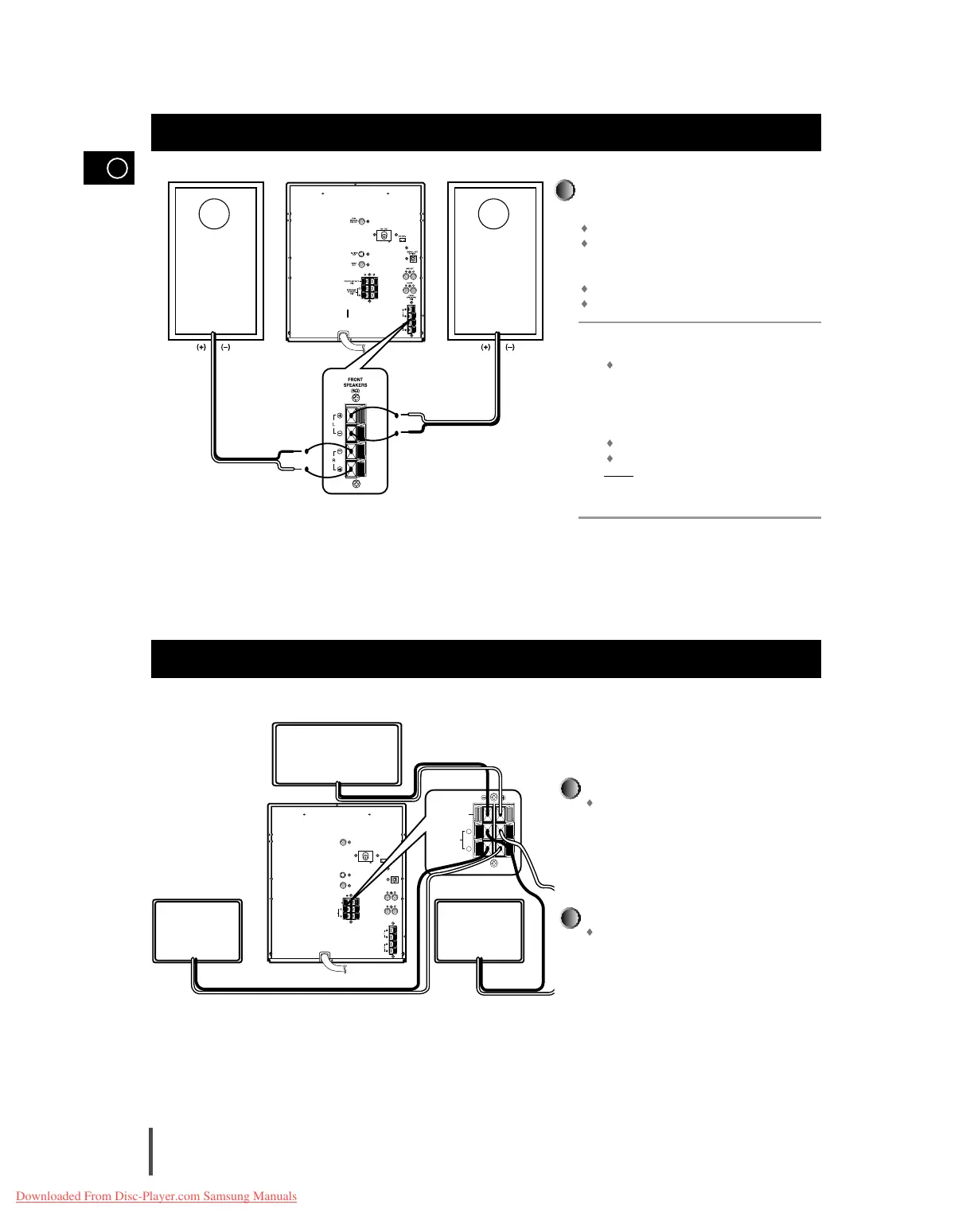
The loudspeaker connector terminals are locat-
ed on the rear of the system.
There are four terminals on the system:
Two for the left speaker (marked L)
Two for the right speaker (marked R)
To achieve the correct sound quality, connect
the:
Red wire to the + terminals
Black wire to the
–
terminals
To connect a wire to a terminal, push the tab as far
as it will go:
To the right on the system
Insert the wire, up to the plastic sheathing, in the
hole.
Push the tab back:
To the left on the system, until it clicks into place
To the top on the loudspeaker
Result:
The wire is pinched and held firmly in place.
Repeat the operation for each wire.
1
2
3
4
Connect the CENTER SPEAKER.
Connect the center speaker cord to the CENTER
SPEAKER terminal.
Connect the SURROUND SPEAKERS.
There is no difference between the surround
speakers. Both speakers can be connected as R
(right) or L (left).
Connect the surround speaker cords to the SUR-
ROUND SPEAKERS terminals.
Connecting the Center Speaker/ Surround Speaker
CENTER SPEAKER
SURROUND SPEAKER
(right)
SURROUND SPEAKER
(left)



 To Next Page