GB
9
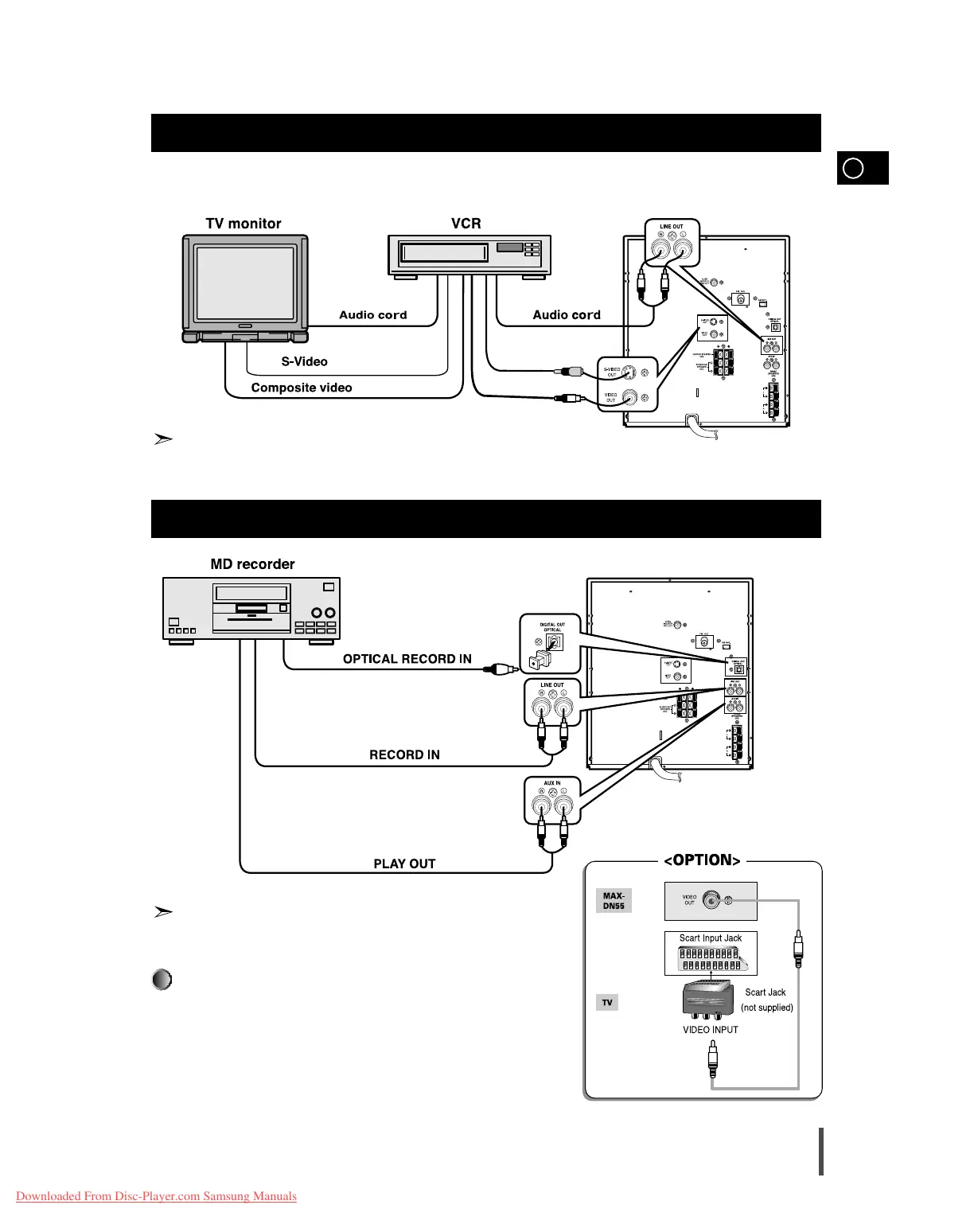
The following show examples of connections commonly used to connect the MAX-DN55 player with a External Source.
(Example : TV, VCR, DAT CD-RW, etc)
When S-VIDEO is connected, S-VIDEO has priority.
Connection of the TV monitor (optional) and VCR (optional)
Connection of the MD recorder (optional)
Refer to page 41 to give a full detail of the peripheral connection
methods
This unit can output DVD/CD digital sound signals through this
jack. Use an optical cable to connect digital audio equipment. (DAT
deck, MD recorder, etc.).
Remove the dust cap (1) from the DVD/CD DIGITAL OUT jack. Then,
connect an optical cable plug to the DVD/CD DIGITAL OUT jack.
When the DVD/CD DIGITAL OUT jack is not being used
Attach the supplied dust cap.
DVD/CD Digital Out Jack



 To Next Page