Setting the 7-day Schedule (Continued)
5
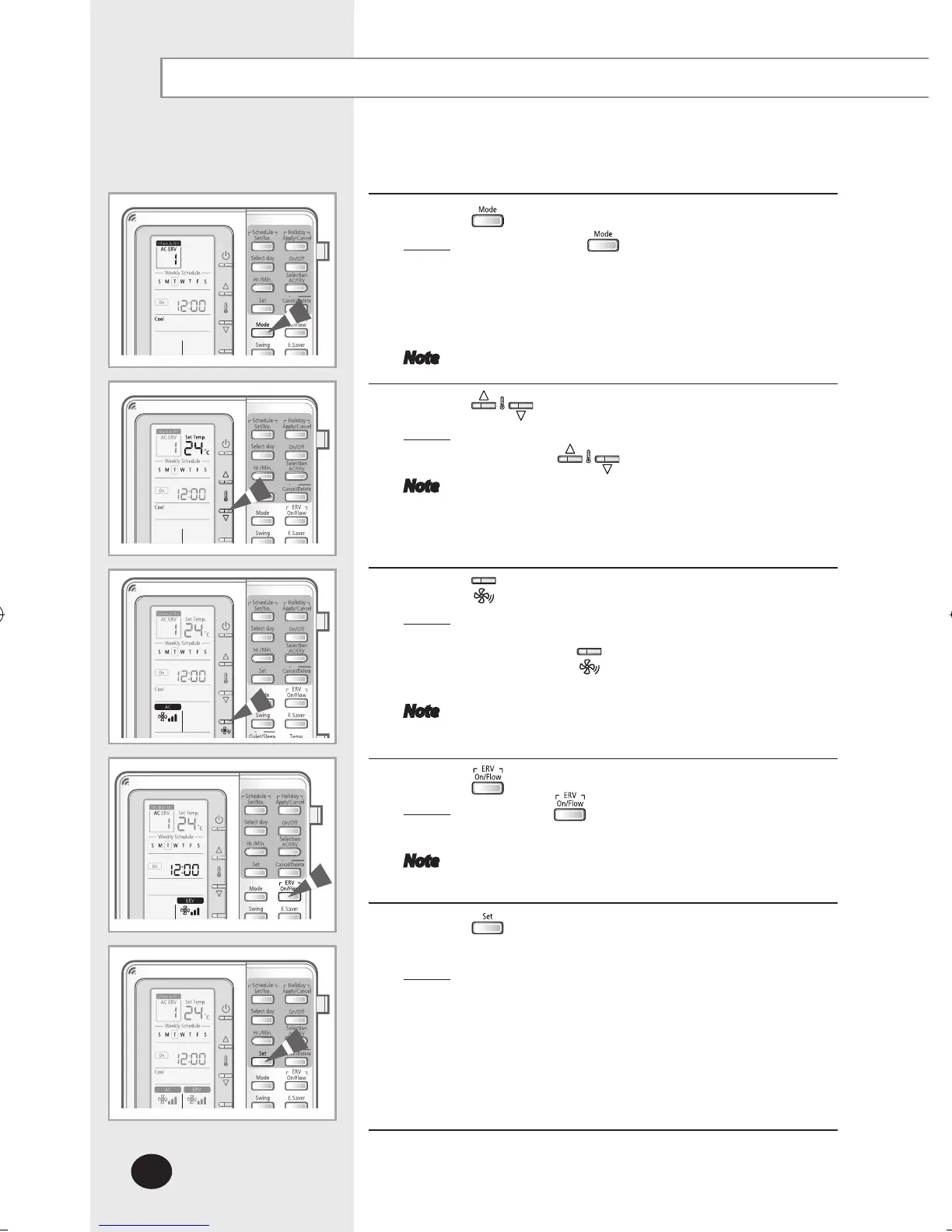
Press the button to select operation mode.
Result: Each time the button is pressed, Auto
Cool Dry Fan Heat will be selected in
order. Auto mode and Heat mode may not be
selected depending on the option settings.
(Refer to the installation manual.)
Note This step is for setting the ‘On schedule’.
6
Press the buttons to set the temperature.
Result
: The temperature will be adjusted by 1°C(1°F)
when the buttons are pressed.
Note This step is for setting the ‘On schedule’.
You cannot control the desired temperature
if you selected fan mode.
7
Press the button to set the fan speed.
Result: Fan speed can be adjusted in cool/fan/heat
mode.
Press the button until the desired fan
speed you want is selected.
Note This step is for setting the ‘On schedule’.
8
Press the button to set the fan speed of ERV.
Result
: Press the button until the desired fan speed
you want is selected.
Note This step is for setting the ‘On schedule’.
9
Press the button to set the set temperature, operation
mode and fan speed.
Result
: Schedule air conditioner and ERV together :
Set the desired temperature, operation mode
and fan speed of air conditioner/ERV.
Schedule air conditioner only: Set the desired
temperature, operation mode and fan speed
of air conditioner
ERV schedule only: Set the fan speed of ERV



 To Next Page