22_
connection & installation
connection & installation
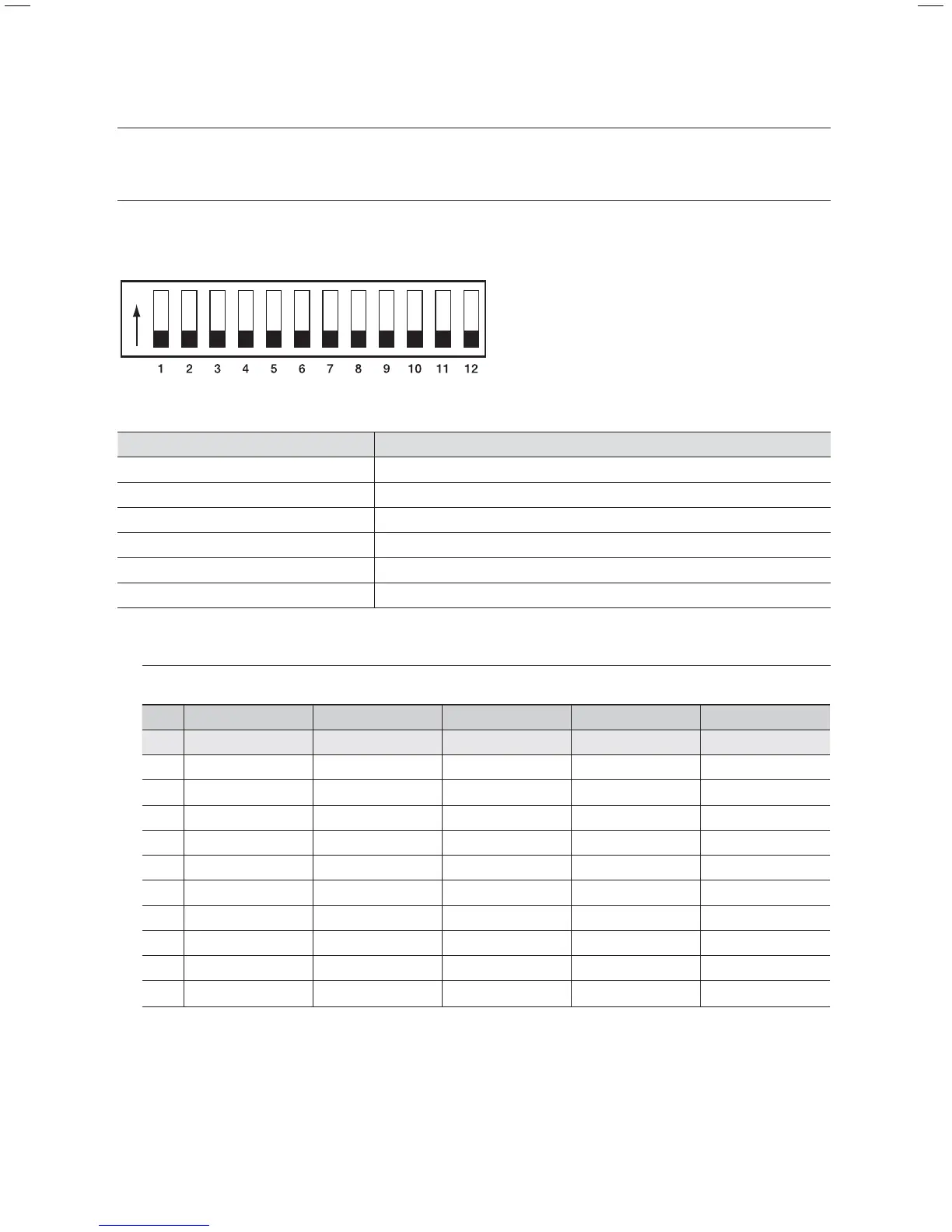
COMMUNICATION PROTOCOL DIP SWITCH SETTINGS (SW2)
Coaxial communication automatically detects signals, and so does not require a separate communication
setup process.
ON
ON
OFF
SW2
SW2 Pin No. Purpose
1 ~ 4 Protocol Settings
5~6 Baud Rate Settings
7 Transfer Method (RS-485/422) Settings
8 Response Mode Settings
9~10 Backup Mode Settings
11~12 Termination Settings
Protocol Settings
Select a communication protocol for the camera.
No Protocol SW2-#1 SW2-#2 SW2-#3 SW2-#4
1 Auto Detected OFF OFF OFF OFF
2 Samsung-T OFF OFF OFF ON
3 Samsung-E OFF OFF ON OFF
4 Pelco-D OFF OFF ON ON
5 Pelco-P OFF ON OFF OFF
6 Panasonic OFF ON OFF ON
7 Vicon OFF ON ON OFF
8 Honeywell OFF ON ON ON
9 AD ON OFF OFF OFF
10 GE ON OFF OFF ON
11 Bosch ON OFF ON ON



 To Next Page