English - 47
● SETUP
CAMERA SETUP
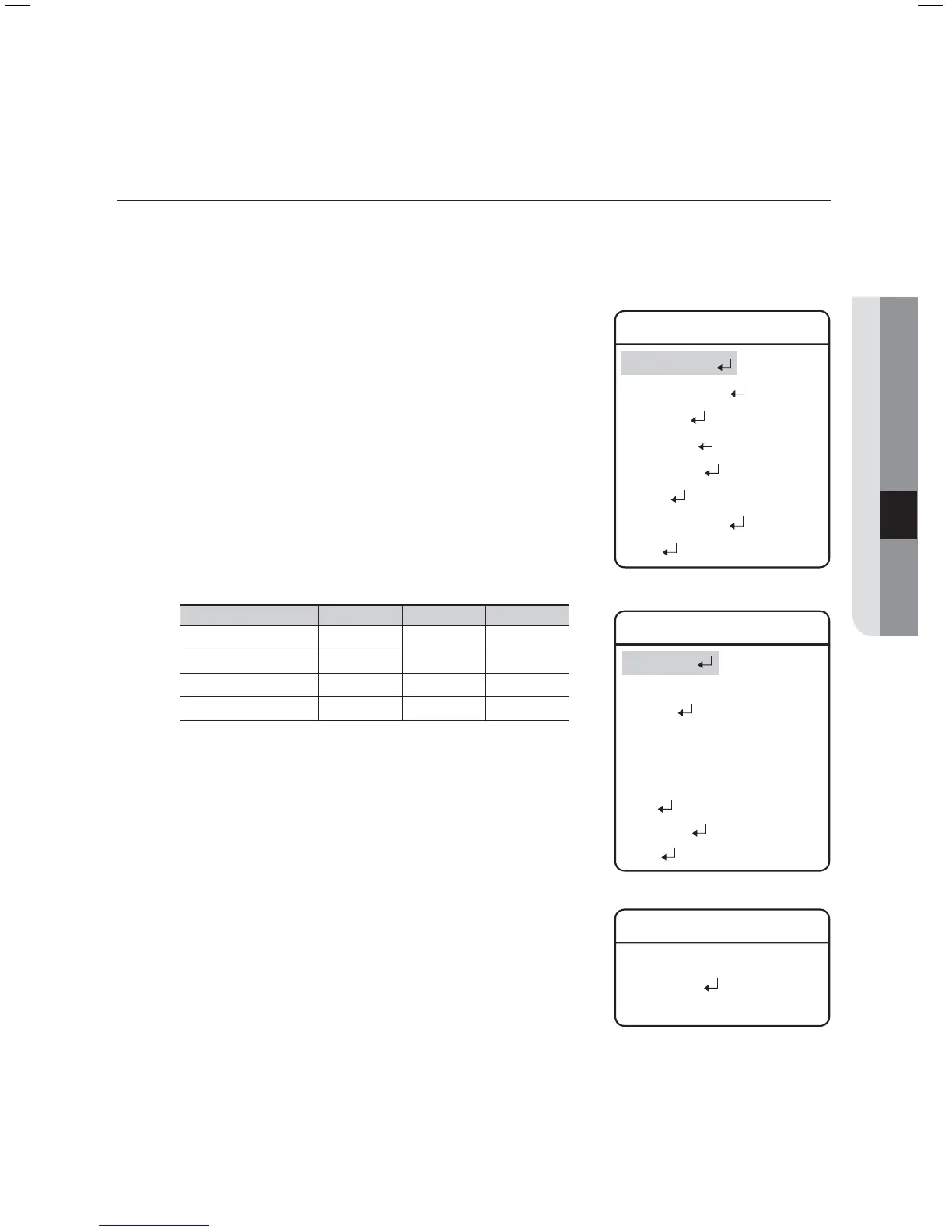
Zoom and Focus Settings
Focus Mode
AUTO : Performs continuous auto-focus.
MANUAL : Changes the camera mode to Manual Focus.
ONE SHOT : Auto-focuses the camera once after the Pan,
Tilt, or Zoom function is used.
Zoom Tracking
Through this menu you can set up the camera’s focus mode when
zooming.
Mode
Auto : Auto-focuses when zooming.
Tracking : Focuses manually when zooming.
Off : Disable the focus modes when zooming. (Full manual
mode)
Speed
Slow/Medium/Fast : Adjusts the zooming speed.
Model Fast Medium Slow
37x (SCP-3370) 2.8 sec 4.0 sec 7.1 sec
37x (SCP-2370) 2.5 sec 3.1 sec 5.6 sec
33x (SCP-2330) 2.2 sec 2.5 sec 4.7 sec
27x (SCP-2270) 1.8 sec 2.3 sec 4.5 sec
Digital Zoom
Enables the maximum digital zoom.
Setting the digital zoom to 16x provides a total zoom of 592x.
Unlike the optical zoom, the graphics quality of the digital zoom decreases
as its zoom ratio increases.
The auto-focus function may not operate normally under the following
conditions :
When background illumination is low
While Slow-Shutter is in operation
If the zoom level is set too high
When background illumination is too high
If a long distance object and a close distance object appear together within a monitoring area
If there is no contrast, e.g. the sky or a wall
If the camera is facing a thin horizontal line
Auto Focus focuses on an object in the center of the screen; objects around the screen edges may not be properly in focus.
z
-
-
-
z
-
y
y
y
-
y
z
M
-
-
-
-
-
-
-
Main Menu
Camera Setting
Sequence Setting
P/T Setting
OSD Setting
Alarm Setting
Initialize
Password Setting
Status
Camera Setting
Zoom/Focus
White Balance AUTO
Exposure
Back Light OFF
AGC High
SSNR Medium
SSDR
Day & Night
Others
Zoom/Focus
Focus Mode ONE SHOT
Zoom Tracking
Digital Zoom OFF
Æ
Æ



 To Next Page