English - 65
● SETUP
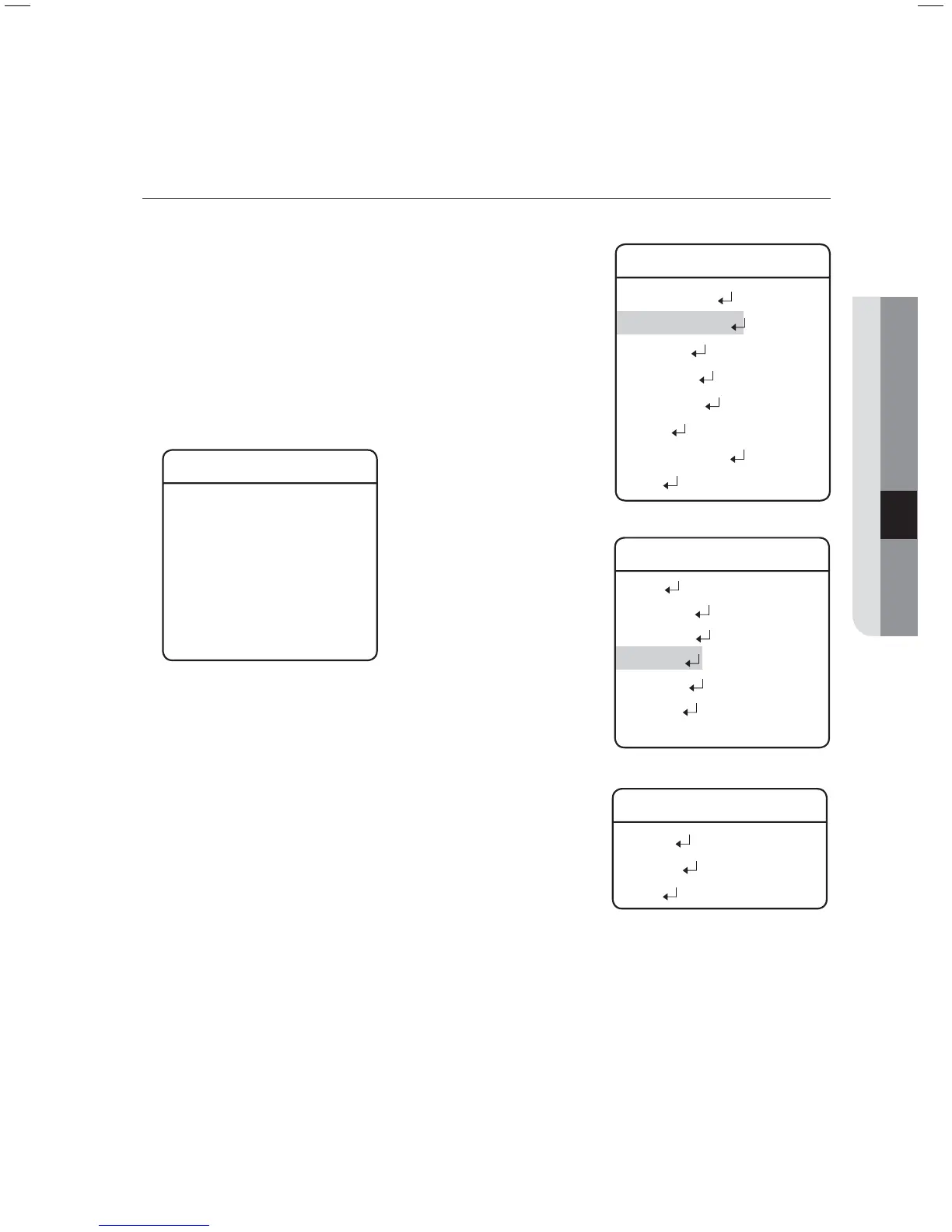
Tour SEQ
Selecting Tour SEQ recalls groups of preset locations in a
consecutive manner. Up to 6 groups can be listed for this function.
Setting :
Selecting the Settings menu brings up the following screen.
Using the joystick, you can enter desired group numbers to the
Group section. DWT indicates the camera’s standby time before
a new group is recalled.
Tour SEQ
NO Group DWT(s)
01: * 003
02: * 003
03: * 003
04: * 003
05: * 003
06: * 003
Execute :
Executes the group operation.
Clear :
Deletes the selected group.
z
z
z
Main Menu
Camera Setting
Sequence Setting
P/T Setting
OSD Setting
Alarm Setting
Initialize
Password Setting
Status
Æ
Sequence Setting
Preset
Swing SEQ
Group SEQ
Tour SEQ
PTZ Trace
Auto Run
Power On Resume ON
Æ
Tour SEQ
Setting
Execute
Clear




 To Next Page