English - 75
● SETUP
Auto Track (SCP-XXXXT)
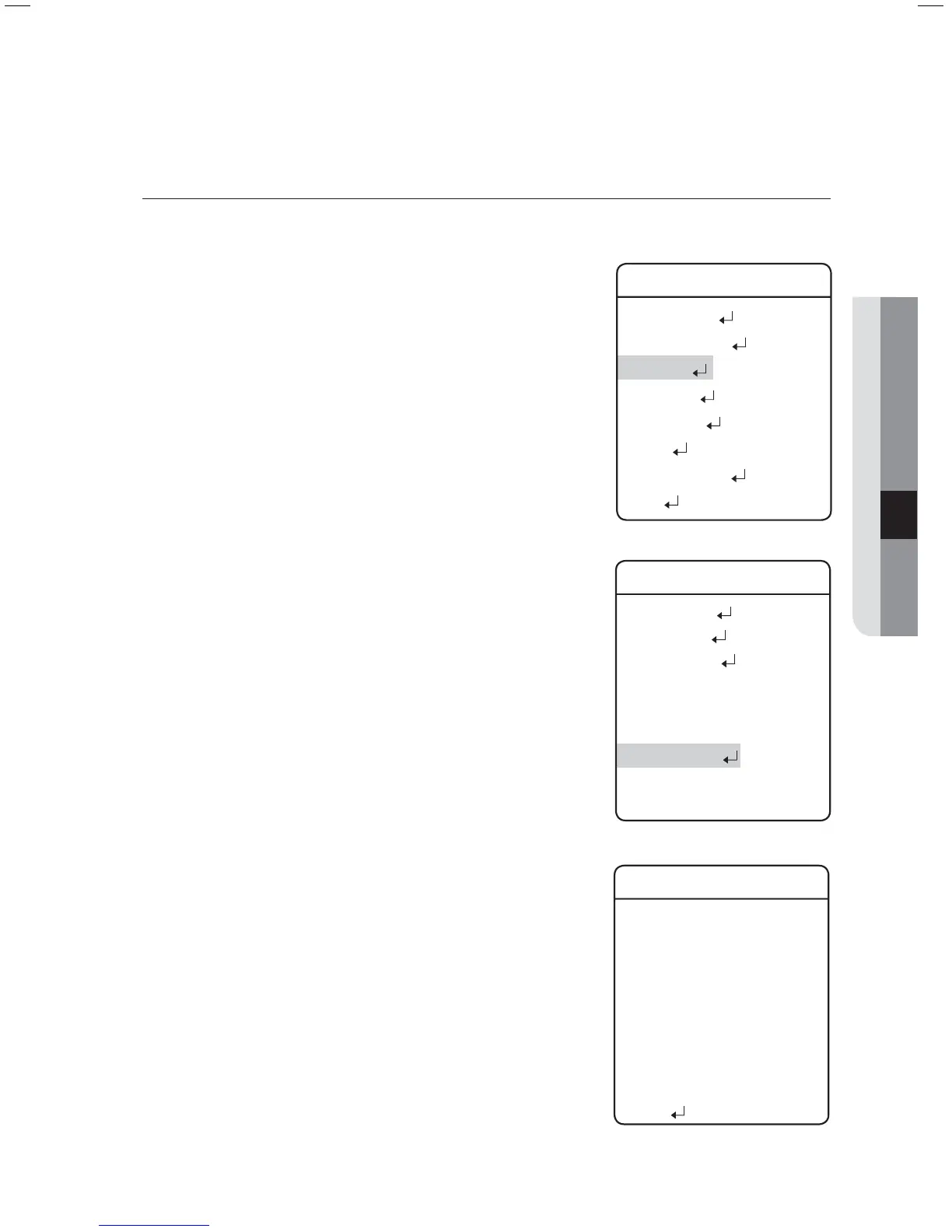
This function is to instruct the camera to track a moving object on the screen.
Auto Track :
ON/OFF : Turns
Auto Tracking
on or off.
Camera Height :
Adjusts the height of the camera. Tracking performance may
decrease if the camera height is not adjusted properly.
(Height: 2.5m ~ 30m)
Object Size :
Sets a maximum zoom ratio to zoom in on an object if the Zoom
function is used for the tracking operation.
Small : Zooms in on a tracking object up to 1/4 of the screen height.
Medium : Zooms in on a tracking object up to 2/4 of the screen height.
Large : Zooms in on a tracking object up to 3/4 of the screen height.
Sensitivity :
Specify the sensitivity of tracking an object when using Auto Track.
LOW/MEDIUM/HIGH: The higher the sensitivity is, the camera
can track a slightest movement. Decreasing it will track only a
greater movement.
Zoom Control :
The function’s zoom control settings are as follows.
Off : Disables the Zoom control.
ONE SHOT : Performs the Zoom control once during the Motion
Detection and Auto Track operations. Depending on the movement
detection, the camera performs the Zoom control multiple times.
Continuous : Performs the Zoom control continuously.
Auto Release :
Enables setting a maximum duration to follow an object. When the
duration expires, the camera stops following the object and returns
to the start position to follow another objects.
Auto Return :
Off : Commands the camera to stay on the location the last object
stopped at instead of returning to the initial position.
Time Setting : Sets a duration for the camera to standby upon the Auto
Release expiration and then return to the start position.
Lost Mode :
Sets up an action for the camera in case the object it is following
goes out of the detection
range.
Stop : Commands the camera to stop and abort tracking at the spot
where its object disappeared.
Research : Commands the camera to stop and standby at the spot
where its object disappeared.
Zoom Out : Commands the camera to zoom out and look for a new
object in case its current object disappears.
z
-
z
-
z
-
-
-
z
-
z
-
-
-
z
z
-
-
z
-
-
-
P/T Setting
Pan/Tilt Limit
Area Setting
Area Masking
Prop. P/T ON
Digital Flip ON
Image Hold OFF
Auto Tracking
Jog Speed
MANUAL
Max Speed Level
6
Main Menu
Camera Setting
Sequence Setting
P/T Setting
OSD Setting
Alarm Setting
Initialize
Password Setting
Status
Æ
Auto Tracking
Auto Track OFF
Camera Height 2.5M
Object Size SMALL
Sensitivity HIGH
Zoom Control OFF
Auto Release OFF
Auto Return OFF
Lost Mode STOP
Others
Æ



 To Next Page