EasyManua.ls Logo

Samsung SM-G9287C - Page 42

Samsung SM-G9287C
179 pages
Print Icon
To Next Page IconTo Next Page
To Previous Page IconTo Previous Page
Loading...
Basics
42
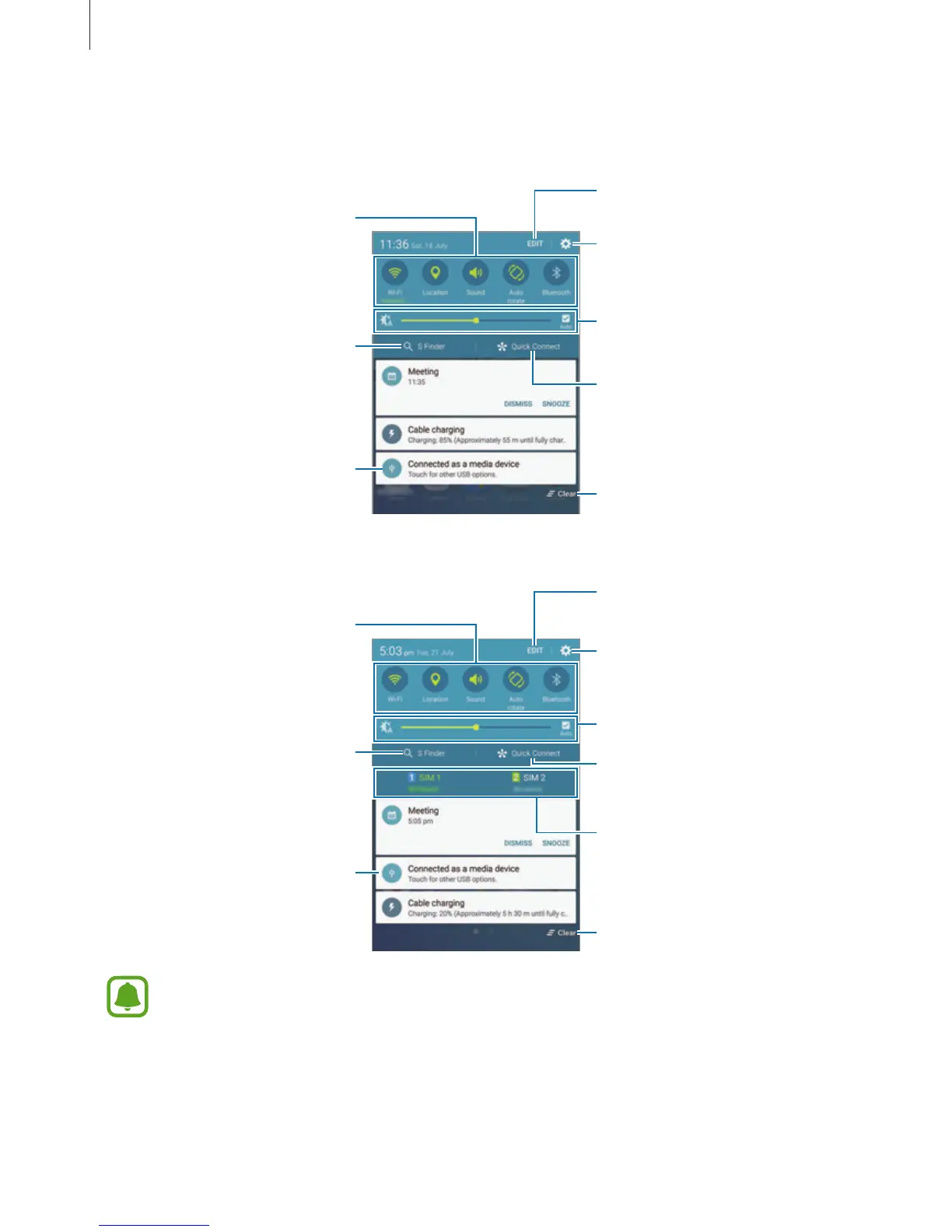
You can use the following functions on the notification panel.
Single SIM models:
Launch Settings.
Launch S Finder.
Tap a notification and perform
various actions.
Clear all notifications.
Adjust the brightness.
Manage quick setting buttons.
Quick setting buttons
Launch Quick Connect.
Dual SIM models:
Launch Settings.
Launch S Finder.
Tap a notification and perform
various actions.
Clear all notifications.
Adjust the brightness.
Manage quick setting buttons.
Quick setting buttons
Launch Quick Connect.
Select a SIM or USIM card.
You can hide
S Finder
and
Quick Connect
by using the edit menu in the notification
panel.

Table of Contents

Related product manuals