16_ network connection and setup
You can set up the network settings according to your network configurations.
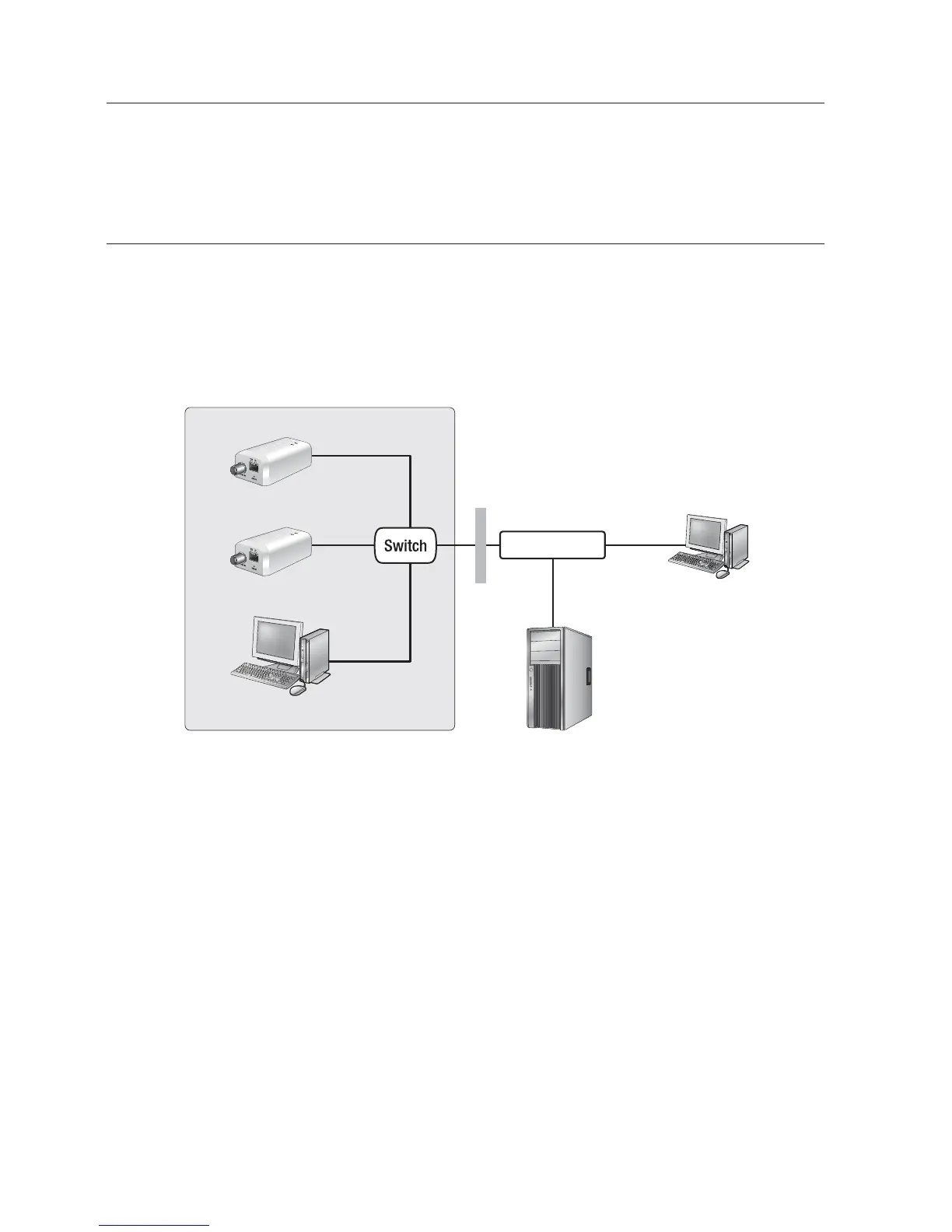
CONNECTING THE NETWORK VIDEO ENCODER DIRECTLY
TO LOCAL AREA NETWORKING
Connecting to the network video encoder from a local PC in the LAN
1. Launch an Internet browser on the local PC.
2. Enter the IP address of the network video encoder in the address bar of the browser.
M
A remote PC in an external Internet out of the LAN network may not be able to connect to the
network video encoder installed in the intranet if the port-forwarding is not properly set or a
firewall is set.
In this case, to resolve the problem, contact your network administrator.
By factory default, the IP address will be assigned from the DHCP server automatically.
If there is no DHCP server available, the IP address will be set to 192.168.1.100.
To change the IP address, use the IP Installer.
For further details on IP Installer use, refer to “Static IP Setup”. (Page 21)
network connection and setup
VIDEO IN
TX D
RESET
+ - + -
VIDEO IN
TX D
RESET
+ - + -
Network Video Encoder
Network Video Encoder
Local PC
Firewall
External Remote PC
DDNS Server
(Data Center, KOREA)
INTERNET
<Local Network>



 To Next Page