English _19
●
NETWORK CONNECTION AND SETUP
CONNECTING THE NETWORK VIDEO ENCODER TO A
BROADBAND ROUTER WITH THE PPPoE/CABLE MODEM
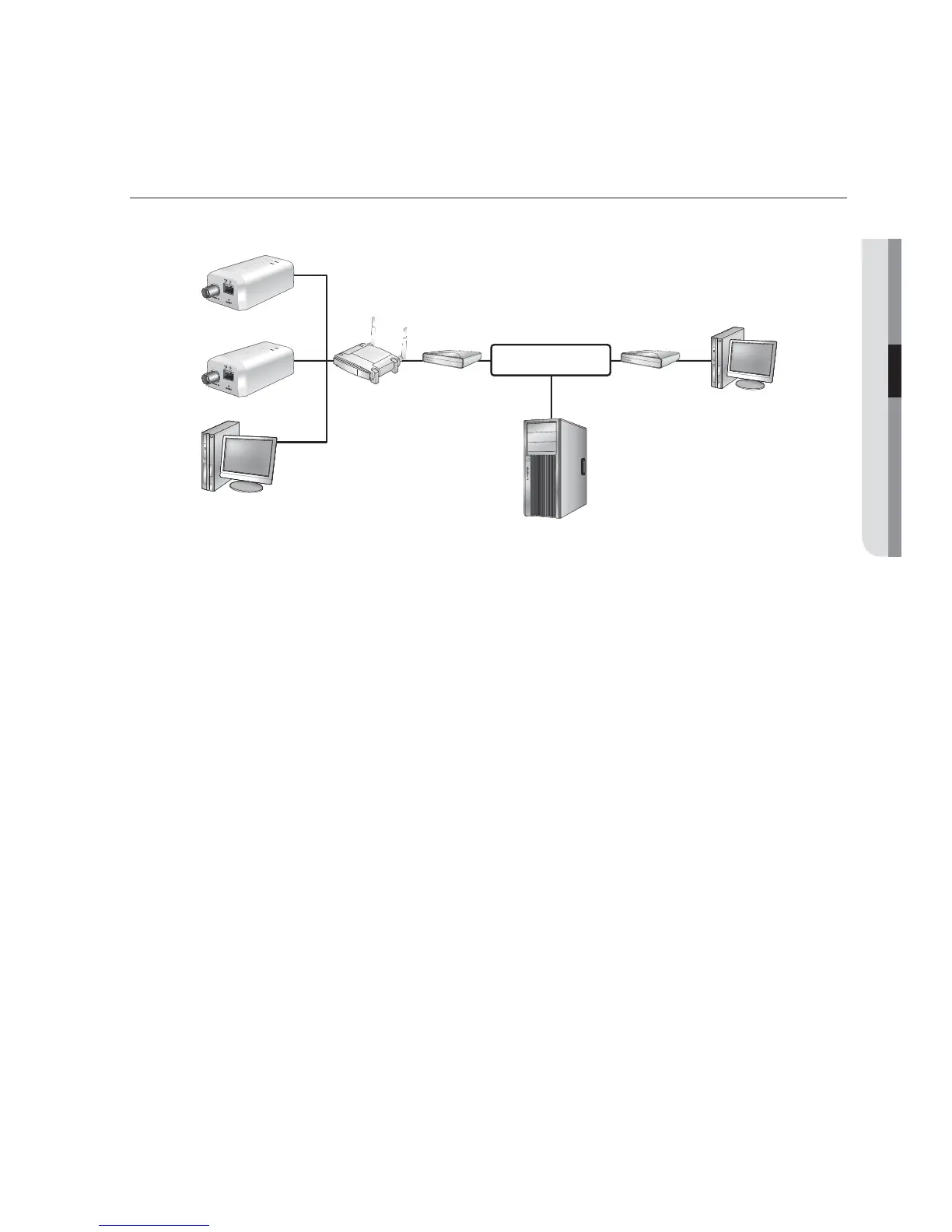
This is for a small network environment such as homes, SOHO and ordinary shops.
Configuring the network settings of the local PC connected to a
broadband router
Configuring the network settings of the local PC connected to a broadband router, follow
the instructions below.
Select : <Network Neighborhood>
<Properties>
<Local Area Connection>
<Properties>
<General>
<Internet Protocol (TCP/IP)>
<Properties>
<Obtain an IP address automatically> or <Use the following IP address>.
Follow the instructions below if you select <Use the following IP address>:
ex1) If the address (LAN IP) of the Broadband router is 192.168.1.1
IP address : 192.168.1.100
Subnet Mask : 255.255.255.0
Default Gateway : 192.168.1.1
ex2) If the address (LAN IP) of the Broadband router is 192.168.0.1
IP address : 192.168.0.100
Subnet Mask : 255.255.255.0
Default Gateway : 192.168.0.1
ex3) If the address (LAN IP) of the Broadband router is 192.168.xxx.1
IP address : 192.168.xxx.100
Subnet Mask : 255.255.255.0
Default Gateway : 192.168.xxx.1
M
For the address of the Broadband router, refer to the product’s documentation.
Refer to the “Port Range Forward (Port Mapping) Setup” section of the Broadband router’s
documentation. (Page 25)
VIDEO IN
TX D
RESET
+ - + -
VIDEO IN
TX D
RESET
+ - + -
Network Video Encoder
Network
Video Encoder
Local PC
Broadband router
PPPoE or
Cable Modem
PPPoE or
Cable Modem
External Remote PC
DDNS Server
(Data Center, KOREA)
INTERNET



 To Next Page