setup screen
46_ setup screen
- Sender : Enter the address of the email sender. If the sender address is incor-
rect, the email from the sender may be classified as SPAM by the email server
and thus may not be sent.
- Subject : Enter a subject for your email.
- Body : Provide the text for the massage. Attach the alarm images to the email
that you are preparing.
4. When done, click [Apply (
)].
Motion Detection
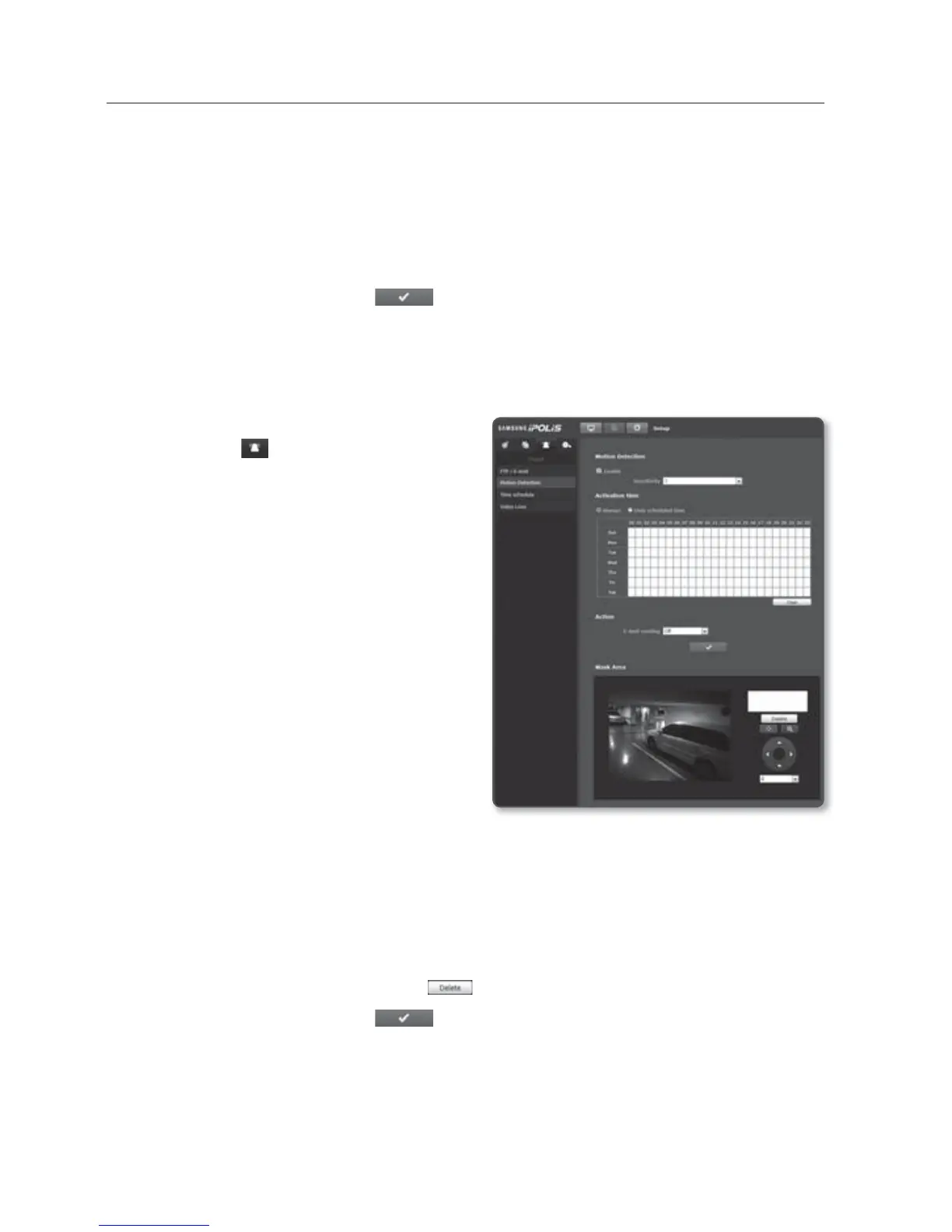
You can set target detection region and motion, as well as the alarm signal output.
1. From the Setup menu, select the
<Event (
)> tab.
2. Click <Motion
Detection>.
To set the Motion Detection
1.
Set <Motion Detection> to <Enable>.
2. Select a sensitivity level of the motion
detection. Higher the sensitivity is, the
smaller motion is detected.
3. Specify the <Activation time>.
Always : Always check if a motion
detects. It activates in operated
mode when the motion detects.
If set to Always, the activation time cannot
be changed.
Only scheduled time : Check if a motion detects at a specified day of the week for
a specified time period. It activates in operated mode when the motion detects.
4. Specify an operation that will perform if a motion detects.
E-mail sending : Specify the use of the email transfer if a motion detects.
5. Use the drag-and-drop method to specify the detection area on the video.
Motion detection is activated in the mask area set.
To delete set area, click [Delete (
)] button.
6. When done, click [Apply (
)].



 To Next Page