English _49
● SETUP SCREEN
SYSTEM SETUP
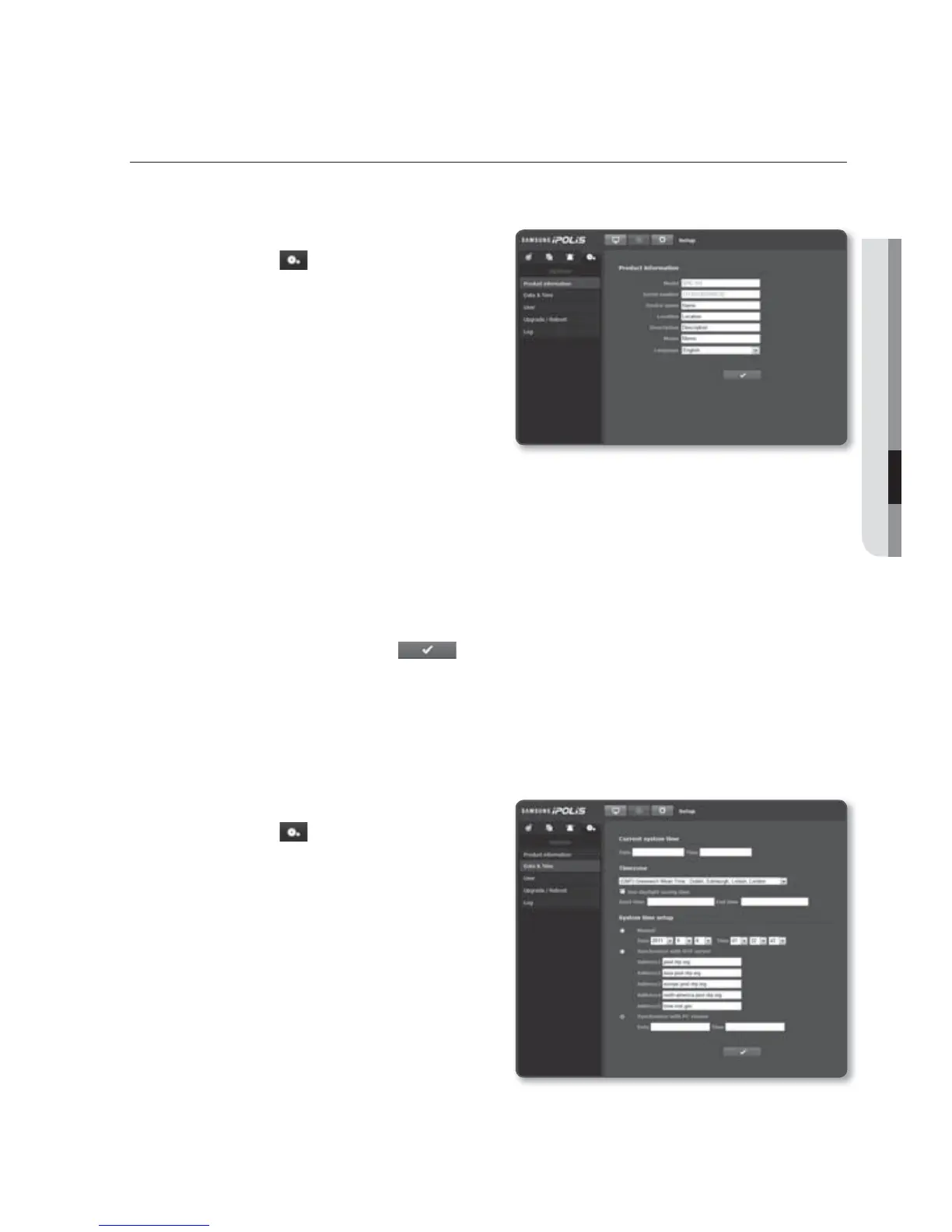
Product information
1. From the Setup menu, select the
<System ( )> tab.
2. Click <Product information>.
3.
Check the network video encoder
information, or provide details according
to your network environment.
Device name : Provide a device
name that will be displayed on the
Live screen.
Location : Specify the location where the
network video encoder is installed.
Description : Provide detailed information about the
network video encoder
location.
Memo : Provide an explanation about the network video encoder for better
understanding.
Language : Select a preferred language for the network video encoder menus and
the Web Viewer OSD.
4. When done, click [Apply (
)].
J
Product related information only allows English for input.
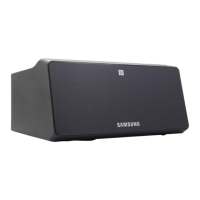
Date & Time
1. From the Setup menu, select the
<System ( )> tab.
2. Click <Date & Time>.
3. Specify the time and date that will be
applied to the
network video encoder.
Current system time : Displays the
current time settings of your system.
Timezone : Specify the local time
zone based on the GMT.
Use daylight saving time :
If checked, the time will be set one
hour before the local time zone for
the specified time period.
This option will be displayed only in areas where DST is applied.



 To Next Page