20 21
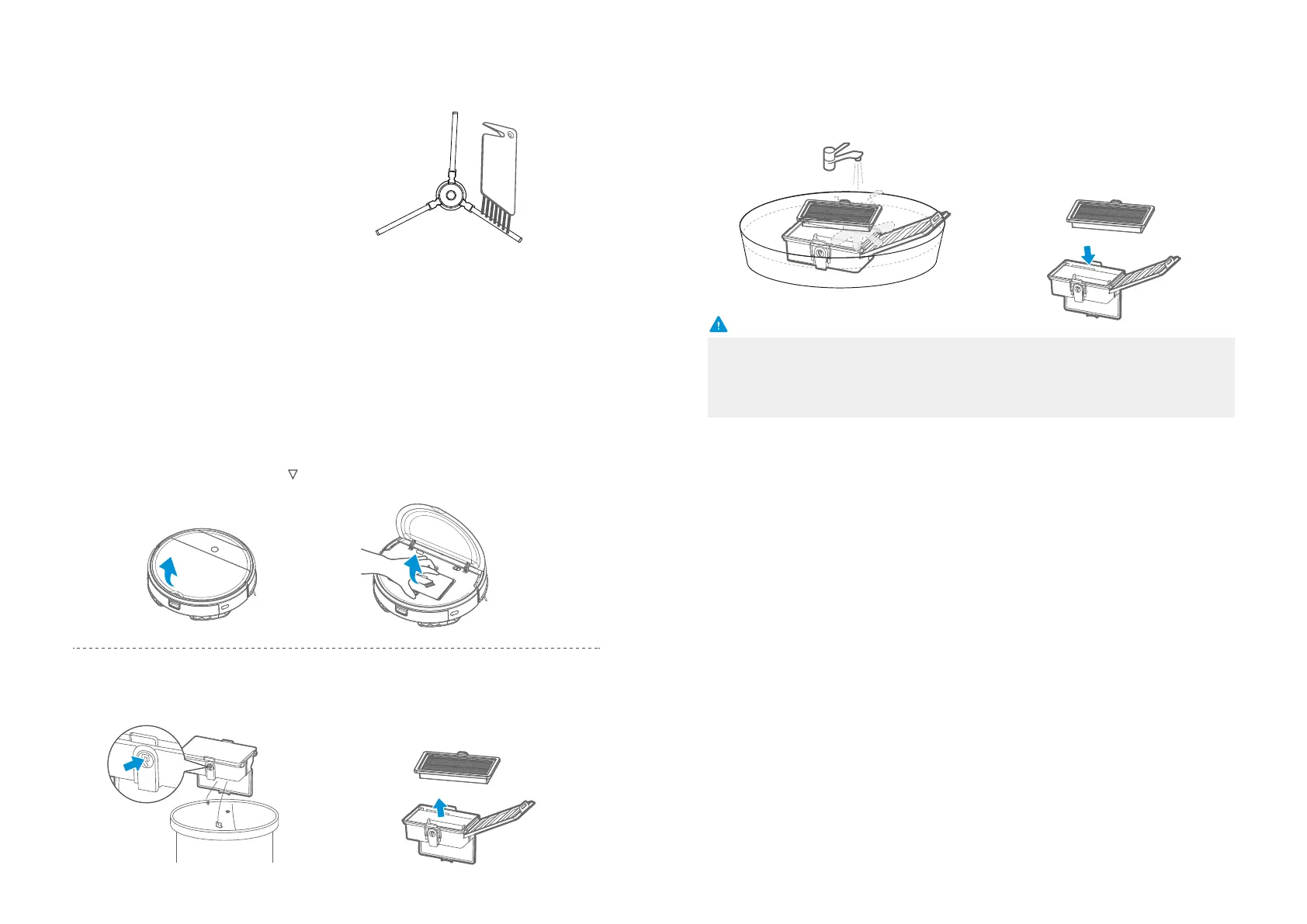
Clean the side brush with a cleaning tool or a rag;
2
If curl or deformation occurs, remove the side brush and put
it in warm water for about 5 seconds;
3
When the side brush is damaged and cannot be used, please replace
as soon as possible.
4
The steps are as follows
Check whether the side brush is damaged or has wrapped;
1
Product Maintenance
Take out the dust bin;
Cleaning
Cleaning of Dust Bin and Filter
Open the cover by lifting the mark “ ”
on the cover with fingers;
1
2
Press a button to empty trash in the
dust bin;
Take out the filter;
3
4
Caution
Clean the dust bin and filter
by water;
Insert the filter into the dust bin.
5 6
1. It is recommended to wash it when the filter is blocked.
If you want to buy the accessories, please contact a Samsung Electronics service center.
2. Before installation, make sure that filter is in a dry condition.
3. Empty the dust bin after each use.








 To Next Page