16 17
1. Do not use mop tank assembly on the carpet.
2. It is recommended to fill in 80% water for the first time to ensure better
3. If it is not necessary to mop the floor, be sure to remove the water tank
and mop cloth assembly or pour out the water in the water tank.
4. It is not recommended to carry out wet-mopping operation with water
tank on wooden floor when unattended in order to avoid damage to the
wooden floor due to excessive water.
5. It is recommended to use pure water to avoid water quality problems
Caution
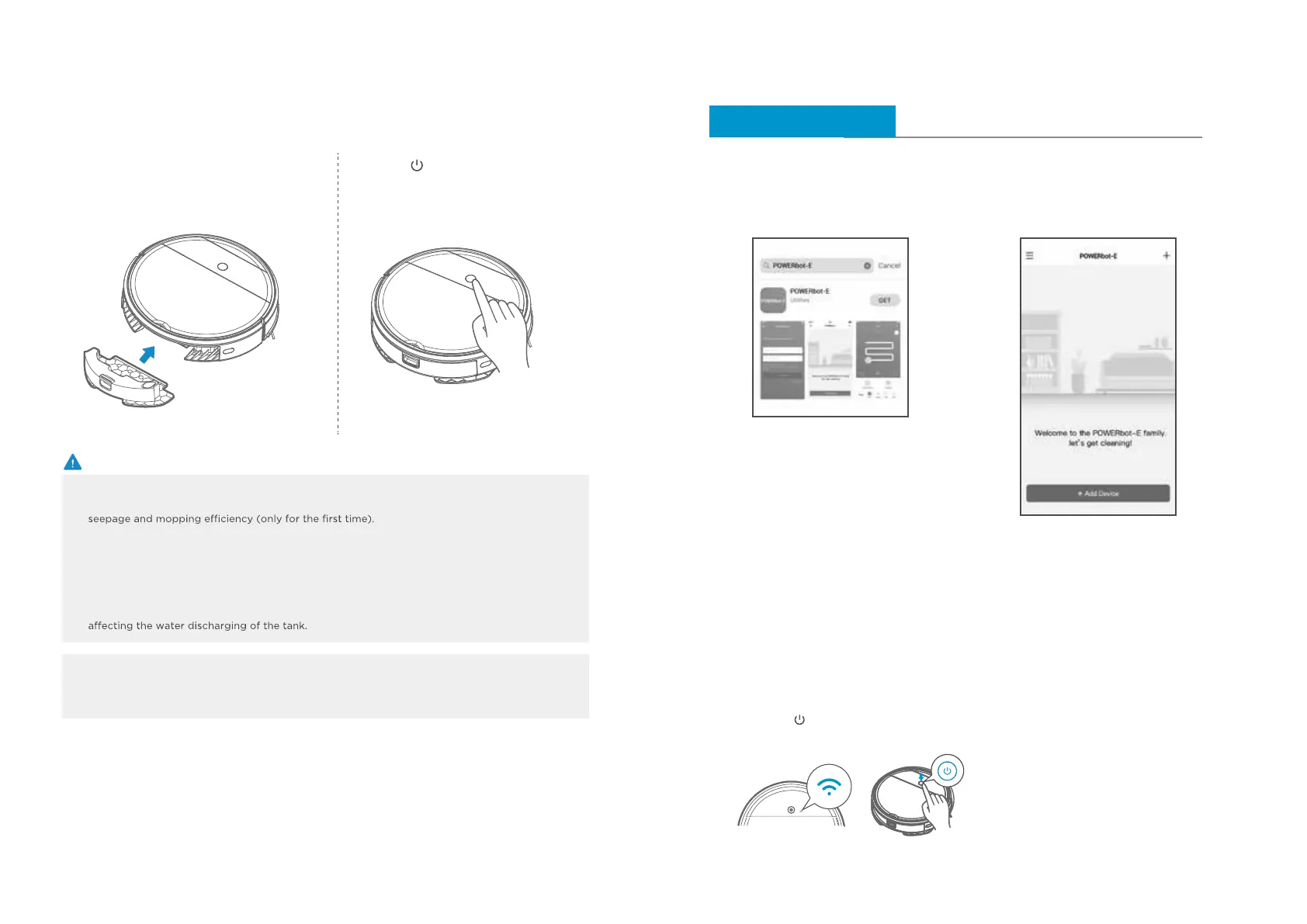
Then insert the water tank assembly into
the appliance.
5
Press ‘‘ ’’ and start mopping.
6
APP Guide Line (POWERbot-E)
App quick guide
Network access guide
Search “POWERbot-E” in APPLE App
Store or Google Play Store, and download
the App. Follow the instructions on the
interface to register and login App.
Click "+ Add Device" on the interface
and operate as instructed.
Step 1 Step 2
When first using, slow flickering of WiFi indicator
light indicates that the cleaner gets into the
state of network accessing configuration, now
click “Next Step” on App and conduct network
accessing config operation as per the prompts
on the interface.
Remarks: If WiFi indicator light doesn’t flicker,
long press “ ”key for 3 seconds and release
after a tick sound is heard.
Step 3
NOTE:
SmartThings is incompatible with tablets and some
mobile devices.
– Android 6.0 or later (at least 2GB of RAM) is
recommended.
iPad and some mobile devices may not be supported.
– iOS 10.0 or later / iPhone 6 or later is supported.
Visit Play Store or App Store to see if your mobile
device is compatible with SmartThings.
The supported features are subject to change without
any prior notice.
Remark
a. It will take 5~10 minutes until the dry mop is wetting.
→ Wet the mop with water before using
b. The amount of water can be controlled in the POWERbot-E App








 To Next Page