SAMWONTECH
4st Edition of TEMI2000_Series IM : Aug. 18. 2009 Page 47 / 55
7 SCREEN DISPLAY setting
7.1 Screen Display settings
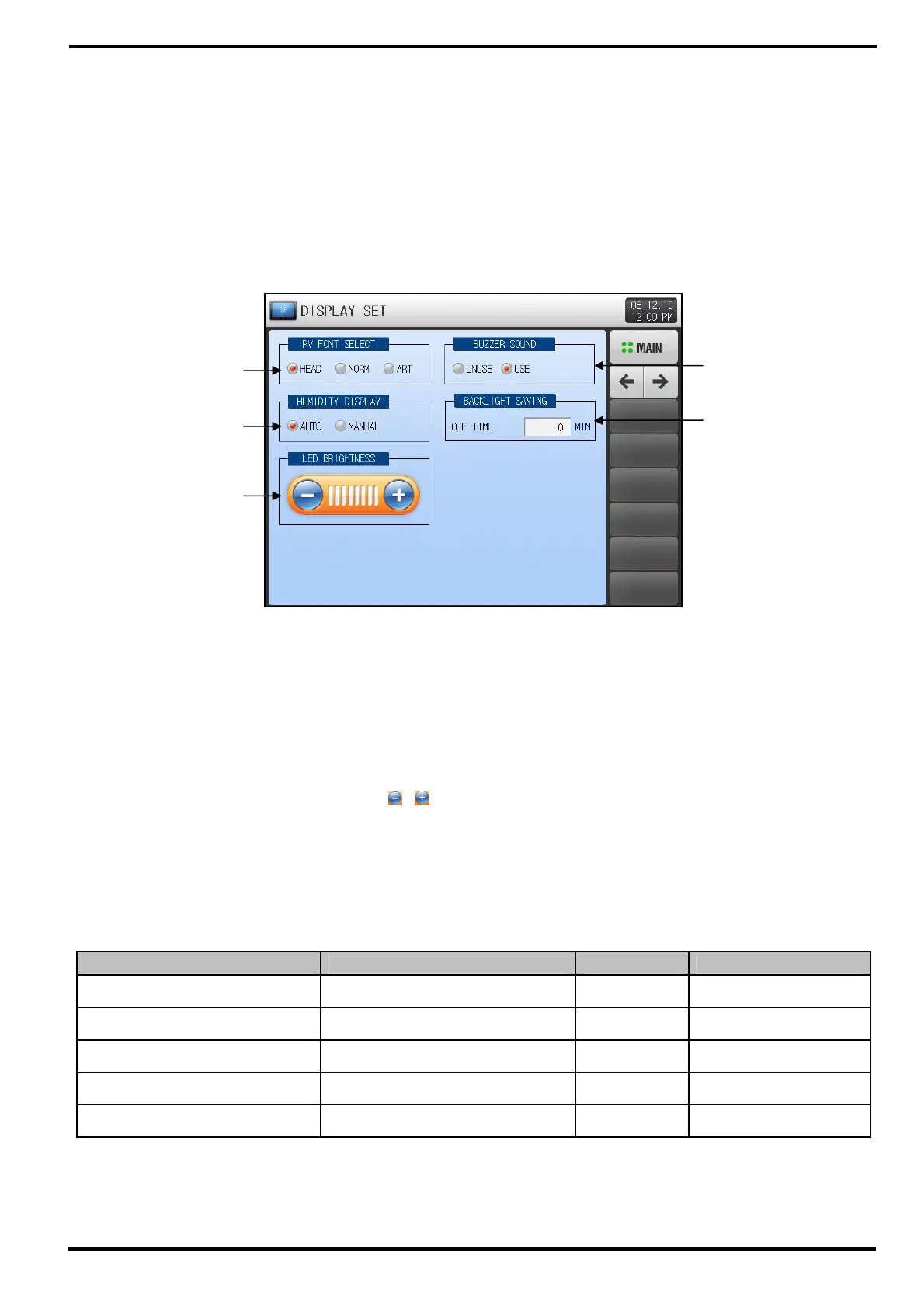
▶ Press the DISPLAY SET on MAIN MENU screen to enter this display setting section.
▶ This screen is to set parameters concerned screen display such as character font, LED brightness,
Buzzer and Backlight off time.
① TEMI2500 provides 3 kind of PV font on Operation Screen. This is the checkbox for display PV font.
② Checkbox to set the Humidity PV display mode on Operation Screen.
☞ TEMI2500 provides Humidity Control operation based on Relative Humpty.
☞ AUTO : The Humidity PV will be displayed if settings meet DRY LIMIT condition for Relative Humidity.
Otherwise, ‘---.-’ will be displayed. ‘(When humidity SP(HSP) ≠ 0)
☞ MANUAL : Same to automatic except SP(HSP) = 0, Humidity PV will be displayed.
③ Adjustable LCD brightness by the
, buttons.
④ Checkbox to set whether or not using BUZZER SOUND.
☞ Even if the buzzer has been turned off, it will sound in cases of DI error.
⑤ Setup box for Backlight OFF time.
☞ Backlight OFF time starting from no Key input.
Table 7-1. DISPLAY setting Parameters
Parameter Range Units Default
PV PONT SELECT HEAD, NORM, ART ABS HEAD
HUMIDITY DISPLAY AUTO, MANUAL ABS AUTO
BUZZER SOUND UNUSE, USE ABS USE
LED BRIGHTNESS 1 ~ 8 ABS 8 units
BACKLIGHT SAVING 0 ~ 99 MIN ABS 10
①
②
③
④
[Figure 7-1] DISPLAY SET Screen
⑤



 To Next Page