SAMWONTECH
4st Edition of TEMI2000_Series IM : Aug. 18. 2009 Page 39 / 55
5.6 PATTERN NAME input
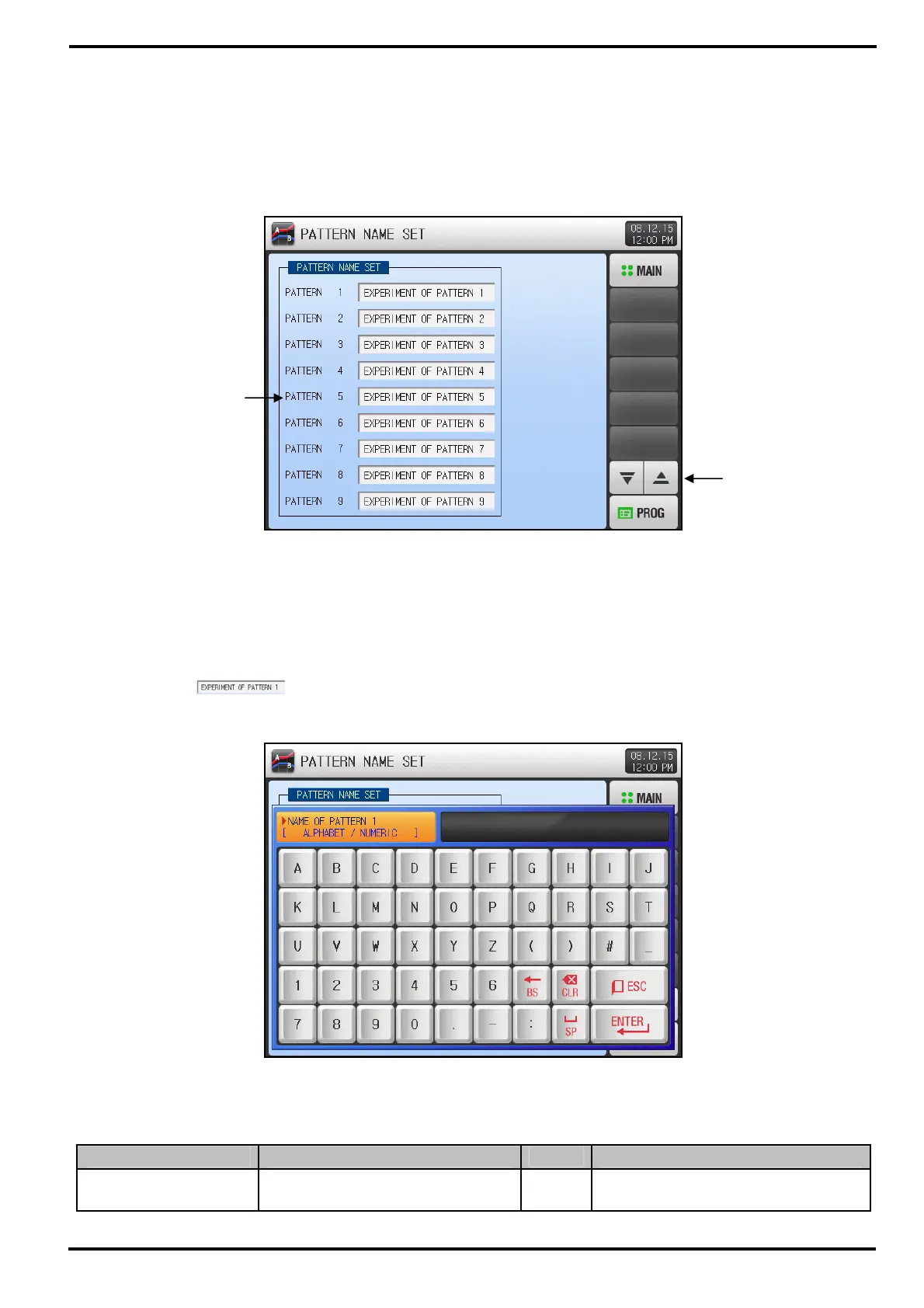
▶ Press [PATTERN NAME] button on PROTRAM SET menu screen to enter into this screen.
▶ This screen is to input the experiment name of each pattern.
▶ Refer to [Figure 3-10 The 1
st
PROGRAM RUN Screen].
① To input experiment name of each pattern. Alpha-numeric Input Keypad will pop-up
② Button to move to the previous / next 9 PATTERN SET page.
▶ Press the button, and the Alpha-numeric Input Keypad will appear.
Table 5-6. PATTERN NAME setting Parameter
Parameter Range Units Default
PATTERN NAME SET
1~120
0~9, A~Z,
Special character (max. 24)
ABS EXPERIMENT OF PATTERN 1~ 120
①
②
[Figure 5-11] PATTERN NAME SET screen
[Figure 5-12] PATTERN NAME Keypad



 To Next Page