13
Y
P
B
P
R
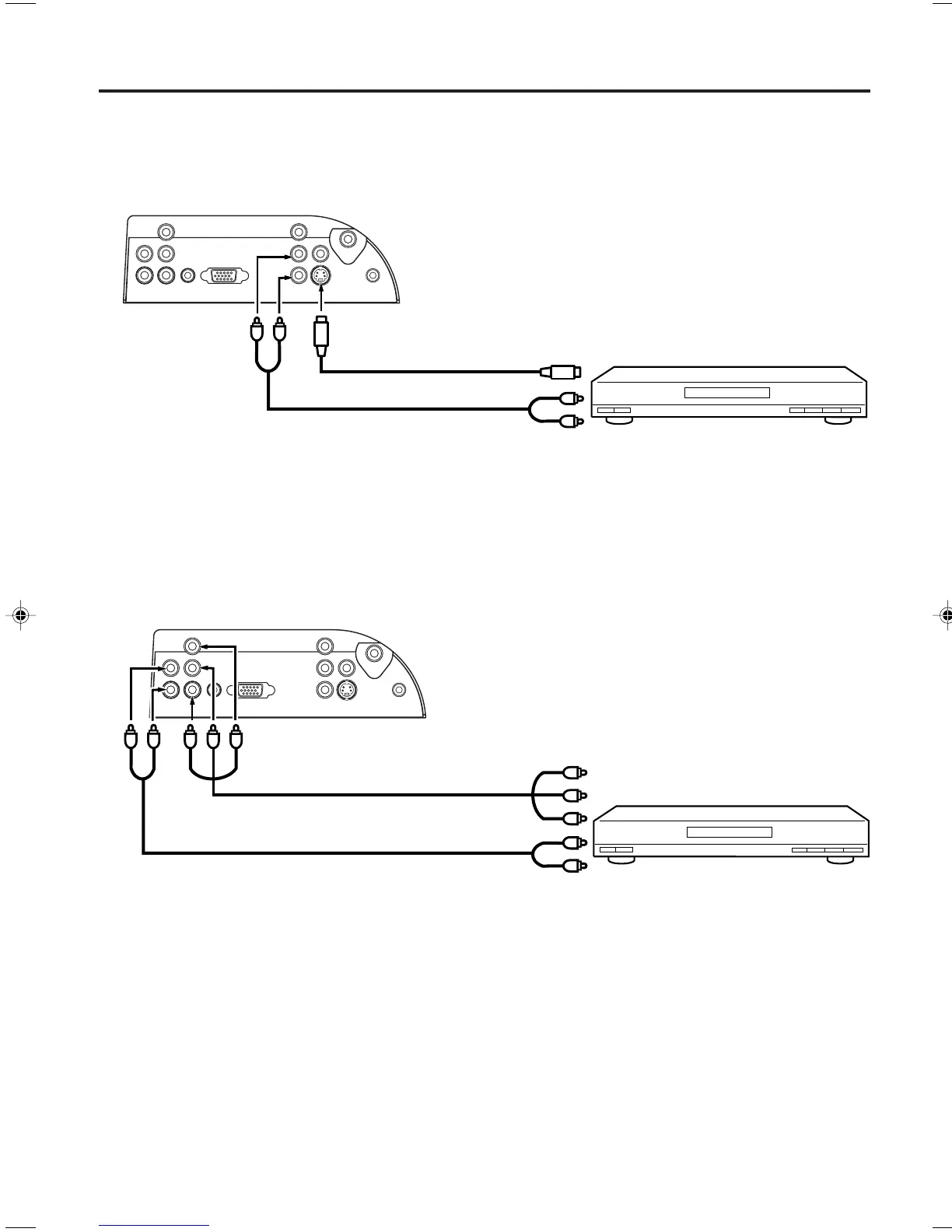
To connect the LCD TV to a DVD player/Satellite receiver
If your DVD player or Satellite receiver has a S-Video out jack, connect cords as shown.
To connect the LCD TV to a DVD player with component video
If your DVD player has component video out jacks, connect your LCD TV to a DVD player using a component
video cord. It can greatly enhance picture quality and performance.
To Component OUT
To Audio OUT
Audio cord (not supplied)
Video cord (not supplied)
To AUDIO(L/R) IN
NOTE:
• Component Video inputs of the unit are for use with a device which outputs 480i/1080i interlaced signals and
480p/720p progressive signals.
Connections to other equipment
To S-Video OUT
To Audio OUT
Audio cord (not supplied)
S-Video cord (not supplied)
To S-VIDEO IN
To AUDIO(L/R) IN
Rear of the LCD TV
Rear of the LCD TV
To COMPONENT IN
33F0201A_En_p12-17 7/5/07, 3:29 PM13



 To Next Page