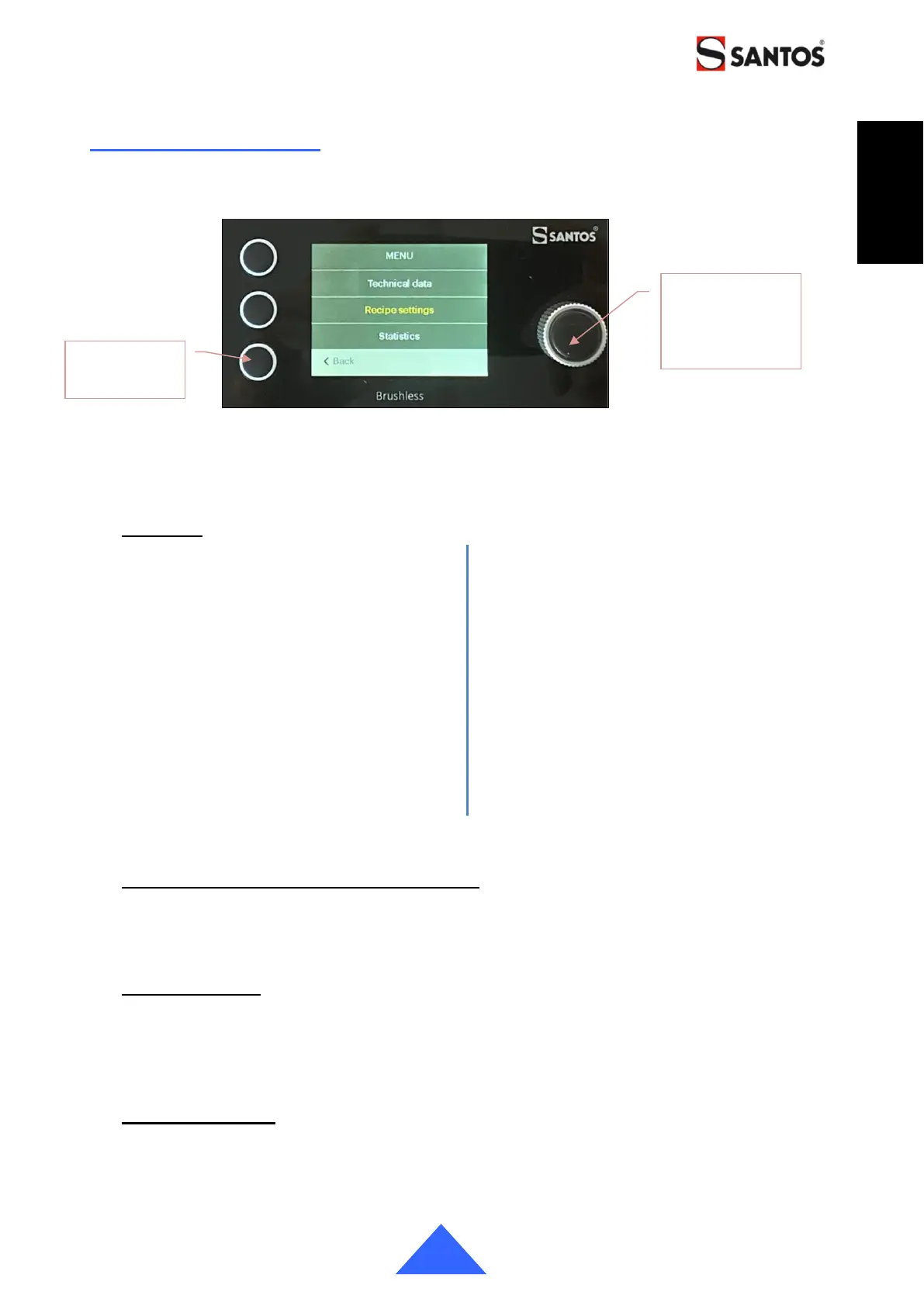
ACCESS TO THE MENUS
A long press on the Turn&Push button (11) activates the "Menus" mode
Use the rotating Turn&Push button (11) to scroll through the menus and select them
Menu list
Recipe settings
Recipe creation
Recipes 1 to 6
Recipe activation
Stop&Go management
Quick modification
Recipe reset
Statistics
Total counter
Partial counter
Reset the partial counter
Display settings
Dose counters
Total
Partial
Brightness
Standby time
Prolonged Standby time
Date and time settings
Languages
Technical data
Burrs wear indicator
Burrs history
Burrs change
Software version
Event log
Displaying the dispensed dose counters
The display of the "Total" and "Partial" counters is activated separately.
Note: The Total counter cannot be reset.
Recipe creation
The appliance has 6 recipes that can be configured.
- Pictogram, timer, motor speed.
The "Hand" pictogram corresponds to the "Pulse" function: no timer setting. The "Pulse"
function can operate for a maximum of 1 minute.
Recipe activation
This menu allows you to activate the display of recipes on the home screen.
By default, only recipes 1, 2 and 3 are activated.
At least one recipe has to be selected.


 To Next Page