SARK
SARKSARK
SARK-
--
-110
110110
110
User’s Manual
Rev 1.2.6 October 3
rd
, 2015 - 42 - © Melchor Varela – EA4FRB 2011-2015
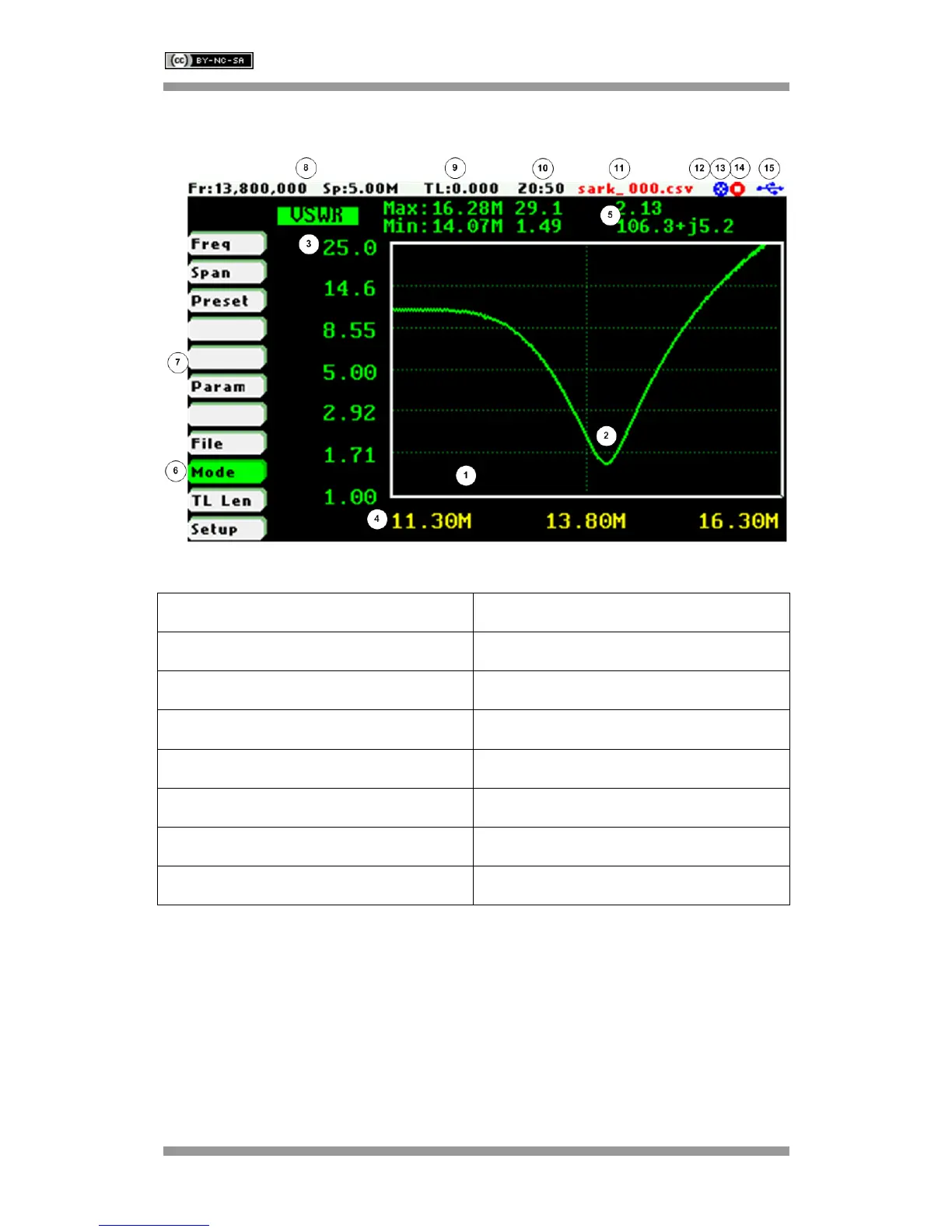
9 Field Mode
1 Diagram 9 Transmission Line length setting
2 Trace 10 Reference impedance setting
3 Vertical axis labeling 11 Loaded data file name
4 Frequency axis labeling 12 Disk write operation in progress
5 Maximum and minimum values 13 Calibration status
6 Highlighted menu option 14 Run/Hold status
7 Main menu 15 USB/Battery status
8 Frequency and span settings
Field Mode is equivalent to the Scalar Chart mode but with a more visible presentation aimed at
operation in the field, especially if combined with the «White» color theme. Frequency and
magnitude of maximum and minimum points in the trace are shown at the top of the graph. This
will be helpful for instance, in the identification of the frequency and magnitude of the minimum
VSWR point.



 To Next Page