SARK
SARKSARK
SARK-
--
-110
110110
110
User’s Manual
Rev 1.2.6 October 3
rd
, 2015 - 44 - © Melchor Varela – EA4FRB 2011-2015
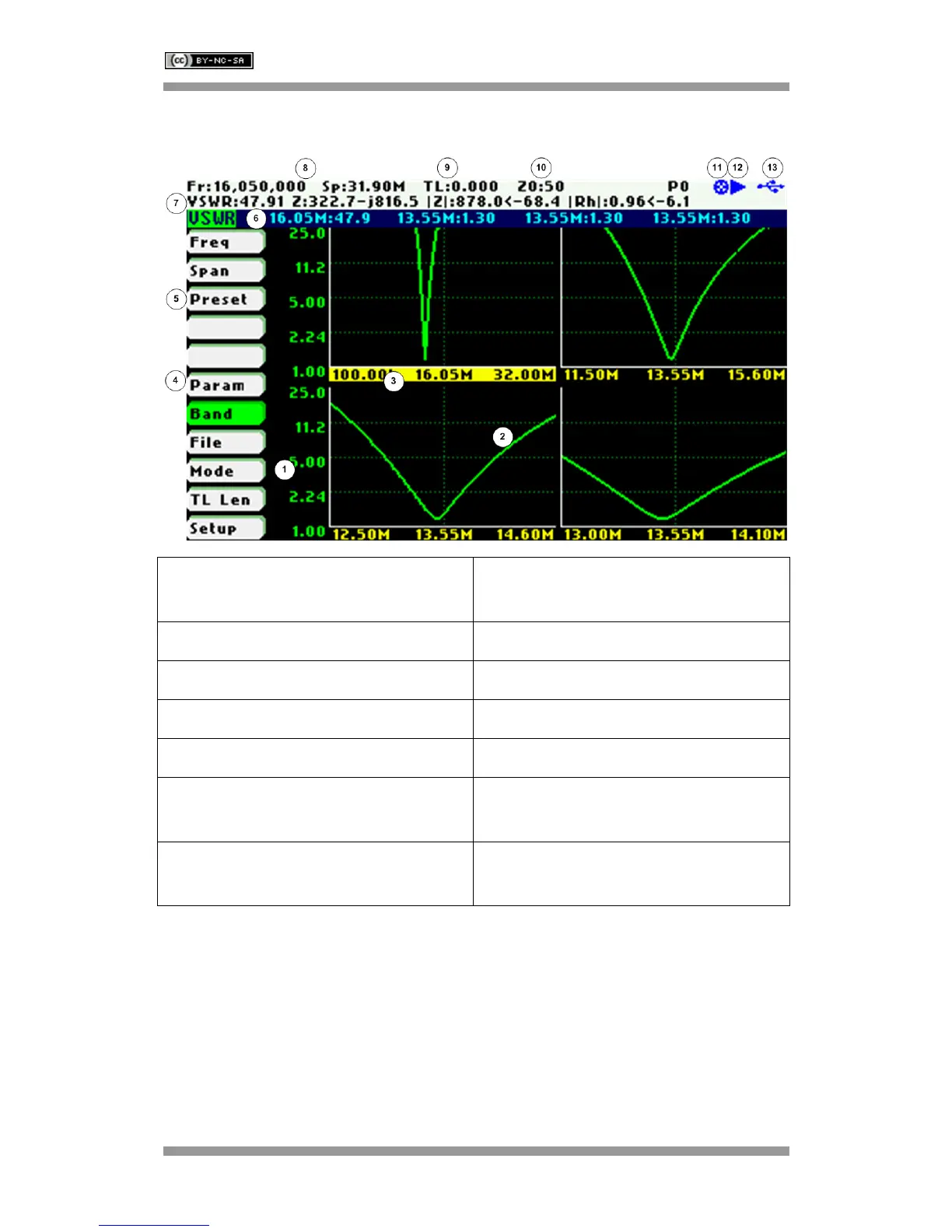
10 Multi-band Mode
1 Diagrams 8 Frequency and span settings (selected
band)
2 Trace 9 Transmission Line length setting
3 Selected band 10 Reference impedance setting
4 Main menu 11 Calibration status
5 Highlighted menu option 12 Run/Hold status
6 Frequency and magnitude value for
each band
13 USB/Battery status
7 Detailed measurements (at centre
frequency of selected band)
The Multiband mode is a unique feature of the SARK-110 to display the plot of an impedance
parameter in four scalar charts simultaneously. This feature is ideal for tuning multiband
antennas. Additionally, it can be used to display different views of the same band, as a kind of
zoom feature.
Use Navigator A to highlight «Mode» in the main menu. Press the Select [■] button to activate
the Mode popup submenu and use Navigator B to highlight «Multi-band» submenu mode option.
Finally press the Select [
■] button to enter into Multi-band mode.



 To Next Page