SARK
SARKSARK
SARK-
--
-110
110110
110
User’s Manual
Rev 1.2.6 October 3
rd
, 2015 - 7 - © Melchor Varela – EA4FRB 2011-2015
4 Operating the SARK-110
This chapter provides information about the SARK-110’s basic functionality and user interface.
4.1 Screen Layout
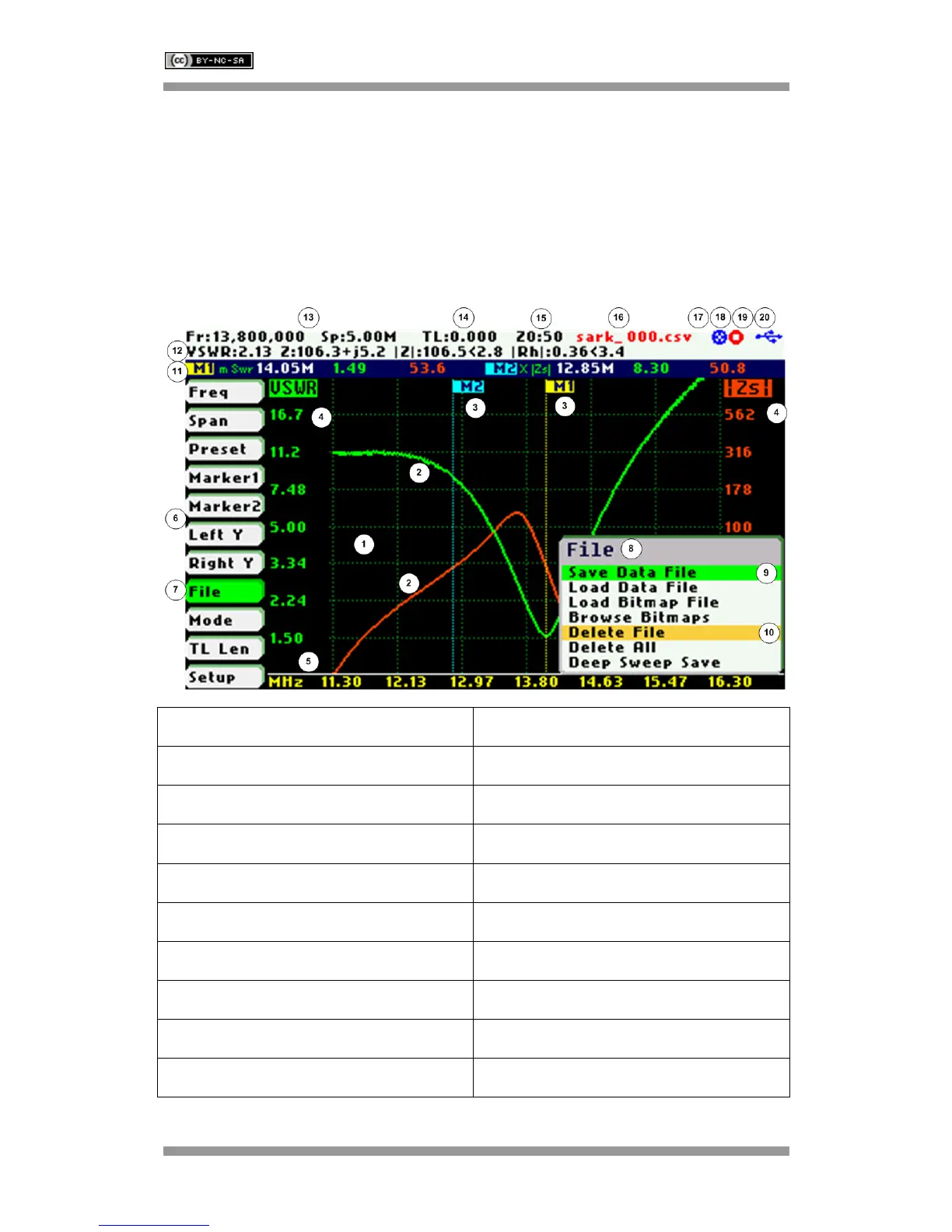
The following figure shows the screen layout in Scalar Chart mode. It shows diagram areas that
are the same for all operating modes of the SARK-110. Screen layouts that show specifics for
each operating mode are provided in corresponding sections of this manual.
1 Diagram 11 Markers information
2 Traces 12 Detailed measurements
3 Markers 13 Frequency and span settings
4 Vertical axis labeling 14 Transmission Line length setting
5 Horizontal axis labeling 15 Reference impedance setting
6 Main menu 16 Loaded data file name
7 Highlighted menu option 17 Disk write operation in progress
8 Submenu 18 Calibration status
9 Highlighted submenu option 19 Run/Hold status
10 Currently selected submenu option 20 USB/Battery status



 To Next Page