20 ACU-280 SATEL
Configuration – for some devices, you can configure additional settings (see “Programming
devices using the ABAX 2 Soft program” p. 61).
Temp.corr. – you can correct the temperature information sent by the device by up to
±3.5°C.
ECO – if this option is enabled, periodical communication with the device takes place every
3 minutes. Thus the battery life can be extended up to four times.
Remember that with the “ECO” option enabled for:
detector – delay between the change of control input state and switch-over of the
detector operating mode (active/passive) can be up to three minutes,
ASP-215 siren – delay in starting / stopping the signaling can be up to three minutes.
Buttons
click to add new device (see “Adding new wireless devices” p. 38).
click to remove selected device (see “Removing wireless devices” p. 38).
5.5 Status
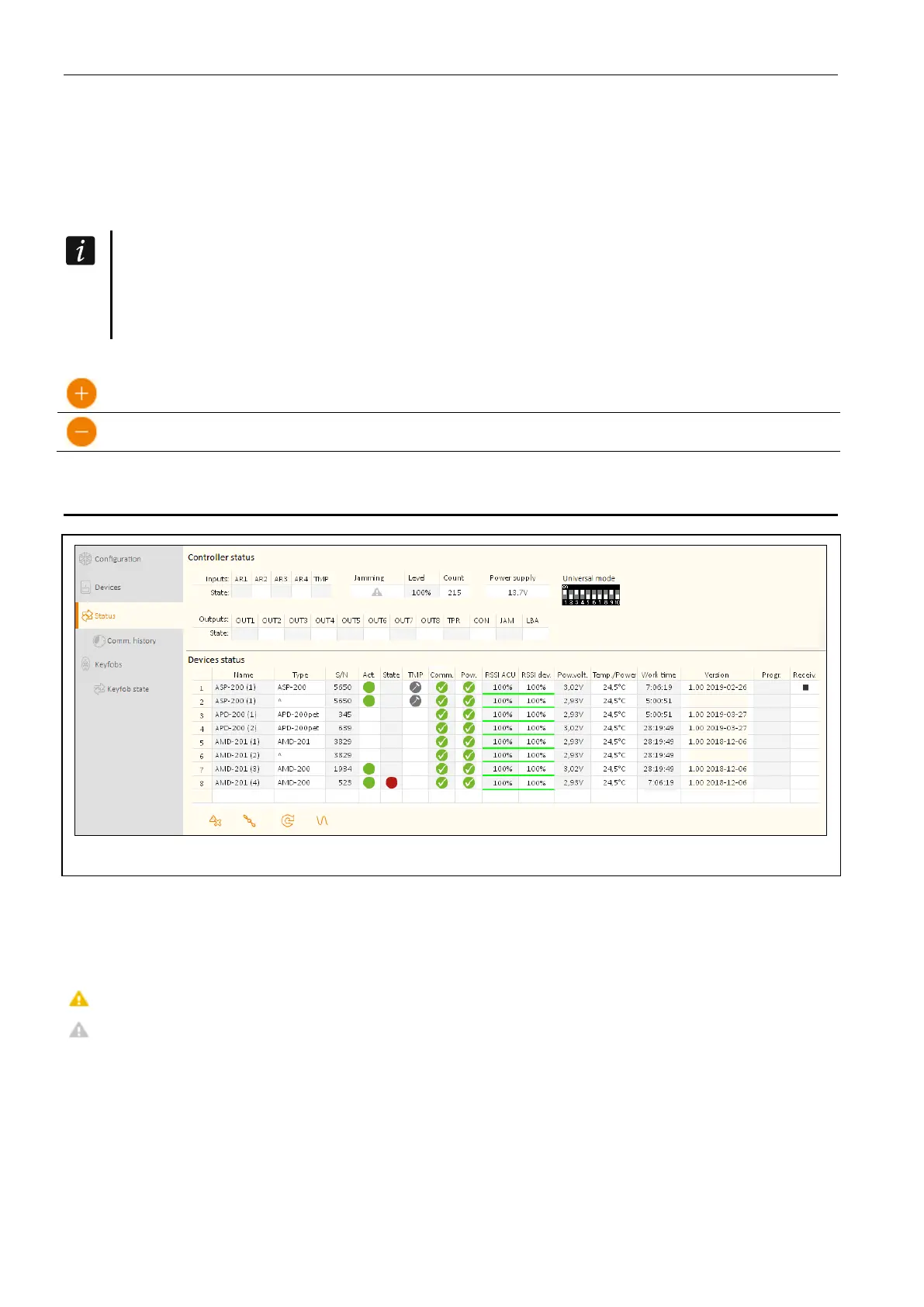
Fig. 16. ABAX 2 Soft program: “Status” tab.
Controller status
Jamming
Information about radio communication jamming:
[yellow] – communication is jammed,
[gray] – communication was jammed.
Level – level of radio communication jamming signal.
Count – number of radio communication jamming cases.
Power supply
Information about current supply voltage of the controller.
DIP-switches
Graphic information about setting of DIP-switches.


 To Next Page