54 ACU-280 SATEL
Some information and commands need to be sent immediately. Therefore, additional
communication takes place when the device reports tamper, when the detector reports
alarm, etc.
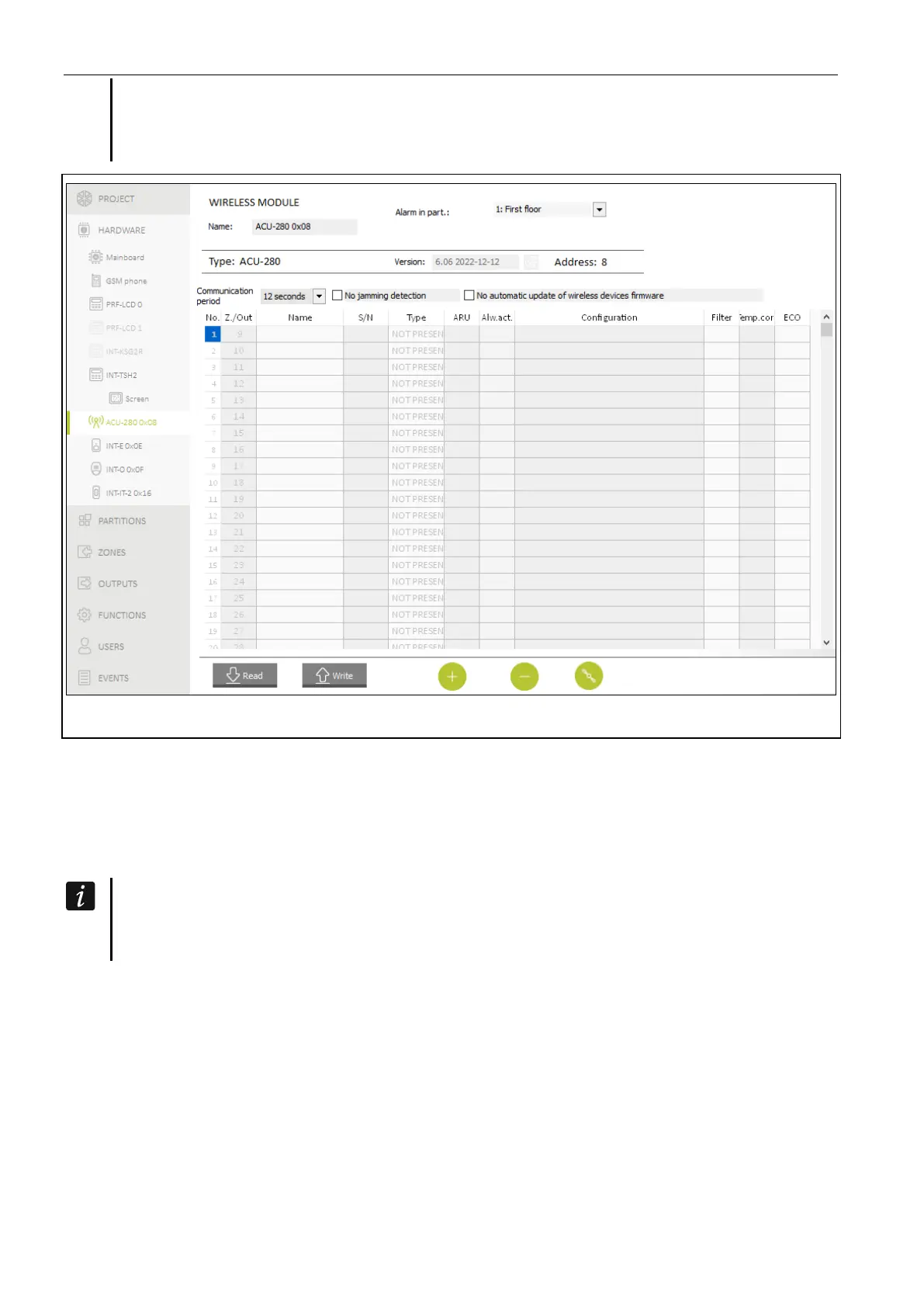
Fig. 27. PERFECTA Soft program: controller settings in the PERFECTA 64 M.
No jamming detection – if this option is enabled, the controller will not detect radio
communication jamming.
No automatic update of wireless devices firmware – if this option is enabled, the firmware
of wireless devices registered in the controller is not updated automatically.
8.2.1.1 Wireless devices
The wireless keypads form a separate category of devices. A separate pool of
positions is provided for them in the controller. Therefore, the keypads are not
presented on the list of ABAX 2 wireless devices.
No. – position number on the list of devices in the controller.
Z./Out – number of the zone/output to which the wireless device is assigned.
Name – name of the zone to which the wireless device is assigned.
S/N – serial number of the wireless device.
Type – type of the wireless device.
ARU – parameter available for the wireless device, if the ARU-200 radio signal repeater is
registered to the controller. It defines whether the device is to communicate with the
controller directly or via the selected ARU-200 radio signal repeater (several ARU-200
radio signal repeaters can be registered to the controller).


 To Next Page