SATEL ACU-280 69
2. Click the “Delete” button.
3. The “Confirm” window will open.
4. Click the “Yes” button.
5. The “Confirm” window will close.
6. The keyfob serial number shown in the “S/N” column will be erased.
9.1.2 Keyfobs in the PERFECTA 64 M system
After a keyfob has been added, its settings will be configured automatically, based on the
default settings (see: “Default keyfob settings” p. 71). These settings can be modified
(different functions can be assigned to the buttons / combination of buttons and different
information to the LEDs).
The user manual for the PERFECTA 64 M control panel describes the procedures for adding
and editing the user by means of the keypad, during which you can add or remove the keyfob
and program its settings.
9.1.2.1 Keyfob management using the PERFECTA Soft program
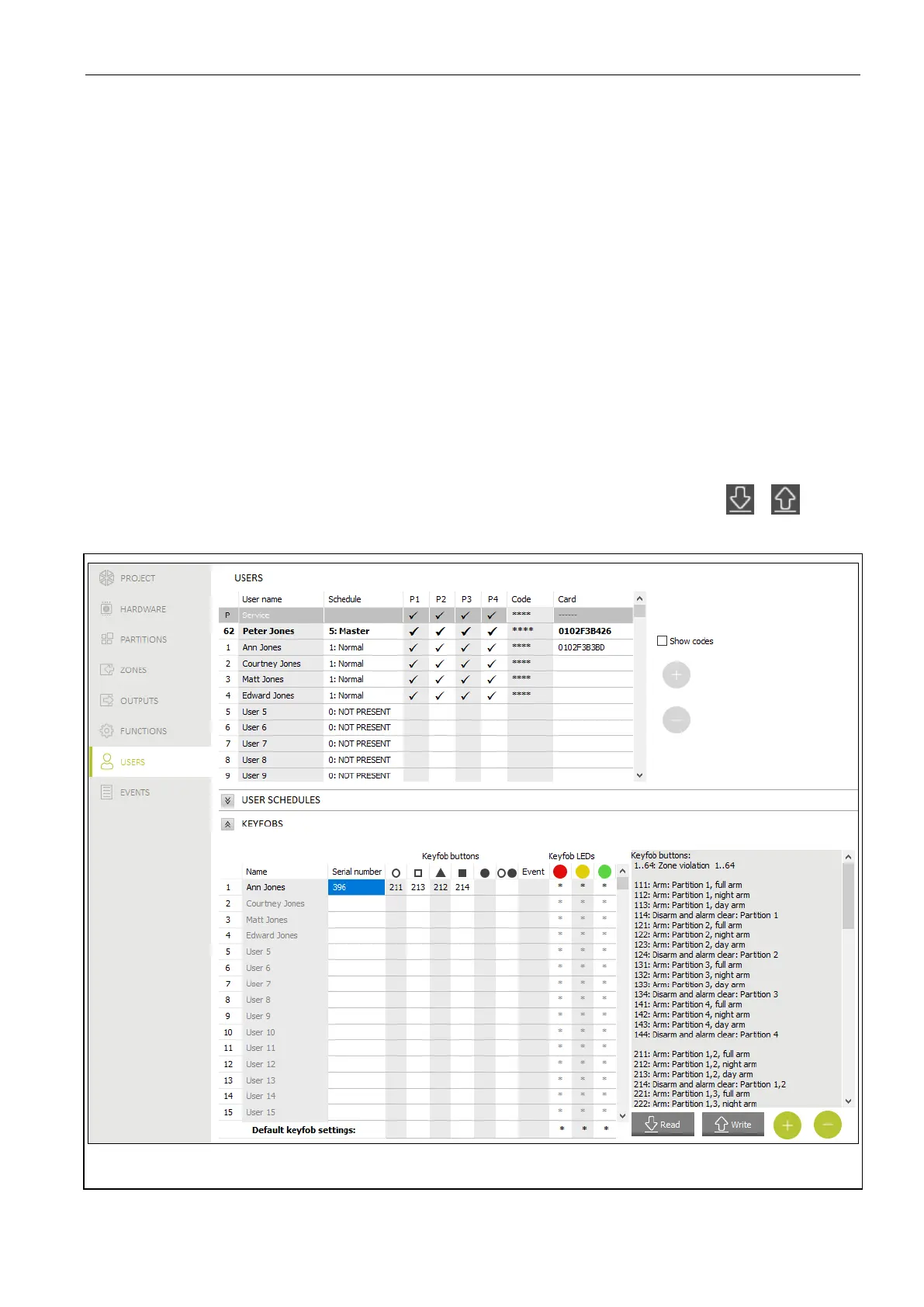
You can manage the keyfobs in the “Users” tab (Fig. 29). Before making any changes to the
keyfob settings, click the “Read” button, and after making the changes – the “Write” button.
The keyfob settings will not be read / written to the controller when you click / on the
menu bar.
Fig. 29. PERFECTA Soft program: “Users” tab.
Name – user name.


 To Next Page