SATEL VERSA 5
30 numbered LEDs provide information about the status of zones. The LED numbers
correspond to the zone numbers. When the user functions are in use, the LEDs can present
other information.
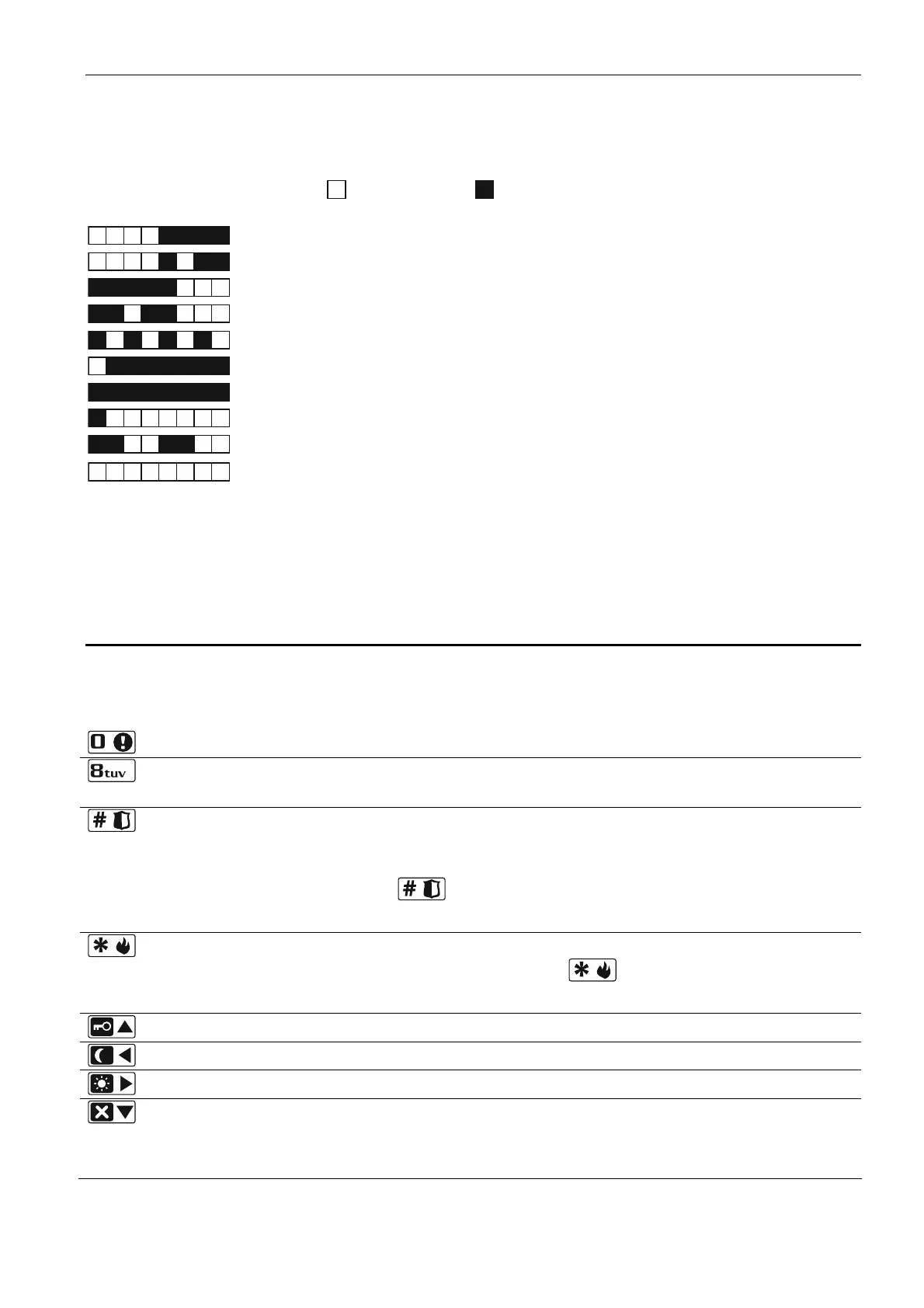
The way of presenting information is shown graphically below. The information is presented
for 2 seconds and repeated ( – LED is OFF; – LED is ON). The higher position in the list
means the higher priority of the presented status:
– inhibited (not displayed when armed),
– isolated (not displayed when armed),
– long violated (not displayed when armed),
– no violations (not displayed when armed),
– first triggered alarm,
– tampered (2EOL type zone),
– violated,
– tamper memory (2EOL type zone),
– alarm memory,
– normal state.
Additionally, the LEDs show countdown of entry delay and exit delay in partitions (the first
partition – LEDs 1-15; the second partition – LEDs 16-30). The LEDs which are ON (exit
delay) or blinking (entry delay) show how much time has left to the end of countdown.
A single LED means 2 seconds. If the countdown time exceeds 30 seconds, the LEDs will
only start going off, when the time left is shorter than 30 seconds.
2.3 Keys
The keys bearing digits and letters enable entering the code, as well as data when the
keypad is being used.
Other functions of these keys and the basic function of the other keys are described below.
allows to trigger the medical (aux) alarm (press and hold down for 3 seconds)
allows to turn on/off the CHIME signal in the keypad (press and hold down for
3 seconds)
allows to:
arm in the full mode [if the system is disarmed and there is no alarm] or disarm
the system and clear the alarm [if the system is armed and/or there is an alarm]
(enter the code and press )
trigger the panic alarm (press and hold down for 3 seconds)
allows to:
open the user menu (enter the code and press )
trigger the fire alarm (press and hold down for 3 seconds)
allows to arm in the full mode (see “Arming”)
allows to arm in the night mode (see “Arming”)
allows to arm in the day mode (see “Arming”)
allows to:
disarm the system and clear the alarm (see “Disarming and alarm clearing”)
quickly check the partition state (press and hold down for 3 seconds)













 To Next Page