13
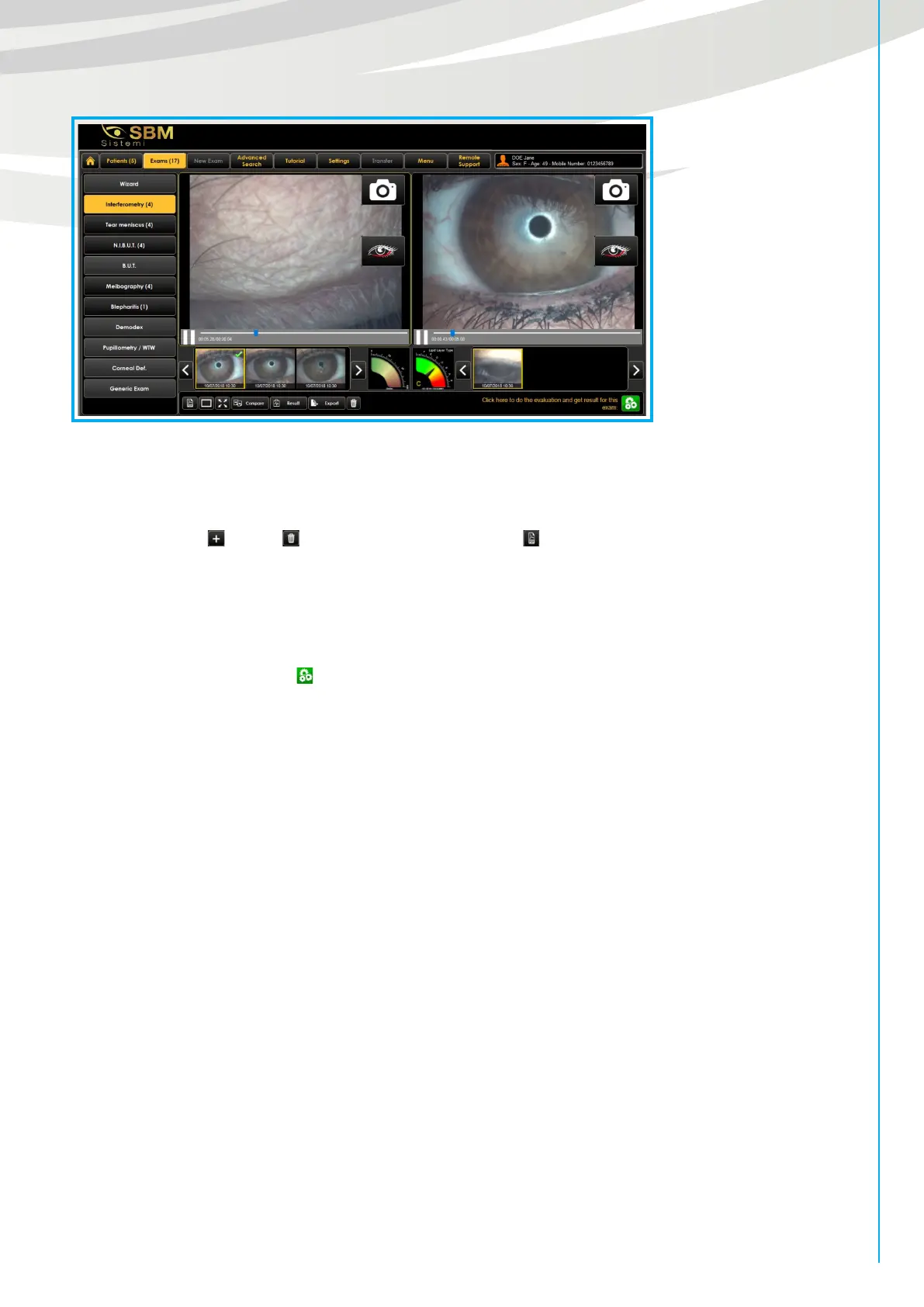
Fig. 6
In this way all the acquisitions are grouped: the unprocessed ones have the relative obscured scale, while in
the elaborated ones the evaluation scale is colored and contains a value (result).
It’s possible to add , delete an exam result and also create a pdf that shows the results of the exams
done.
Warning: delete an exam result, it means that will be deleted permanently and no longer recoverable.
“Note” tab displays the agreement on the handling of personal data and its acceptance by the signature of
the patient, through the button . In addition you can add any information about the patient’s exam.
New exam
Tapping “New Exam” button on the top, it is possible to start a new screening exam for the patient choose.
Please choose a patient before proceeding with a new exam creation.
In this section will be highlighted the IDRA interface that will allow you to make dierent main exams:
• Interferometry
• Tear Meniscus
• B.U.T. Exam
• N.I.B.U.T. Exam (manual and automatic)
• Meibography.
Selecting each examination will appear on the right the instrument specifications required and a brief
description of the exam chosen.
Tap the “Start” button located at the bottom right of the screen to start the examination.


 To Next Page