EasyManua.ls Logo

Schlage CO100 - Pass Through Credentials; Create a Pass Through PIN; Other Programming; Delete a PIN

Schlage CO100
12 pages
Print Icon
To Next Page IconTo Next Page
To Previous Page IconTo Previous Page
Loading...
7 • Schlage • CO-100 user guide
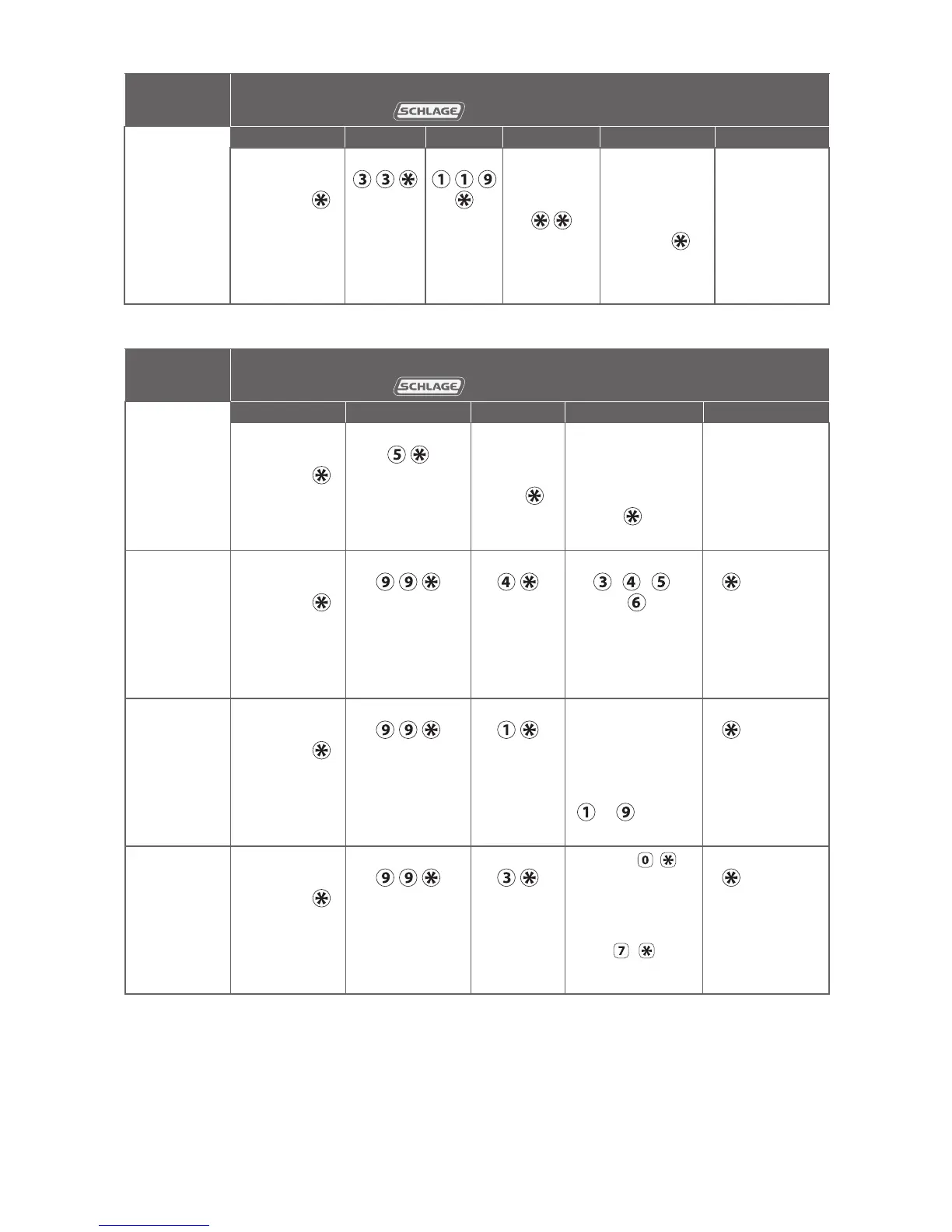
PASS THROUGH credentials
To complete
this action:
Perform the following steps:
Wait for to stop ashing between each step!
1
2 3 4 5 6
Create a
Pass
Through
PIN
Enter
Programming
PIN and
Enter Enter Enter new
3-6 digit
PIN and
Wait for
right green
light.
For another
PIN, go back
to step 3
OR
press
again to
finish
Wait for
confirmation:
2 right green
blinks.
OTHER programming
To complete
this action:
Perform the following steps:
Wait for to stop ashing between each step!
1
2 3 4 5
Delete a PIN
Enter
Programming
PIN and
Enter Enter the
PIN to be
deleted
and
To delete
another PIN, go
back to step 3
OR
press again
to finish
Wait for
confirmation:
2 right green
blinks.
Change PIN
length
(Available
with rmware
version 2.5.0
or higher.)
Enter
Programming
PIN and
Enter
Enter Enter
, , ,
OR for
desired PIN
length
Press
again to
finish
Wait for
confirmation:
2 right green
blinks.
Change
relock delay
period
Enter
Programming
PIN and
Enter Enter Each button
press adds to
the total delay
time
Example:
+ adds a
10 second delay
Press
again to
finish
Wait for
confirmation:
2 right green
blinks.
Disable/
enable
beeper
Enter
Programming
PIN and
Enter Enter
Enter
to disable
beeper
OR
to enable beeper
Press
again to
finish
Wait for
confirmation:
2 right green
blinks.

Related product manuals