9 • Schlage • CO-100 user guide
Lock status reports
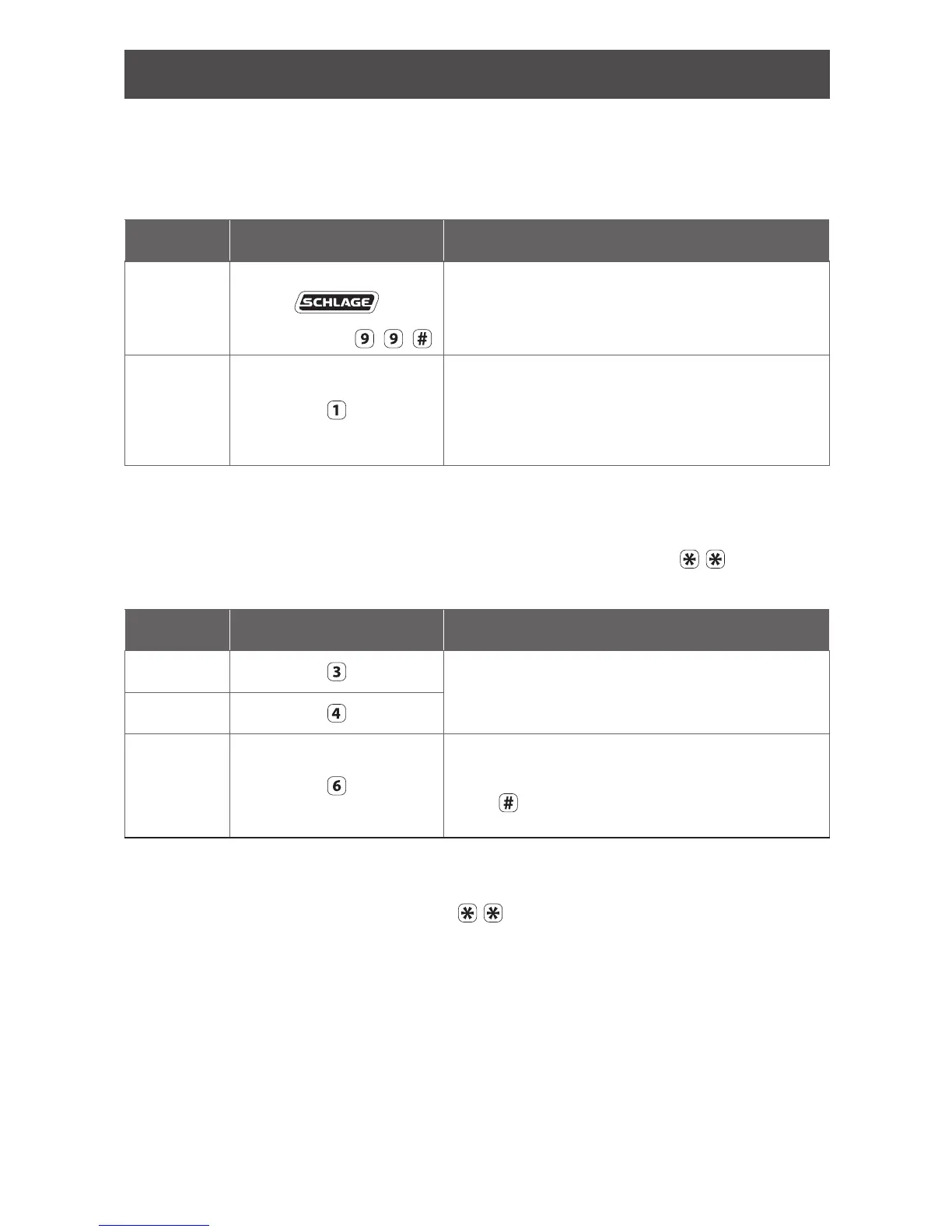
Follow the steps below to obtain lock status reports:
L Lock status reporting is available with rmware version 2.5.0 or higher.
L The left and right Schlage button LEDs will blink red once with each button press,
followed by the status indicator as described below.
Function /
Report Press Indicator/Report result
Initiate
report mode
Press and hold
while pressing
Wait until only the right Schlage button LED is on
to indicate the lock is in report mode and awaiting
an entry. If no entry is made, then timeout will
occur in 20 seconds.
Battery
status
Left LED:
Solid green = excellent
Blinking green = good
Blinking red = low
No indicator = critical battery
Once a status is reported, both left and right LEDs will light green, followed by
solid green on the right LED only. The right green LED indicates the lock is awaiting
another entry.
Obtain an additional status report as described below, or press
to exit
report mode.
Function /
Report Press Indicator/Report result
Firmware
status
Left LED blinks green for the version number
Decimal point is indicated by one red blink
“Zero” is indicated by two red blinks
Hardware
status
PCB serial
number
Left LED blinks green for each number
Each number is separated by two red blinks
Press
after two red blinks to display the next
number
If no entry is made within 20 seconds of the solid green right LED, then timeout
will occur.
To exit report mode at any time, press
.




 To Next Page