4. The Edit options appear on the display: View, Edit, Delete. Push START/ENTER to make your selection.
VIEW--The display shows these screens: TotalWorkouts, Total Hours, Total Miles (km), TotalCalories, Starting Weight, Target
Weight, Current Weight, Weight Change.
EDIT-- Youcanedit the values for: CurrentWeight, TargetWeight, Current Height, EnterAge, CustomWorkout. Push START/ENTER
to set each value after you makethe change. When the changes are complete, tap the START/ENTERor STOP/RESETbutton
until you are out of the Edit option.
DELETE--To delete the User data, push START/ENTER.To cancel the deletion, push STOP/RESET.
Custom Workout
After your CustomWorkout is set up in your User Profile, you can start the program from the CustomWorkout option in the Program
Menu. Theconsole display will prompt you to set the Timefor the workout (default is30:00).Usethe Increase/Decrease buttons to
adjust the Timevalue, and pushSTART/ENTERto set the time.
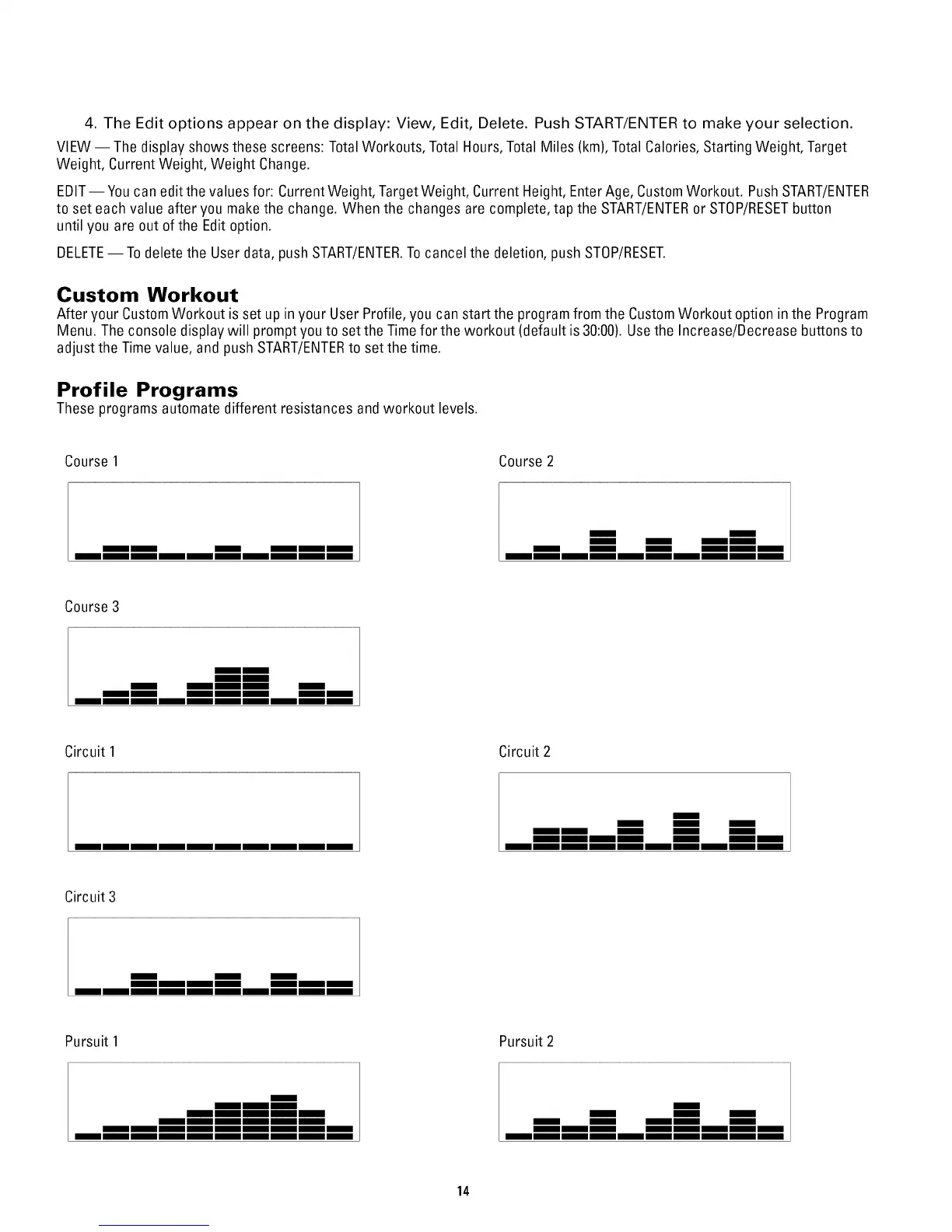
Profile Programs
These programs automate different resistances and workout levels.
Course1
mm m
mm
Course 2
m m m
mm
Course3
mm mm
mm mm
mm
Circuit 1 Circuit 2
mm
m m m
mm mm mmmm
Circuit 3
Pursuit 1
m
Pursuit 2
mm mm mm
mm mm mmmm mm
m m
mm
14


 To Next Page