Console Features
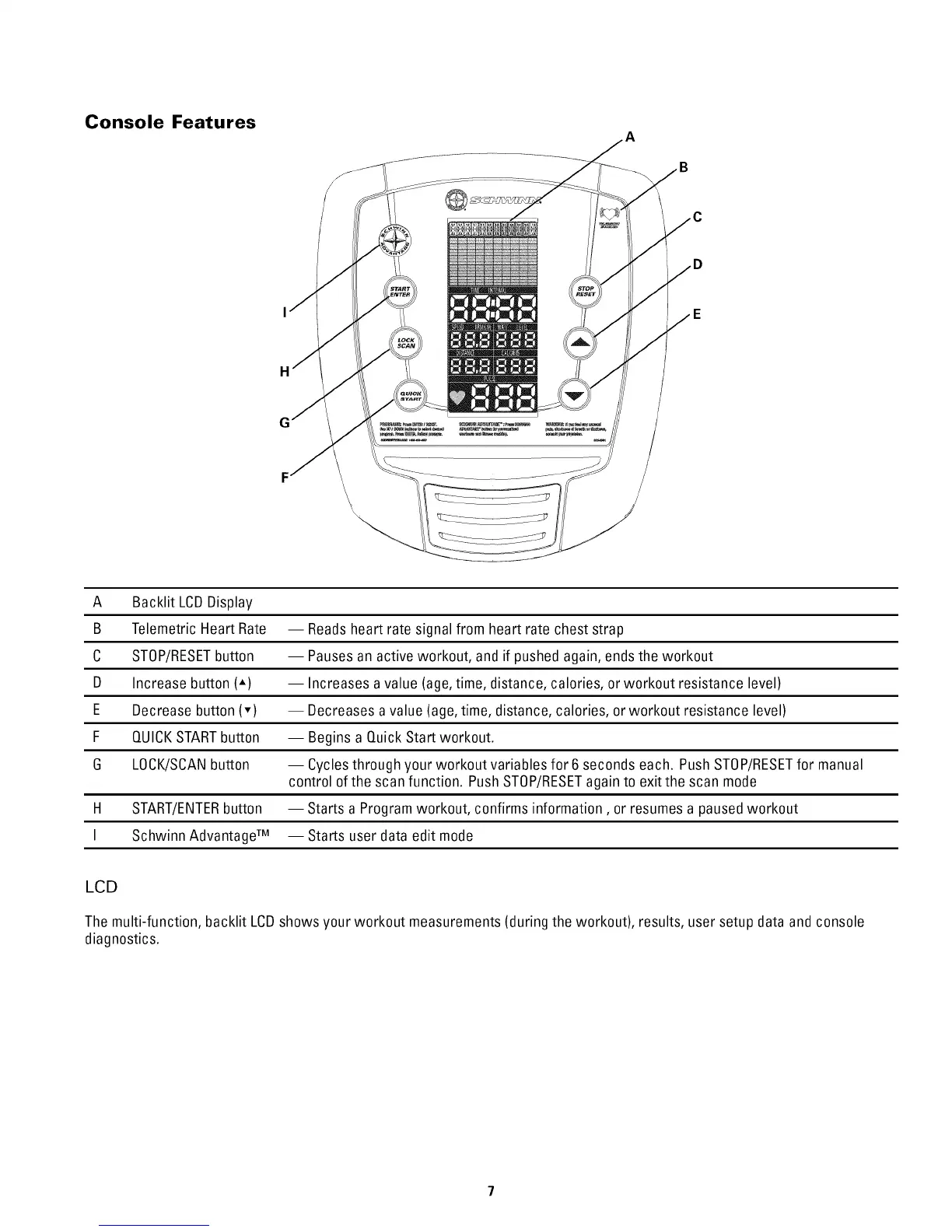
A Backlit LCDDisplay
B Telemetric Heart Rate -- Readsheart rate signal from heart rate chest strap
C STOP/RESETbutton -- Pausesan active workout, and if pushed again, ends the workout
D Increase button (-) -- Increases avalue (age,time, distance, calories, or workout resistance level)
E Decrease button (v) -- Decreases a value (age,time, distance, calories, orworkout resistance level)
F QUICKSTARTbutton -- Begins a Quick Start workout.
6 LOCK/SCANbutton -- Cyclesthrough your workout variables for 6 seconds each. PushSTOP/RESETfor manual
control of the scan function. Push STOP/RESETagain to exit the scan mode
H START/ENTERbutton -- Starts a Program workout, confirms information, or resumesa pausedworkout
I Schwinn AdvantageTM -- Starts user data edit mode
LCD
The multi-function, backlit LCDshows your workout measurements(during the workout), results, user setup data and console
diagnostics.


 To Next Page