Maintenance and Troubleshooting ST144-21 C/Ku-Band TVRO
13-22
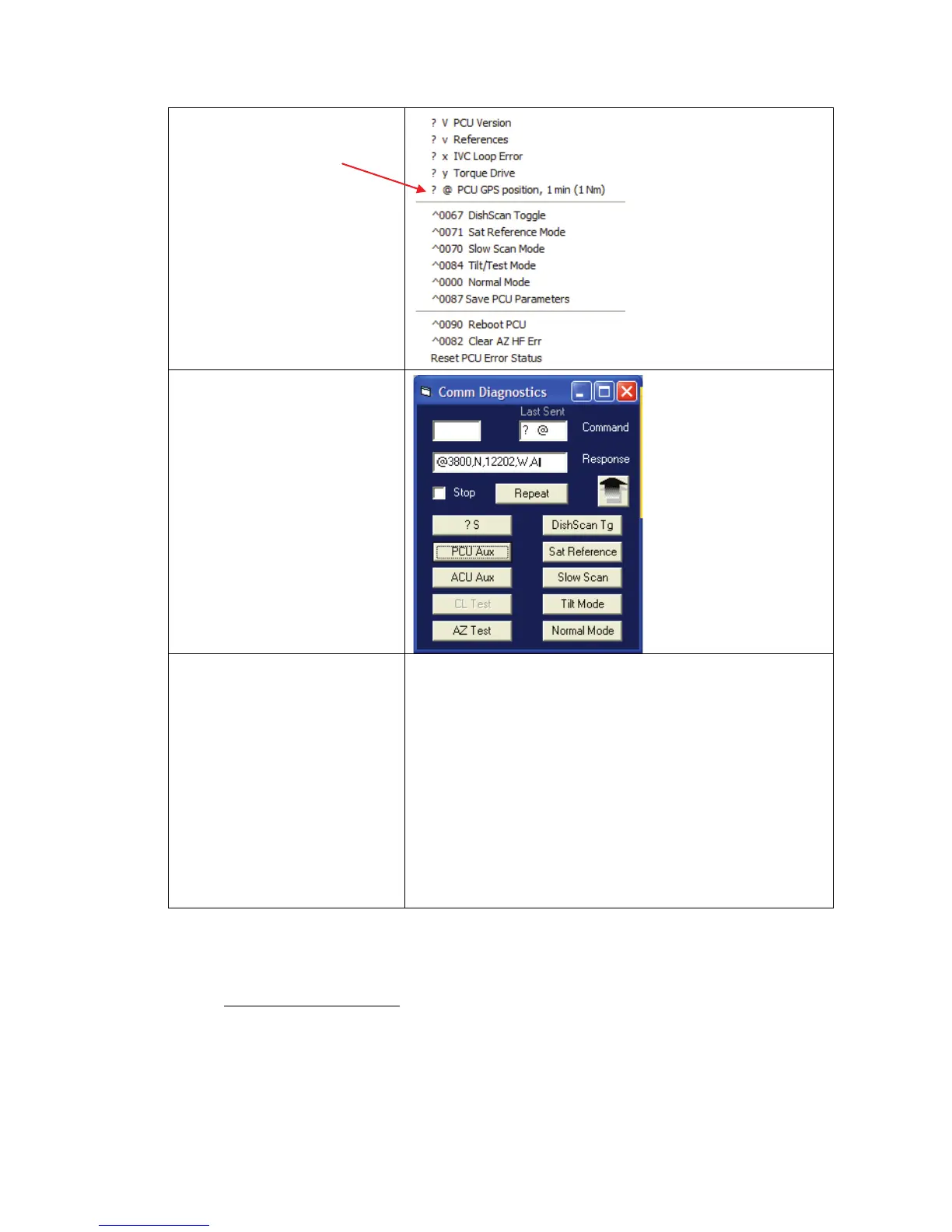
3. Left Mouse click on the
“?@ PCU GPS position, 1
min (1 Nm)”
4. In the “Response” window
verify proper GPS position
to within 1 nautical mile
of your current position.
The Latitude & Longitude position
of the GPS will be displayed in the
following format:
“@ LAT,N,LON,E,A”
Where LAT and LON are in degrees
and minutes, LAT will be followed
by N or S (North or South), LON will
be followed by E or W (East or
West), then a status character and
finally a checksum character.
Furuno default value is in Japan at
34.4N 135.2E
(@3444,N,13521,E,,_).
After acquiring a good fix at Sea Tel
the string is @3800,N,12202,W,A^
for our 38N 122W Latitude and
Longitude position.
The status character tells you the
status of the GPS.
“,” (Comma) = GPS has NOT
acquired a proper fix,
“N” = GPS fix is NOT valid
“A” = GPS has acquired a valid fix.
13.8. Maintenance
13.8.1.
The antenna and equipment frame are balanced at the factory however, after disassembly for shipping or
maintenance, balance adjustment may be necessary. The elevation and cross-level motors have a brake
mechanism built into them, therefore, power must be ON to release the brakes and DishScan® and
antenna drive must be OFF to balance the antenna. . Do NOT remove any of the drive belts. Balancing
is accomplished by adding or removing balance trim weights at strategic locations to keep the antenna from
falling forward/backward or side to side. The antenna system is not pendulous so 'balanced' is defined as the
antenna remaining at rest when left in any position.
Balancing the Antenna











 To Next Page