Maintenance and Troubleshooting ST144-21 C/Ku-Band TVRO
13-8
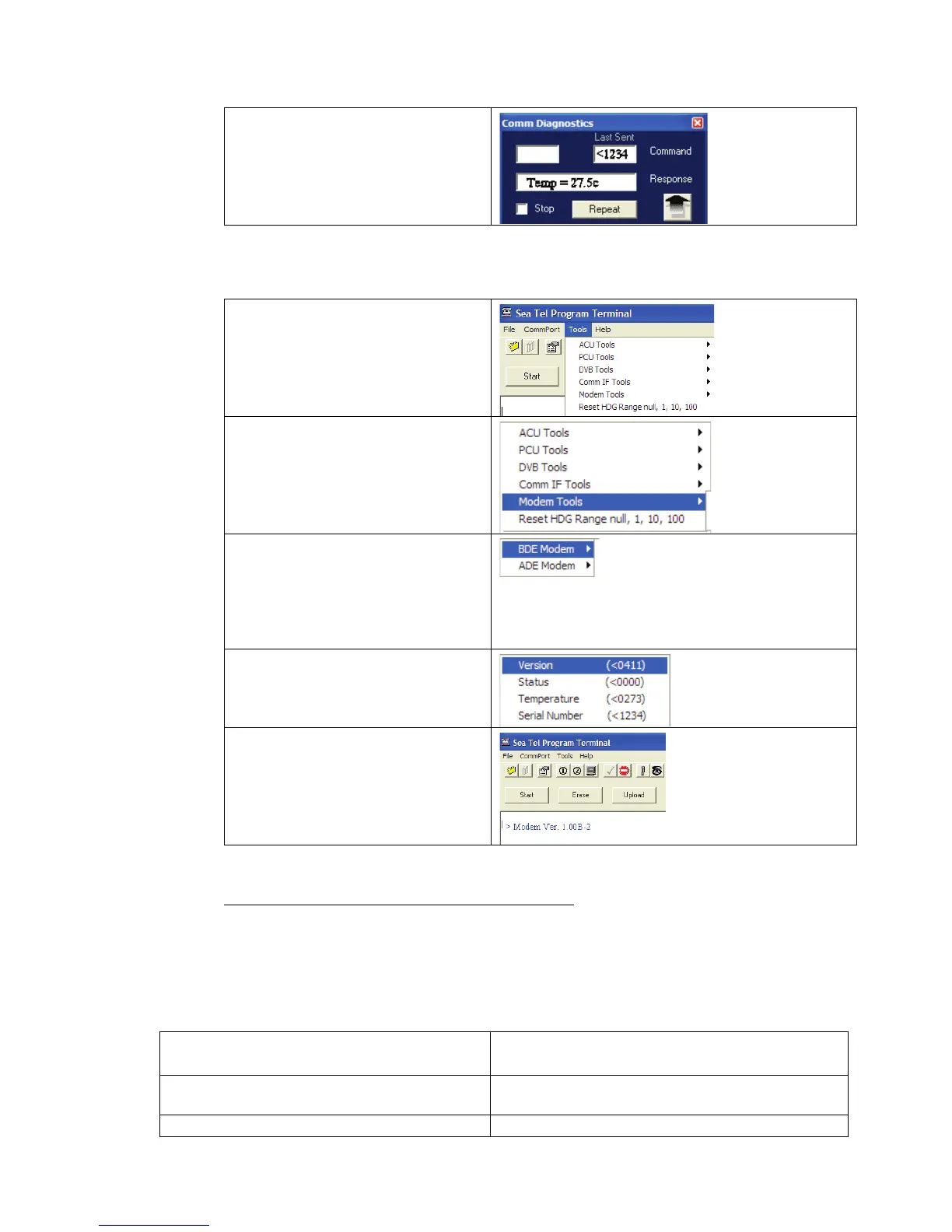
3. Observe and/or Record the
displayed response.
4. Repeat as required until all
desired modem queries are
noted.
13.6.2.4. Using ProgTerm
1. Open up ProgTerm and select
the Tools Menu.
2. Select “Modem Tools”.
3. Select the desired modem
location.
BDE is the Below Decks
Modem.
ADE is the Above Decks
Modem.
4. Select the desired modem
query.
5. Observe and/or Record the
displayed response.
6. Repeat as desired until all
desired modem queries are
noted.
13.6.3.
1. Issue “<0000” and “>0000” queries to the ADE and BDE modems and record the responses.
Isolating a 400 MHz Modem Fault Procedure:
ADE (>0000)______________ BDE (<0000)______________
2. Compare your recorded responses to the list below to determine what modem fault(s) (if any) is present.
3. Use the appropriate text following the failure table for a list of possible failures attributed to the failure
type established.
Tools suggested:
Laptop or PC w/ an available comport and
diagnostic software installed
ProgTerm Ver. 1.35 or Later
DacRemP Ver. 0.20 or Later
9 pin Serial cable Straight thru (1-1 Pin out) For Serial Based
Connections
CAT5 Cross-over cable Required for IP based connections (HTML, DacRemP IP)










 To Next Page