EasyManua.ls Logo

Sea Tel ST94-21 - User Manual

Sea Tel ST94-21
143 pages
Print Icon
To Next Page IconTo Next Page
Loading...
Sea Tel, Inc.
4030 Nelson Avenue
Concord, CA 94520
Tel: (925) 798-7979
Fax: (925) 798-7986
Web: http://www.cobham.com/seatel
Sea Tel Europe
Unit 1, Orion Industrial Centre
Wide Lane, Swaythling
Southampton, UK S0 18 2HJ
Tel: 44 (0)23 80 671155
Fax: 44 (0)23 80 671166
Web: http://www.cobham.com/seatel
Sea Tel Inc is also doing business as Cobham SATCOM - Maritime
July 1, 2015 Document. No. 136465 Revision A1
INSTALLATION AND OPERATION MANUAL
FOR SEA TEL MODEL
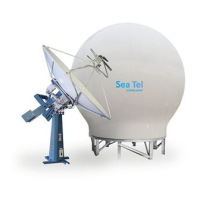
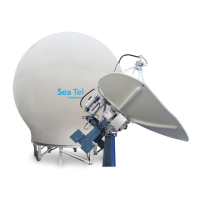
ST94-21 DUAL C/QUAD KU-BAND TVRO ANTENNA
EAR Controlled - ECCN EAR99
This technical data is subject to US Government export control in accordance with
the Export Administration Regulations. Export of this data to any foreign country
or disclosure of this data to a Non-US person may be a violation of Federal law.

Table of Contents

Questions and Answers

Summary

Introduction

General Description of System

Describes the system's overall characteristics and operational capability.

Purpose

Explains the system's function and application for shipboard TV programming.

System Components

Lists the main hardware groups of the TVRO system: above-decks and below-decks.

Dual Antenna Configuration

Describes system setup for multiple antennas to ensure uninterrupted service.

Dual Antenna Arbitrator

Explains the function and wiring of the dual antenna arbitrator panel.

General Scope of this Manual

Defines the manual's coverage of the antenna system and its installation.

Quick Overview of Contents

Briefly outlines the manual's chapter organization and content.

Site Survey

Site Selection Aboard The Ship

Guidelines for choosing the optimal antenna mounting location on a ship.

Antenna Shadowing and RF Interference

Discusses factors affecting signal reception due to obstructions and interference.

Mounting Foundation

Details on selecting and preparing the antenna mounting foundation.

Mounting Height and Fore-Aft Location

Explains height and location impact on accelerations and overall performance.

Mast Configurations

Discusses various mast types for antenna mounting and their considerations.

Safe Access to the ADE

Safety guidelines for accessing the antenna for maintenance.

Below Decks Equipment Location

Guidance on placing below-deck components for optimal installation.

Cables

General guidance on cable routing, selection, and marine installation practices.

Installation

General Cautions & Warnings

Important safety and installation advisories, including torque values and hoisting.

Site Selection Aboard Ship

Reiterates site selection criteria for optimal antenna placement.

Preparation

Steps before starting assembly: unpacking and preparing the work area.

Opening Your Crates

Instructions on unpacking equipment crates to prevent loss or misplacement.

Unpacking the Base Frame and Reflector Crate

Detailed steps for unpacking the base frame and reflector, including hardware.

Unpacking the Pedestal Crate

Step-by-step guide to unpacking the pedestal crate and its contents.

Unpacking the Radome Crate

Detailed instructions for unpacking the radome crate, including panels and adhesive.

Assembling the ADE

Instructions for assembling the Above Decks Equipment (ADE).

Installing The ADE

Steps for installing the complete Above Decks Equipment (ADE) assembly.

Installing the Below Decks Equipment.

Installing the ACU, TMS, and other below-deck components.

Connecting the Below Decks Equipment

Wiring instructions for BDE components based on the system block diagram.

Final Checks

Post-installation checks including visual, electrical, and wiring verification.

Power-Up

Procedures for powering up the system after installation.

Cable Terminations

Final cable connections and sealing requirements.

Final Assembly

Final assembly steps and checks.

Power-Up The ADE

Powering up the Above Decks Equipment.

Setup

Transition to the setup section of the manual.

Basic Setup of the ACU

Operator Settings

Initial setup for operators, including ship info and satellite selection.

SETUP Parameter display and entry menus.

Accessing and navigating system setup parameters.

TRACK DISP

Parameter for setting tracking display selections and band selection.

ACU Factory Default Parameter Settings

Table of default parameters for ACU and ST-21 series antennas.

Setup - Ships Gyro Compass

GYRO TYPE

Selecting the correct gyro compass interface type for accurate heading input.

Updating the GYRO TYPE parameter

Procedure for manually updating the gyro type parameter.

If There is NO Ships Gyro Compass

Configuration for systems without gyro input, using "No Gyro" search.

Determine Internal Tracking Receiver Settings

IF Tracking Frequency

Calculating and setting the IF tracking frequency parameter in the ACU.

Baud Rate

Setting the baud rate for accurate tracking based on satellite downlink.

FEC

Setting the Forward Error Correction (FEC) rate for the DVB receiver.

Tone

Tone settings for band selection in TVRO applications.

Volt

Voltage selection for receiver options based on satellite polarization.

NID

Setting the Network Identification parameter, including decimal to hexadecimal conversion.

Setup - Home Flag Offset

Electronic Calibration of Relative Antenna Position (Home Flag Offset)

Calibrating antenna position relative to ship's bow.

To Enter the HFO value in the DAC_2202:

Procedure for entering calculated HFO values into the ACU.

Setup - Targeting

AUTO TRIM

Automatic calculation and setting of Azimuth/Elevation trim offsets.

Manually Optimizing Targeting

Manual procedure for optimizing antenna pointing accuracy.

EL TRIM

Adjusting the Elevation trim offset parameter in tenths of degrees.

AZ TRIM

Adjusting the Azimuth trim offset parameter for installation errors.

SAVE NEW PARAMETERS

Saving changed parameters to NVRAM for permanent storage.

Setup - Searching

Searching Operation

Overview of the automated antenna search process after signal loss.

Default Standard (Box) Search Pattern

Configuration for the standard box search pattern using specific ACU settings.

Inclined Orbit Search Pattern

Search pattern configuration for satellites in inclined geosynchronous orbits.

No Gyro Search Pattern

Search pattern used when no gyro compass input is available.

Changing the Search Parameters

How to adjust parameters like SEARCH INC, LIMIT, DELAY, and SWEEP INC.

SAVE NEW PARAMETERS

Saving new search parameters to NVRAM.

Setup - Blockage & RF Radiation Hazard Zones

Radiation Hazard and Blockage Mapping (AZ LIMIT parameters)

Mapping zones to prevent blockage or hazards using AZ LIMIT parameters.

Setup

Operator Settings

Setting ship information, latitude/longitude, and satellite details.

Optimizing Targeting (Auto Trim)

Using Auto Trim feature for accurate satellite targeting.

Optimizing Targeting (Manually)

Manual procedure for optimizing antenna pointing accuracy and trims.

Radiation Hazard and Blockage Mapping (AZ LIMIT parameters)

Mapping blockage zones via AZ LIMIT parameters for safety and performance.

TX Polarity Setup

Configuring transmit polarity based on observed wave-guide vector.

TRACK DISP

Setting tracking display parameters and band selection logic.

Functional Testing

ACU; Antenna System Check

Verifying ACU initialization, software versions, and display responses.

Latitude;Longitude Auto-Update check

Checking if GPS position information is automatically updating.

Ship Heading - Gyro Compass Following Check

Verifying that the heading display follows the ships gyro compass.

Azimuth & Elevation Drive

Testing antenna movement controls for Azimuth and Elevation.

Four Quadrant Tracking Test

Testing tracking accuracy by moving the antenna in four quadrants.

Blockage Simulation Test

Testing the blockage logic output (SW2) function.

Maintenance and Troubleshooting

Warranty Information

Details on the limited warranty coverage for Sea Tel antenna systems.

Recommended Preventive Maintenance

Routine maintenance procedures to ensure correct operation.

400 MHz Modem Configuration

Configuring 400MHz modem settings via jumper blocks.

400 MHz LED indicators

Understanding modem LED status lights for diagnostics.

400 MHz Modem Signals

Explaining the signals and ports related to 400 MHz modems.

Troubleshooting 400 MHz Modem Communication Faults

Diagnosing and resolving modem communication issues.

Troubleshooting

General troubleshooting principles and system operation theory.

Maintenance

Procedures for general maintenance tasks.

Pedestal Control Unit Configuration - STxxx-21 Series

Configuring the PCU for specific pedestal types.

Antenna Stowing Procedure

Procedure for properly restraining the antenna during underway conditions.

ST94-21 Technical Specifications

9497 Antenna Reflector

Specifications for the 2.4 Meter antenna reflector.

Feed Assemblies

Specifications for the feed assemblies used with the system.

Stabilized Antenna Pedestal Assembly

Specifications for the stabilized antenna pedestal.

MK 2 Pedestal Control Unit (PCU)

Specifications for the PCU, including connectors and LEDs.

MK 2 Motor Driver Enclosure (MDE)

Specifications for the MDE, including motors and connectors.

400 MHz Base & Pedestal Unlimited Azimuth Modems (3 Channel)

Specs for 400MHz modems, including frequencies and connectors.

144” Radome Assembly

Specifications for the 144-inch radome assembly.

Environmental Conditions (ADE)

Environmental operating conditions for the ADE (temperature, humidity, wind).

Cables

Specifications for various cables used in the system.

Model ST94-21 Drawings

Model ST94-21 Specific Drawings

List of specific drawings related to the ST94-21 model.

STxxx-21 General Drawings

List of general drawings applicable to STxxx-21 series.

Sea Tel ST94-21 Specifications

General IconGeneral
BrandSea Tel
ModelST94-21
CategoryAntenna
LanguageEnglish

Related product manuals