MENU
SEA
SET
Trs
U
MENU
SEA
SET
strt
MENU
SEA
SET
push
MENU
SEA
SET
e
UU
MENU
SEA
SET
ot
U
MENU
SEA
SET
MENU
SEA
SET
logc
MENU
SEA
SET
t.pau
MENU
SEA
SET
st.ps.
MENU
SEA
SET
Prg
U
MENU
SEA
SET
st.pr.
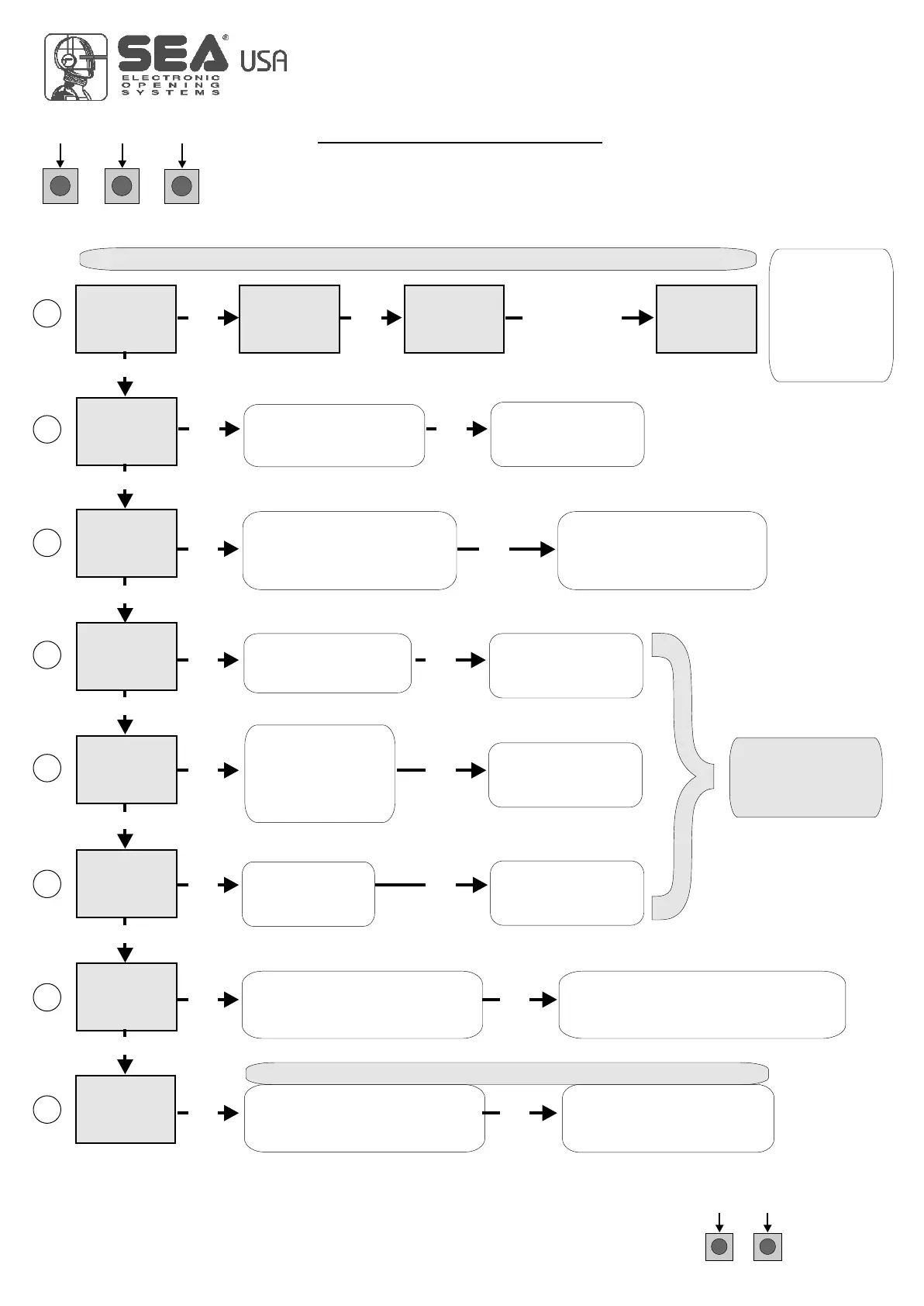
OK to exit Menu
or press the
button of the next
TX to be stored
Choose the type of
motor with
UP or DOWN
Skip this step if you do not want to program a transmitter
With UP or DOWN
choose
the desired logic
To confirm and return
to main menu
With UP or DOWN
choose a delay for
automatic closing
With UP or DOWN
Choose ON
With UP or DOWN choose ON
to start times learning
At the end of the selflearning
the control unit returns automatically
to the main menu
With
UP or DOWN Choose
ON to start test
To confirm and return to
main menu
Skip this step if a TX has already been stored
UPDOWN
ALL OTHER PARAMETERS HAVE DEFAULT SETTINGS WHICH ARE USEFUL FOR THE 90% OF THE
APPLICATIONS BUT CAN BE HOWEVER SET THROUGH THE SPECIAL MENU. FOR ENTERING INTO THE
SPECIAL MENU PRESS THE UP AND DOWN BUTTONS AT THE SAME TIME FOR 5 S.
OK
UP DOWN
PROGRAMMING BUTTONS
QUICK START
OK
Press the
button of the
TX to be
stored
1
2
3
4
5
6
7
8
To confirm and return
to main menu
To confirm and return
to main menu
OK
OK
OK
OK OK
OK OK
OK OK
OK OK
OK OK
UP
UP
UP
UP
UP
UP
UP
OK
To confirm and return
to main menu
Skip this step
if you wna tto work
in half-automatic
logic
USER 1 - 24V DG
In. T
U
Choose "ON" with UP or
DOWN button only if in
programming the motor starts
in opening
Return to menu 7,
place the gate halfway
and repeat
the times programming
OK
8
International registered trademark n. 2.777.971
67411535 REV 03 - 05/2013



 To Next Page