DRIVER MOTORS
Each selection is vended by the action of the Driver Motor. The HFBV has 5 Driver Motors. The Driver Motors are clipped to the
front of the Motor Bracket. (Fig. 16 & Fig. 14)
In the rare event of a jam a Driver Motor may need to be returned to its home position. The home position is when the shaft of
the Can Spiral Coil that is held by the Driver is vertical, with the end of the shaft pointing up.
1. To "Home" a Driver Motor.
A.) Unlock and open the Front door to access the Circuit board, and enter Service Mode by pressing the Red
Service Mode Button (Fig. 3)
B.) Cycle through the Service Mode until the display reads “SLCT”.
C.) Enter the letter and number of the motor you wish to home. The motor will rotate to it’s home position.
2. To Remove a Driver Motor.
A.) Unlock and open the Front Door, unplug vendor.
B.) Unload any product from the Serpentine Product Chute in question.
C.) Depress the top tab on the Driver Motor, rock the Driver Motor forward, and lift the Driver Motor free. (Fig. 8)
D.) Disconnect Wires.
E.) Replace Driver Motor by repeating above steps in reverse order. Note: When inserting the Driver Motor make sure
that the end of the Can Spiral Coil is pointed upward.
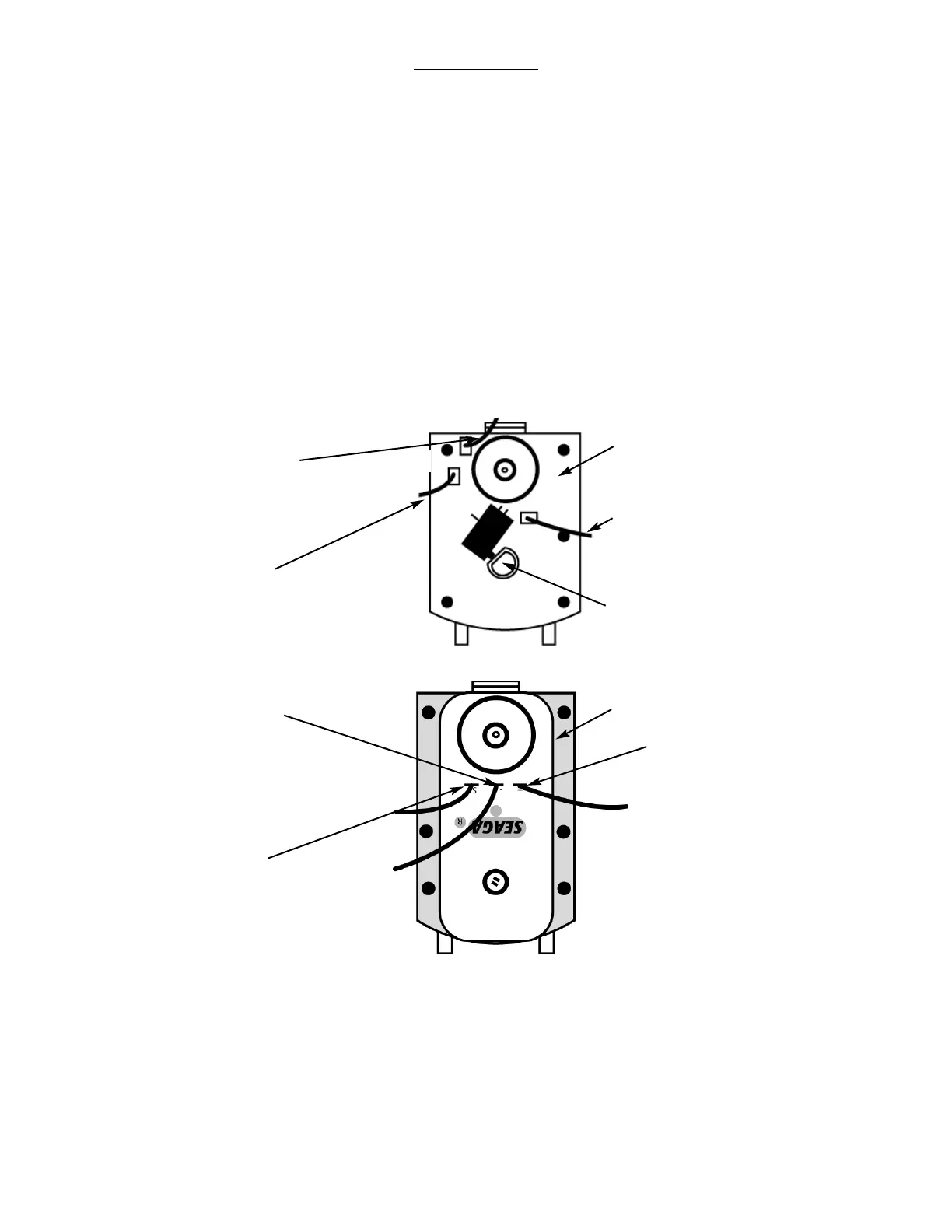
Figure 17 Gray and White Driver Motor
At “Home” switch is
not depressed
Driver Motor
White Wire with
Brown Stripe
Red Wire
Color Wire
Color varies from Left to Right
(From Left)
Blue, Purple, Brown, Gray, White
Figure 17 Black Driver Motor
Driver Motor
White with
Brown Stripe
Wire (S)
Color Wire
(+)
Color varies from
Left to Right
(From Left)
Blue, Purple, Brown,
Gray, White
Red Wire (-)


 To Next Page