SeaSTAR 3610 USER MANUAL
Issue 2.3 02/11
3610 DGNSS RECEIVER AND DPS SETUP EXAMPLE
The 3610 DGNSS receiver may be used together with a variety of DPS systems:
DPS 116, DPS 122, DPS 132, DPS 200, DPS 232 and DPS 700. The different DPS
systems use different SeaSTAR services:
To set up a DPS system to use Fugro SeaSTAR services do the following:
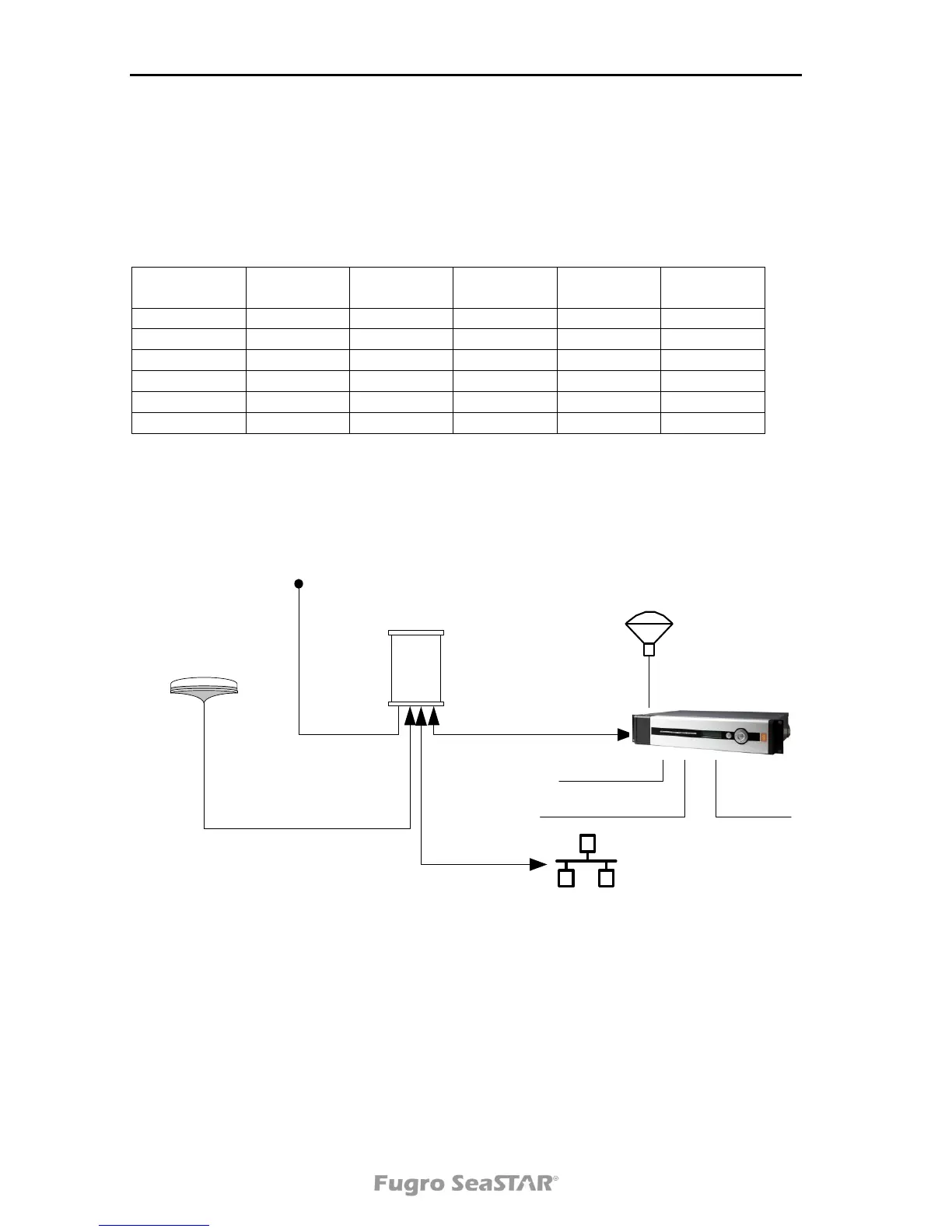
1. Connect the receiver and DPS as described in Figure 6. below:
3610 receiver
DPS
DGNSS antenna
DC power supply
A and/or B
PWR
ANT
220 VAC
Keyboard/mouse
GNSS antenna
Display
LAN
Figure 6. DGNSS receiver and DPS connection
2. Power on the units. The DPS will start automatically.
3. In the DPS, select System|Change system mode. Select Configuration. A
dialog which requires a password will open. The password is "stx".


 To Next Page