Seatex DPS 132 Installation Manual, rev. 0 Appendix H – NMEA display
80
Connection with DPS 132 System
The NMEA port on the display shall be connected to a DP port on the DPS 132 system.
Which NMEA message(s) to output to the display shall be decided in the DPS 132 set up file,
see section 3.9.3.
Operation
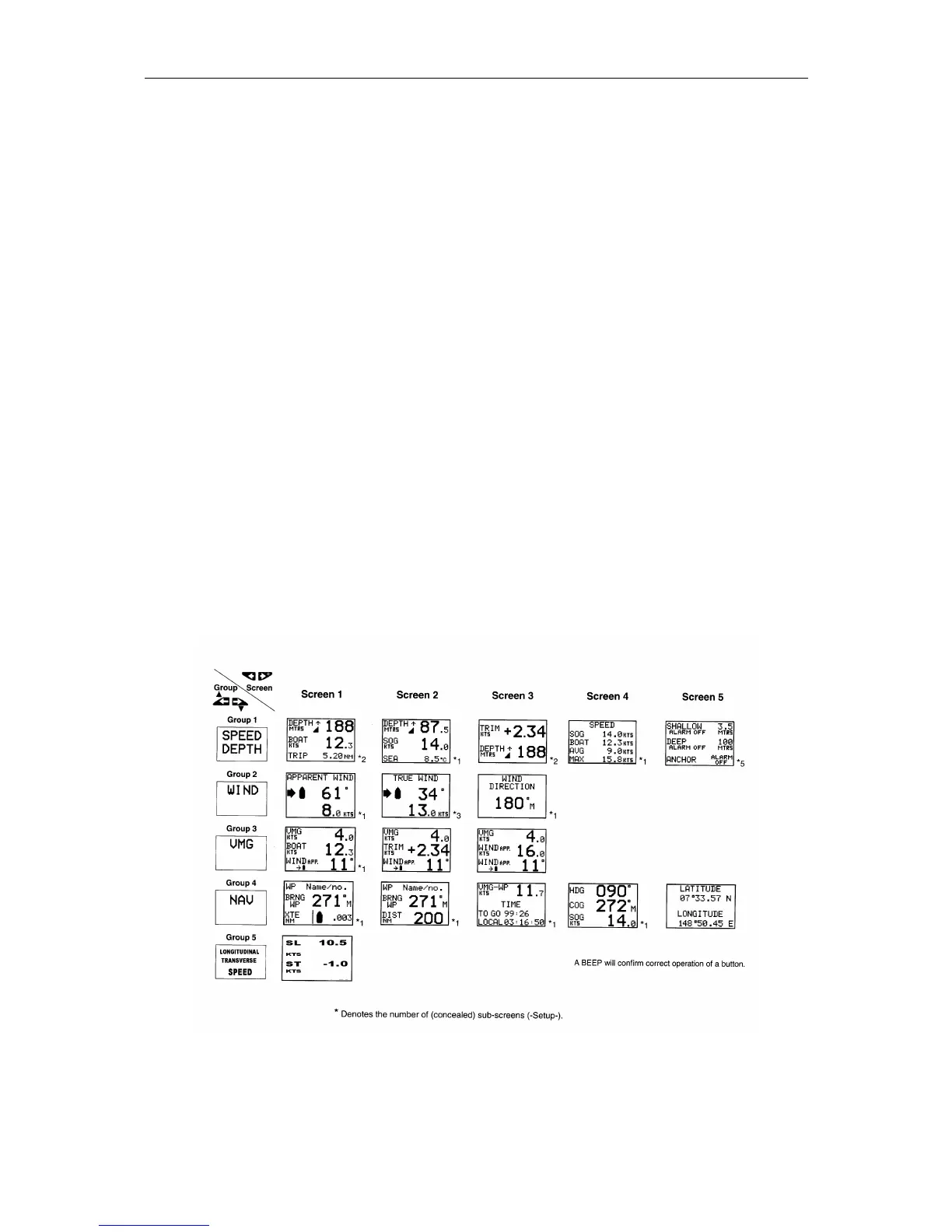
The display screens of the NMEA display are arranged in a table as described in Figure 14
below. The table consists of five screen groups, each group being a logical collection of
useful screens.
The display is operated by five buttons. By pressing one of the arrow buttons, selection of
display screens is available. Pressing the upper buttons, screen groups are selected, while
different screens in each screen group are selected by using the two lower arrow buttons. The
reset button, the button between the lower arrow buttons, is only used on some of the screens.
The display is self-configuring and will automatically present data available at the data input
port.
Display Screens
The NMEA display is arranged in five screen groups: Speed/Depth, Wind, VMG, NAV and
Longitudinal-Transverse Speed. Each group has a set of screens, which logically belongs to
the group.
Figure 14 Table of display screens



 To Next Page