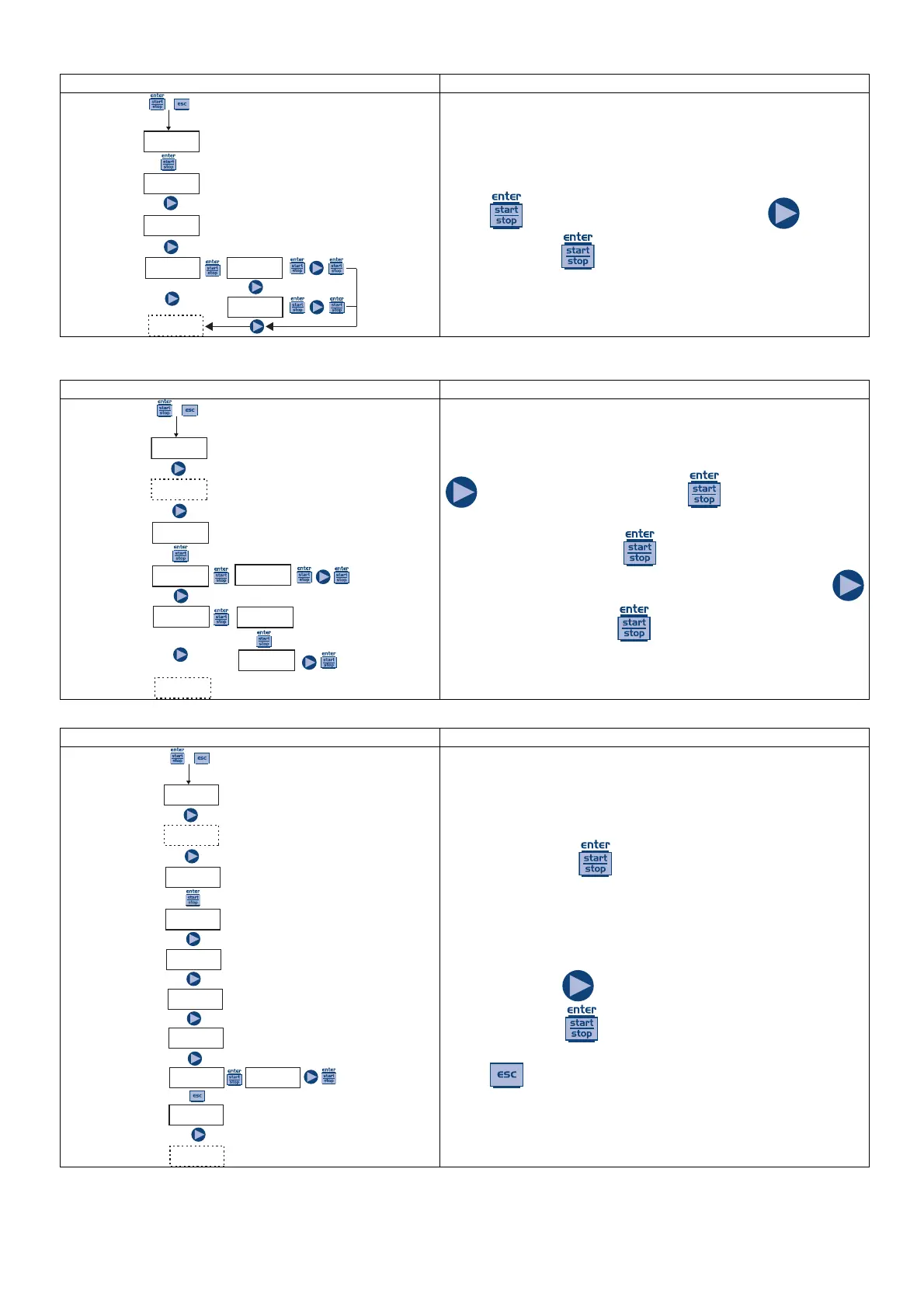
Paragraph 10 – Setting the Maximum Flow Rate
PROG
Config.
+
Config.
Funct.
Language
English
Max Flow
P100%
Max Flow
P100%
Max Flow
F160s/m
Allows you to set the maximum flow rate of the pump and
the programmed mode (% or frequency) is used as the
standard measurement unit when displaying the flow rate.
Press
to access the item, and then press to set
the value. Press
to confirm and return to the main
menu.
Paragraph 11 – Flow Rate Calibration
PROG
Config.
+
Pump Cal
0.25cc/l
Pump Cal
Manual
Pump Cal
Auto.
cc/s
0.25
Cal.Auto
Start
cc
25
On the main menu appears the memorized cc/stroke value.
You can perform the calibration in two modes:
MANUAL – insert manually the cc/stroke value using the
key and then confirm with the key.
AUTOMATIC – the pump runs 100 strokes, which are
started by pressing the
key, and at the end of the
strokes insert the amount aspirated by pump using the
key and confirm with the
key.
The data entered will be used for the calculation of the flow
rates.
Paragraph 12 – Statistics
PROG
Config.
+
Stats
Hours
Hours
0
Strokes
0
Q.ty (L)
L 0
Power
1
Reset Reset?
Yes
Stats
Hours
On the main menu is displayed, in hours, the operating time
of the pump; press
to access other statistics:
- Strokes = the number of strokes performed by the pump
- Q.ta (L) = the quantity dosed from the pump expressed in
liters; this information is calculated based on the memorized
cc/stroke value
- Power = the number of pump activations
- Reset = press
to reset the counters, select (YES) or
(NO), then press
to confirm.
Press
to return to the main menu.



 To Next Page