16
15) Push button for left side conveyor lifting ( 15
Fig. 13)
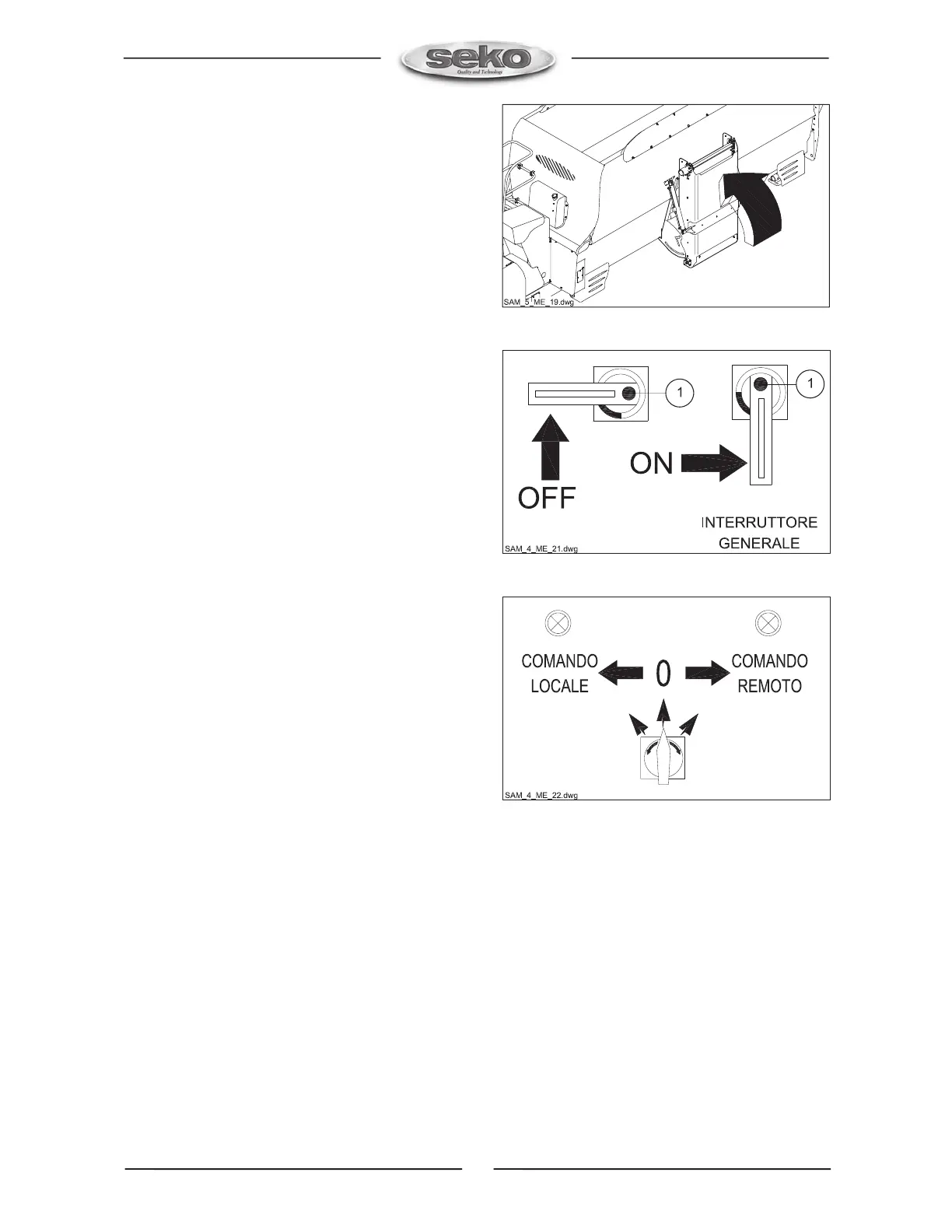
This button activates the lifting of the discharge left side
conveyor (Fig. 21). To activate this function keep the
button pressed until it achieves the required position, (
Release button for stop).
16) Main switch lever ( 16 Fig. 13)
This lever in horizontal position disconntes board to main
supply (Fig. 22).
The lever in vertical position connects board to main
supply (Fig. 22). The lever can be moved to desired
position only if p. button is kept pressed ( 1 Fig. 22 )
Release it only after desired position is achieved.
17) Local control light ( 17 Fig. 13)
This light is on when the switch ( 20 Fig. 13 ) is set in
“LOCAL” position.
18) Remote control light ( 18 Fig. 13)
This light is on when the switch ( 20 Fig. 13 ) is set in “
REMOTE “ position.
19) Bypass starter light ( 19 Fig. 13)
This light is on in case damage occurred in the electric
wiring. If light is on, stop immediately the machine and
check the reason of the failure. In the negative please
contact an authorized assistance dealer or SEKO technical
service.
.
20) Switch for local and remote control ( 20 Fig.
13)
By means of this switch we can operate the machine on
bord or from another position.
By turning this switch anticlockwise (Fig. 23) we select
the local control and in this case the machine can be
controlled from control panel.
By turning tha switch clockwise (Fig. 23) we select the
remote control and the machine can be controlled from a
remote place. According to the choice only one control
type is possible ( local or remote ).
21) Timer ( 21 Fig. 13)
It shows the time the electric motor is really in function
Fig. 21
Fig. 22
Fig. 23


 To Next Page
 Loading...