EasyManua.ls Logo

Selbit ISP - 010 - User Manual

Selbit ISP - 010
25 pages
Print Icon
To Next Page IconTo Next Page
Loading...
MANUAL HANDBOOK
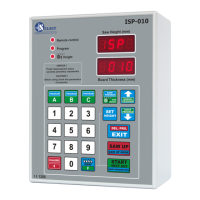
Automatic thickness controller for sawing frame machines
Automatic thickness controller ISP
machine.
Before assembly and start please read this handbook manual carefully, instructions
provided help you in correct mounting and operating of our product.
MANUAL HANDBOOK
Automatic thickness controller for sawing frame machines
ISP - 010
Automatic thickness controller ISP
-
010 is designed to be mounted on the sawing frame
Before assembly and start please read this handbook manual carefully, instructions
provided help you in correct mounting and operating of our product.
010 is designed to be mounted on the sawing frame
Before assembly and start please read this handbook manual carefully, instructions
Question and Answer IconNeed help?

Do you have a question about the Selbit ISP - 010 and is the answer not in the manual?

Selbit ISP - 010 Specifications

General IconGeneral
Power Supply24V DC
TypeProgrammable Logic Controller (PLC)
Analog Input4 channels
Analog Output2 channels
Communication InterfaceRS485

Summary

Mounting and Controllers Connections

Electrical Safety and Montage

Guidelines for safe electrical assembly and wiring.

First Start

Controller Connection Checking

Procedure to verify all controller connections are correctly made.

Controllers Parameters Checking

Input Divider Checking

Verifying and setting the correct input divider value.

Saw Trace Value Checking

Checking and adjusting the saw trace value for accuracy.

Auto-Calibration Procedure

Performing automatic calibration for optimal machine parameters.

Real Saw Height Settings

Setting and verifying the actual head saw height.

Manual Mode Cutting

Manual Mode Cutting Procedure

Steps for creating and executing custom cutting programs manually.

Quick Program Mode

Quick Program Mode

Guide to quickly programming cutting dimensions and positions.

Possible Errors and Solutions

Controller Not Working

Troubleshooting steps for when the controller does not turn on.

Related product manuals