21
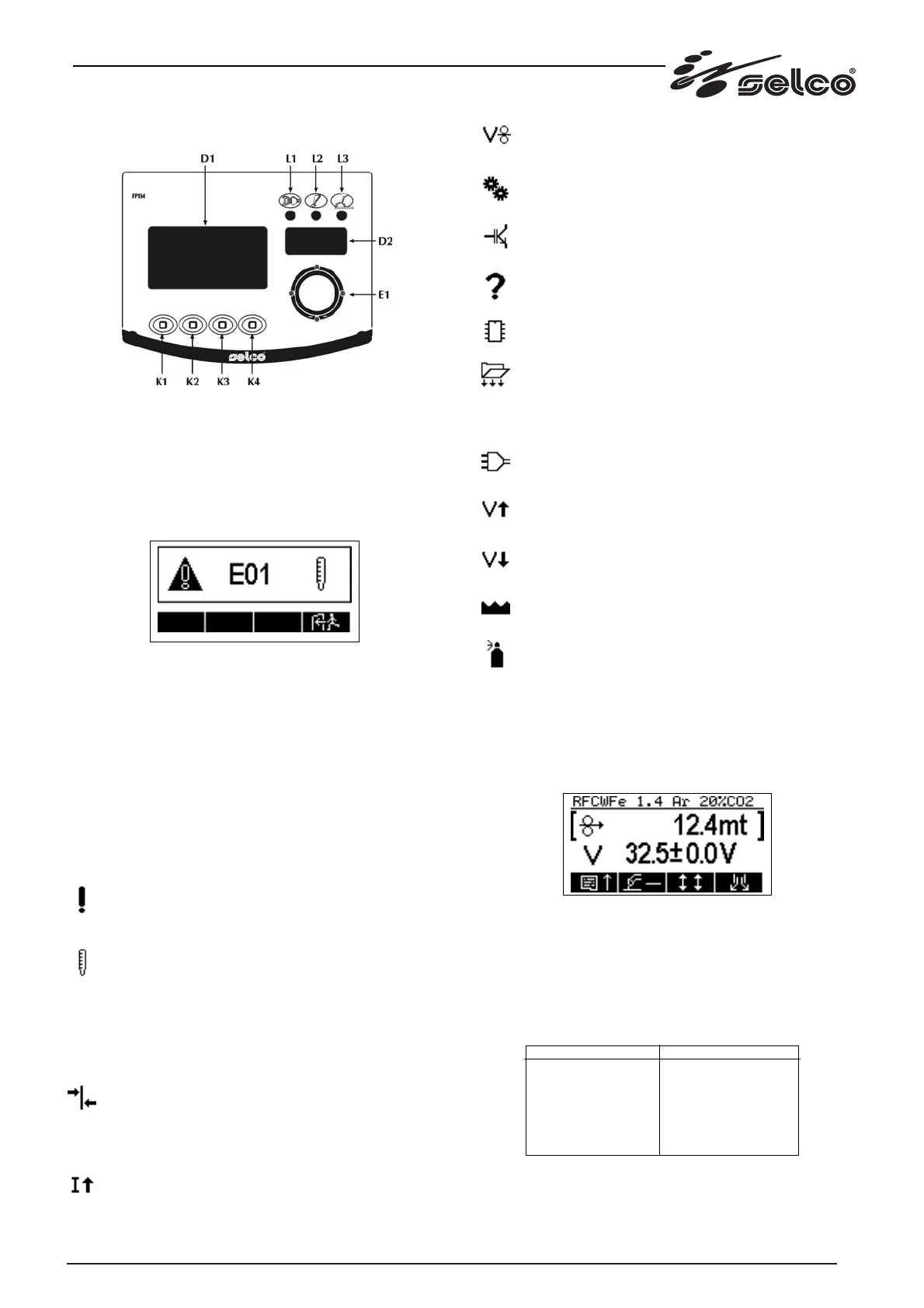
1.3 Front control panel
Fig. 1
* L1: Voltage on: green led.
It comes on with the wire feed unit connected to a switched-
on power source and with the ignition switch "I1" on the rear
panel set to "I". It indicates that the system is on and powered.
* L2: Protection device: yellow led.
Indicates that a protection device has cut in. With L2 on, an
alarm code appears on the display "Y1".
The symbol that appears on the left identifies an alarm condi-
tion; the character "E" is then displayed followed by a numerical
code that defines the type of alarm (this code appears also on
the 7-segment display in blinking mode). Lastly, the second
symbol on the right of the display changes together with the
numerical code and symbolically describes the type of alarm.
In the event of an alarm, the yellow led on the panel also comes
on and a buzzer sounds, if enabled by the related parameter.
The alarms remain displayed until the user intervenes, with the
exclusion of E20 and E21 which remain displayed for approx. 6
seconds: the key K4 permits reset of the alarm and resumption
of power source operation if the alarm condition has ceased.
* Description of the alarms.
E00- General alarm: general alarm emitted by the power
source unit (WF110).
(WF110)
E01- Thermal alarm no. 1: power source unit power
module overheating.
(WF111)
E01- Rectifier bridge thermal alarm.
E02- Inductance thermal alarm.
E03- Transformer thermal alarm.
E04- Alarm indicating no communication with power
source unit.
E12- Alarm indicating no communication between panel
board and motor (CAN BUS).
E05- Alarm indicating mean current too high: the power
source mean current has exceeded for 1 second the
maximum permitted value (limits: 506A, 360A with power
sources 500A, 350A for WF110; limit 550A for WF111).
E07- Alarm indicating wire feed motor power supply
below minimum limit.
E08- Alarm indicating rotor blocked, motor driver or enco-
der failure.
E10- Power source unit power module alarm.
E11- Alarm indicating wrong PSR/PSM configuration: the dip
switches on the power source board are set incorrectly.
E20- EEPROM memory failure alarm.
E21- EEPROM memory data loss alarm.
E22- Alarm indicating LCD display not identified (not dis-
playable).
E40- Alarm indicating no power source unit power supply
phases.
E41- Alarm indicating power source unit power supply
overvoltage.
E42- Alarm indicating power source unit power supply
undervoltage.
E43- Alarm indicating no cooling liquid in cooling unit.
E44- No gas alarm.
* L3: Output voltage on - red led.
Indicates the presence of welding voltage on the output con-
nectors.
* Display D1.
LCD graphic display for display of all welding settings.
A typical LCD display screen appears as follows:
* Display D2.
7-segment display in which, for every welding procedure, a
parameter is displayed which is normally a measurement (cur-
rent or gas flow) but the user is free to choose, from the set-up
menu, any other parameter for display.
The table below shows the default settings of the parameters
that are displayed on the 7-segment display.
MMA
ARC AIR
TIG
MIG Short Manual
MIG Short Synergic
MIG Pulsed Synergic
7-SEGMENT DISPLAY
Current Reading
Current Reading
Current Reading
Gas flow reading
Gas flow reading
Gas flow reading



 To Next Page