4 English
INITIAL CONTROLLER SETUP
Constant temperature controllers are equipped with an innovative solution, which allows
initial setup of the controller in only three steps.
When you connect the controller to the power supply for the rst time, the software version
is shown. Next, the rst step appears on the screen.
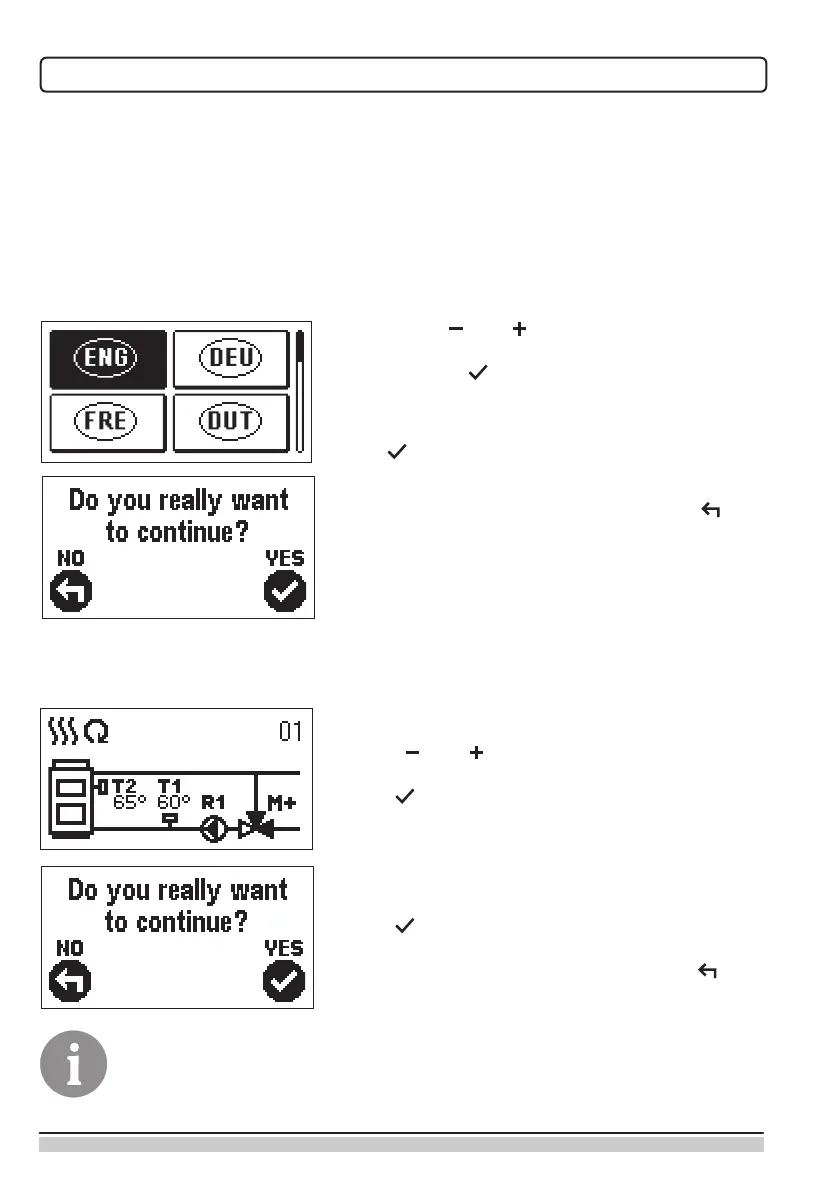
STEP 1 - LANGUAGE SELECTION
Using buttons and you select the required
language.
Press the button to conrm the selected language.
After selecting the language, the controller requires
conrmation of the selection by pressing the
button .
If you accidentally selected the wrong language, go
back to reset the language by pressing button .
STEP 2 - HYDRAULIC SCHEME SELECTION
Next, you select a hydraulic scheme for the control-
ler function. Move between schemes by means of
buttons and .
Conrm the selected scheme by pressing the
button .
After you selected the scheme, the controller re-
quires conrmation of the selection by pressing the
button .
If you accidentally selected the wrong scheme, go
back to reset the scheme by pressing button .
Selected hydraulic scheme can be later changed with service parameter
S1.1.


 To Next Page