6 English
GRAPHIC LCD DISPLAY
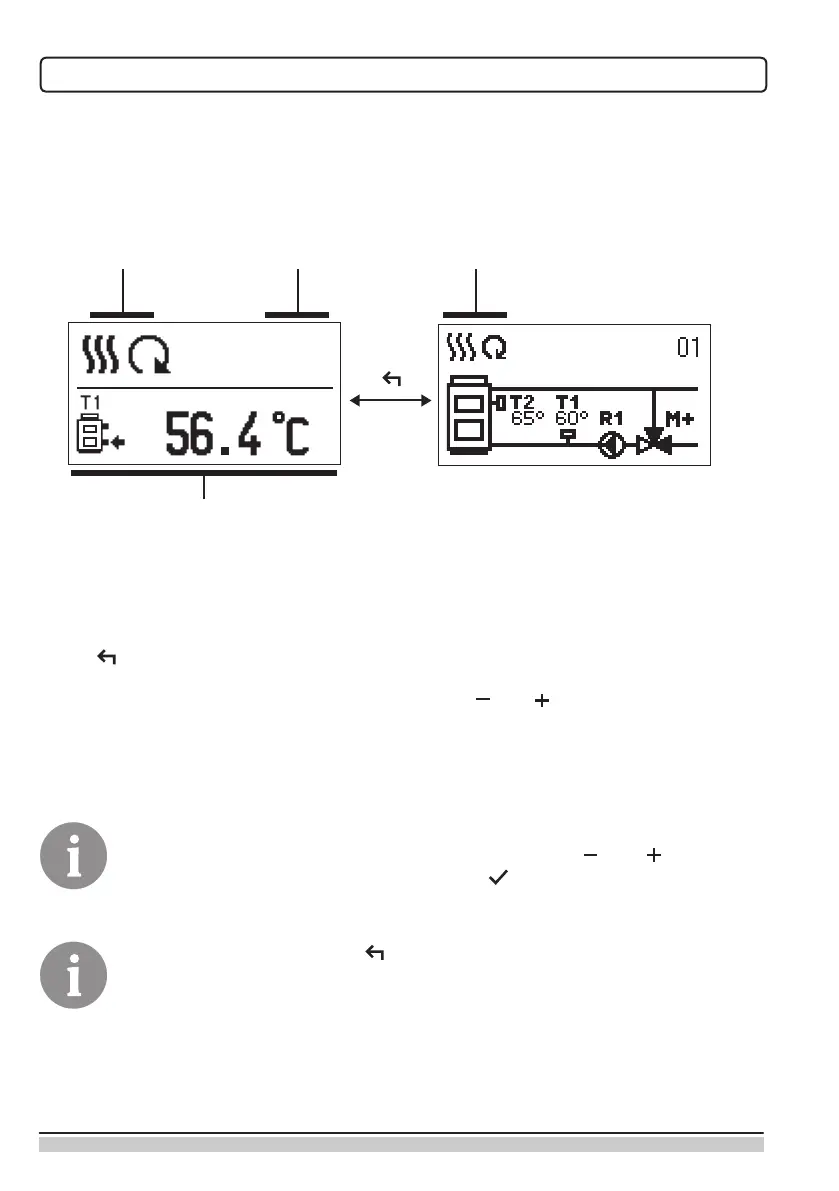
All important data of controller operation are shown on the graphic LCD display.
DESCRIPTION AND DESIGN OF THE MAIN DISPLAY
Notications
and warnings.
Controller mode.
Controller mode.
Temperature, protection functions and over-
view of other data.
Display of information on the screen:
The controller mode, notications and warnings are displayed in the upper third of the
display. For switching between basic display and display of the hydraulic scheme use the
button .
To check the temperature and other data, use buttons and . The number of sensors
and other data, which can be listed on the display, depends on the selected hydraulic sche-
me and controller settings.
If you would like to have a specic data display to appear after you stop using
the keyboard then select the desired data with buttons and . Conrm
the selected screen by pressing the button for 2 seconds.
When you press the button for 2 seconds, then the display of the tem-
perature will change from one to two rows and vice versa. On the two line
temperature display, the measured temperature is displayed in the rst row
and the required or calculated temperatire in the second row.


 To Next Page