Using the SKM 300 G4
101
Displays on the SKM 300 G4 handheld transmitter
display panel
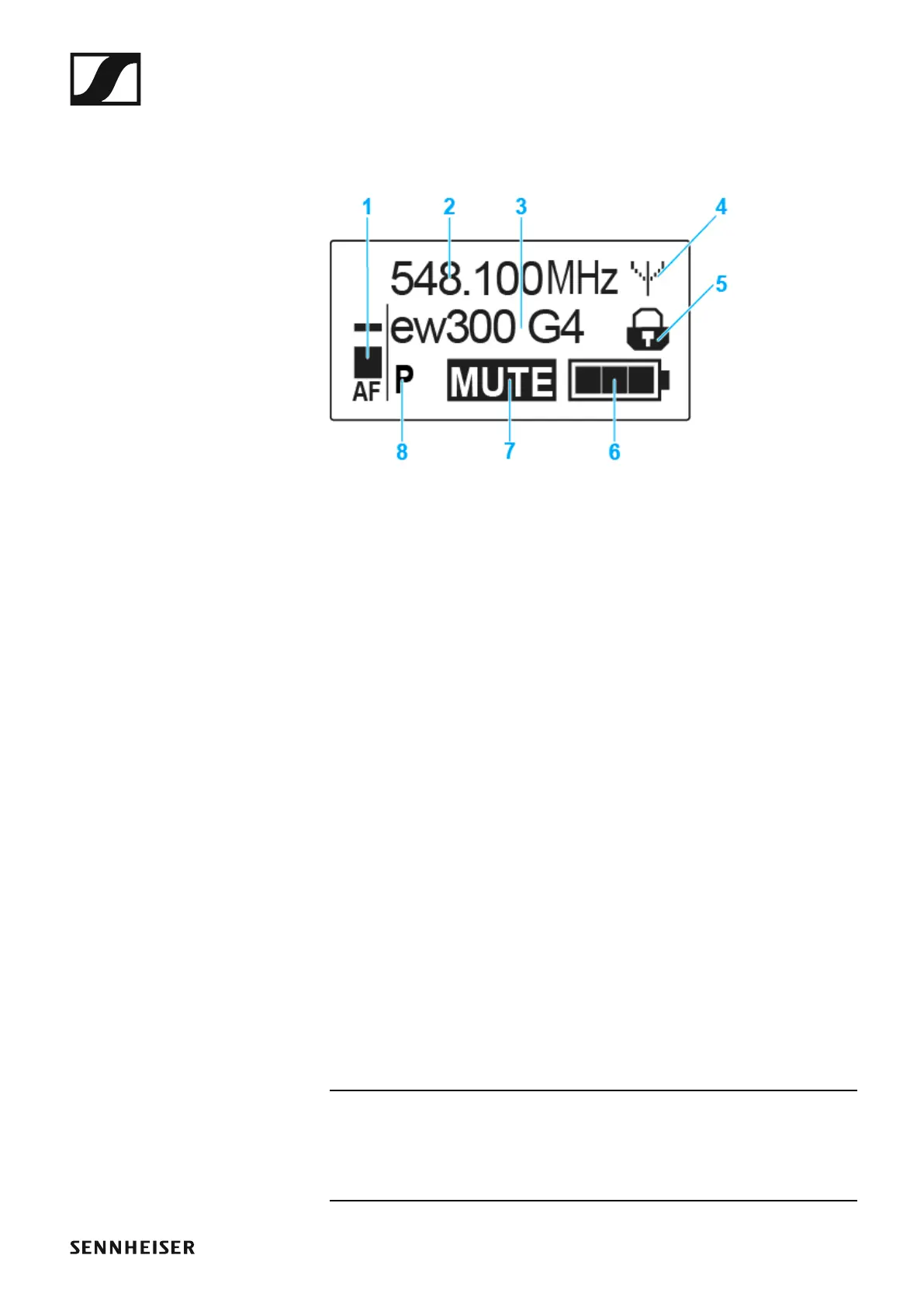
You can view the following information on the transmitter display.
►
1 AF audio level
• Displays the audio level with peak hold function
• See “Sensitivity menu item”
2 Frequency
• Configured transmission frequency
• See “Frequency Preset menu item”
3 Name
• Freely selectable name of the receiver
• See “Name menu item”
4 Transmission icon
• RF signal is being transmitted
• See “Deactivating the RF signal (RF mute)”
5 Lock-off function
• Lock-off function is activated
• See “Auto Lock menu item”
6 Battery status
• See “Battery status”
7 MUTE muting function
• The audio signal is muted
• See “Muting the handheld transmitter (AF mute)”
8 P pilot tone
• Pilot tone transmission is activated
• See “Advanced > Pilot Tone menu item”
>> “Buttons for navigating the SKM 300 G4 menu”
>> “Setting options in the menu”













 To Next Page