Chapter 4: Introduction to AutomationControl 17
RTM II FlexNet User Guide DUG-10009-01
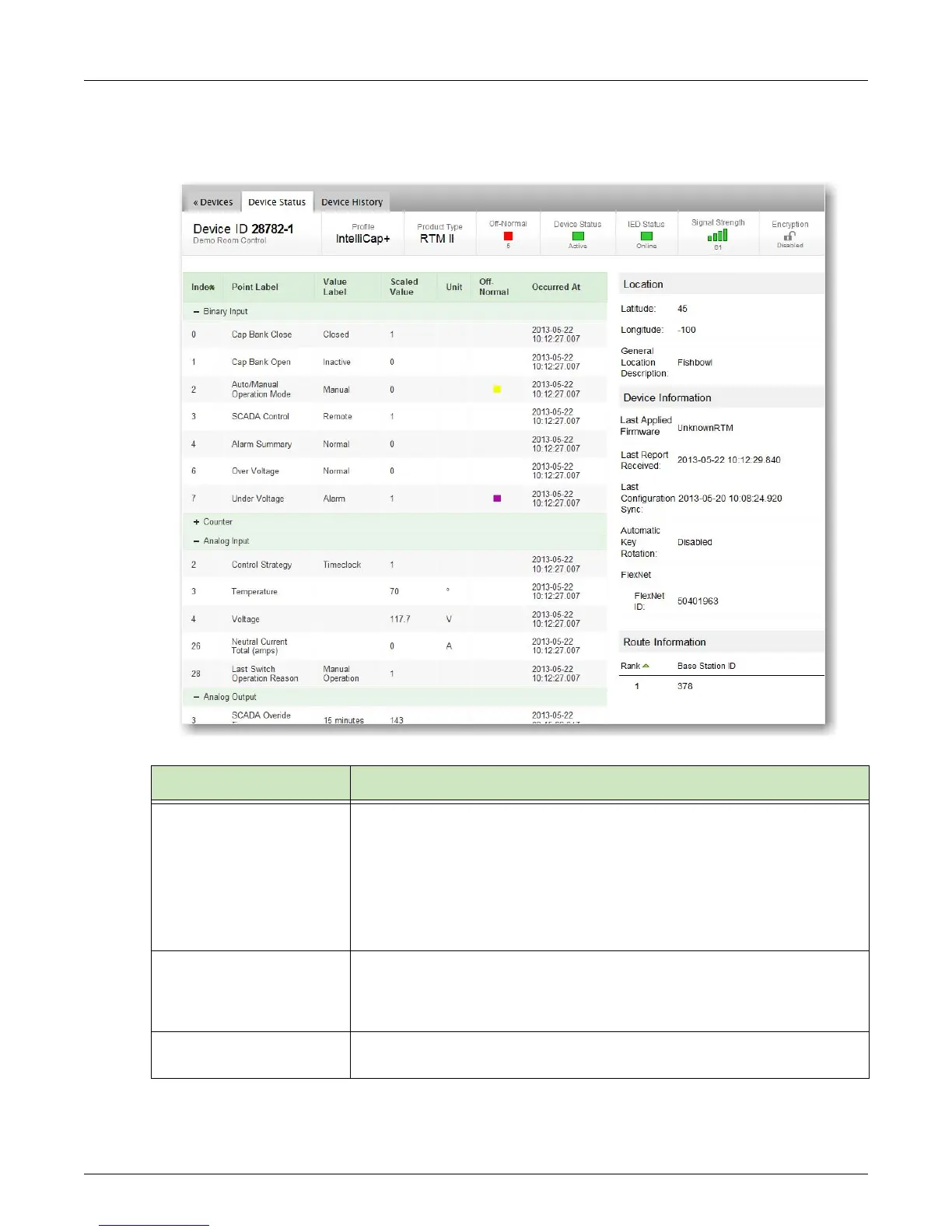
3. Click a Device ID to see the real-time status of that device on the Device Status page.
Data is updated automatically, and you can also click your browser's Refresh button at any time to
update the data manually.
Feature Description
Top Banner Contains the device ID and physical location, the profile currently assigned to
the device, product type (RTM II, RTM II+, TC032, T866, NaviComm), current
status of the device, the current status of the associated IED, signal strength,
and encryption status.
Signal Strength Indicator Colors and Values
• Green = Excellent: Greater than 11
• Yellow = Moderate: 7 - 11
• Red = Weak: 6 or below
Point Data Based on the device profile, this list shows the last reported binary input,
analog input, and analog output values and their timestamp. It also shows any
values in an off-normal state.
To sort data, click a column heading.
Location Geographic location by latitude and longitude, and any other customized
location information for the device.



 To Next Page