EasyManua.ls Logo

Sequential PROPHET-600 - 3-7 IN CASE OF DIFFICULTY

Sequential PROPHET-600
92 pages
Print Icon
To Next Page IconTo Next Page
To Previous Page IconTo Previous Page
Loading...
VOICES
A
JUU
f
i
c
©
♦
3V.
TP30I
a
E
a
a
!a
a-
i
SCALE
1
i
n
a
a
a
j
a
!a
;
a-
fS]'
T£]\
(•
1'
E
x
E
x
a
4-
COMPUTER
PCS
•
>
—
'
\
^
\
3
S
“
>
\
\
3
\
^
I
\
(BOARD
3)
OSC
A'*
OSC
B't
votes
Pea
fBOARD
4)
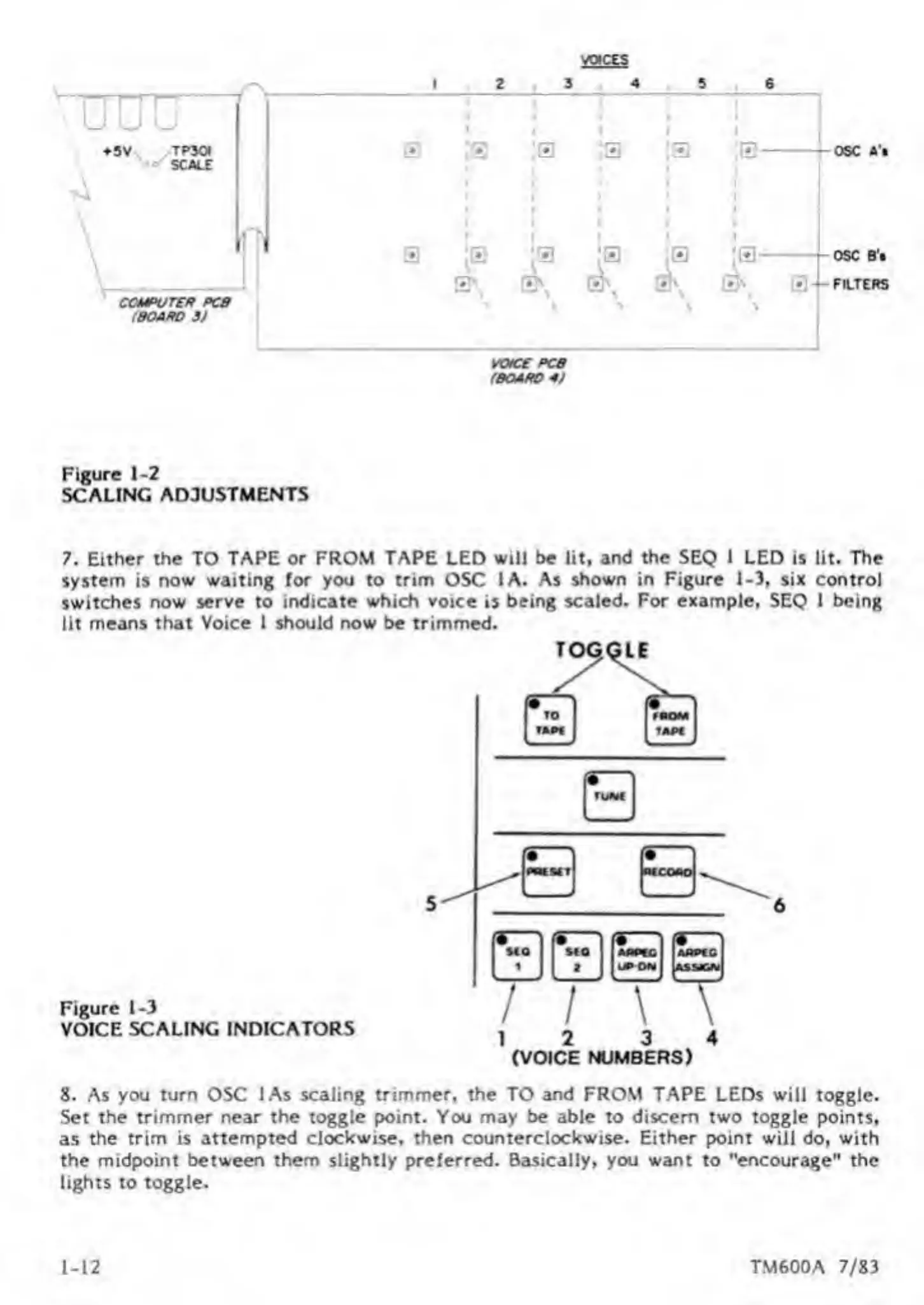
Figure
1-2
SCALING
ADJUSTMENTS
7.
Either
the
TO
TAPE
or
FROM
TAPE
LED
will
be
lit,
and
the
SEQ
1
LED
is
lit.
The
system
is
now
waiting
for
you
to
trim
OSC
1A.
As
shown
in
Figure
1-3,
six
control
switches
now
serve
to
indicate
which
voice
is
being
scaled.
For
example,
SEQ
1
being
lit
means
that
Voice
1
should
now
be
trimmed.
Figure
1-3
VOICE
SCALING
INDICATORS
12
3
4
(VOICE
NUMBERS)
8.
As
you
turn
OSC
lAs
scaling
trimmer,
the
TO
and
FROM
TAPE
LEDs
will
toggle.
Set
the
trimmer
near
the
toggle
point.
You
may
be
able
to
discern
two
toggle
points,
as
the
trim
is
attempted
clockwise,
then
counterclockwise.
Either
point
will
do,
with
the
midpoint
between
them
slightly
preferred.
Basically,
you
want
to
"encourage"
the
lights
to
toggle.
1-12
TM600A
7/83

Other manuals for Sequential PROPHET-600

Related product manuals