EasyManua.ls Logo

Sequential PROPHET-600 - ARPEGGIATOR; 4-2 ARPEGGIATE UP;DOWN

Sequential PROPHET-600
92 pages
Print Icon
To Next Page IconTo Next Page
To Previous Page IconTo Previous Page
Loading...
9.
When
OSC
1A
is
scaled,
press
any
PROGRAM
SELECT
1-6,
to
move
on
to
OSC
2A.
The
SEQ
2
LED
will
light,
to
indicate
that
Voice
2
should
be
trimmed.
10.
Scale
OSC
2A,
then
press
any
PROGRAM
SELECT
1-6
to
move
on
to
3A
through
6A.
(If
it
is
desired
to
immediately
exit
the
scaling
routine
without
advancing
through
any
remaining
adjustments,
simply
remove
the
TP301
jumper.)
11.
After
OSC
6A,
trim
OSC
lB-6B(the
second
row
of
trimmers),
then
Filters
1-6
(the
third
row).
Note
that
when
tuning
filters,
there
is
a
slight
delay
before
each
voice
trimmer
will
respond.
12.
After
Filter
6
is
scaled,
pressing
any
switch
1-6
exits
the
scaling
routine,
activates
TUNE,
then
enters
Preset
Mode.
13.
Remove
jumper,
press
TUNE,
then
verify
tuning
by
playing
a
few
programs.
14.
If
the
scaling
procedure
fails
to
correct
an
oscillator,
repeat
to
be
sure
an
error
wasn't
made.
To
verify
an
oscillator
IC
is
bad,
exchange
it
with
an
oscillator
from
another
voice.
Re-scale.
1-11
MODIFICATION
CHECK
If
the
Prophet-600
is
serial
number
0001
through
0113,
the
modification
described
here
is
required
to
prevent
memory
loss
and
erratic
sequencer
operation.
Check
for
existence
on
these
units
and
install
if
necessary
(order
kit
0UD6OO-O1).
This
modification
is
covered
under
warranty.
(For
more
information,
contact
SCI
Field
Service.)
Identifying
the
modification.
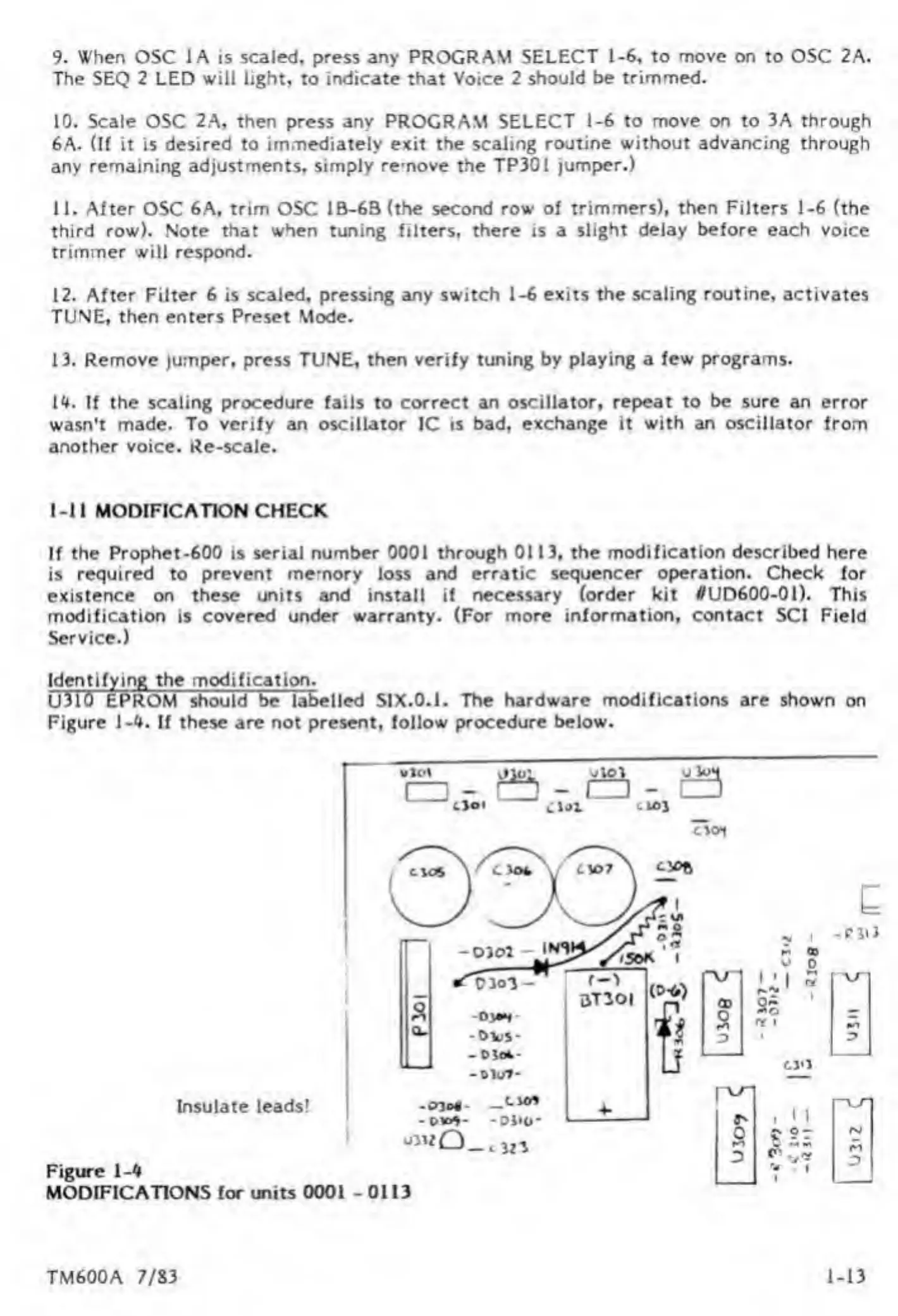
U310
EPROM
should
be
labelled
SIX.0.1.
The
hardware
modifications
are
shown
on
Figure
1-4.
If
these
are
not
present,
follow
procedure
below.
Insulate
leads!
I
-tno*
-
d**-
-
Diio-
1
Figure
1-4
MODIFICATIONS
for
units
0001
-
0113
TM600A
7/83
1-13

Other manuals for Sequential PROPHET-600

Related product manuals